
CanaKit Raspberry Pi 5 Starter Kits for Home Labs

For a single-board home lab with room for several lightweight services, choose CanaKit Pi 5 PRO 128GB, 8GB: its 8GB RAM, 128GB preloaded card, cooling, and power supply make it a ready-to-start package. Choose CanaKit Pi 5 MAX 256GB, 8GB instead if you want the same RAM and a 256GB card; CanaKit Pi 5 Essentials, 4GB is the more limited 4GB essentials option.
A Raspberry Pi 5 is a compact, single-board computer suited to learning and small always-on services, but it is not a substitute for a multi-drive server when you need substantial storage or many demanding workloads.
We earn a commission if you buy through links on this page. As an Amazon Associate I earn from qualifying purchases. Products are compared on manufacturer specifications, not hands-on testing.
- Best overall: CanaKit Pi 5 PRO 128GB, 8GB – Includes 8GB RAM, a 128GB preloaded microSD card, fan, heat sink, power supply, and two display cables.
- Best for more card space: CanaKit Pi 5 MAX 256GB, 8GB – Keeps the 8GB RAM and cooling setup while including a 256GB preloaded microSD card.
- Best for essentials: CanaKit Pi 5 Essentials, 4GB – The 4GB essentials kit is the lower-memory option for a small, focused home lab.
| Product | Best for | RAM | microSD card | Cooling | Shop |
|---|---|---|---|---|---|
| CanaKit Pi 5 PRO 128GB, 8GB | General home lab | 8GB | 128GB preloaded | Fan and heat sink | Check Price on Amazon |
| CanaKit Pi 5 MAX 256GB, 8GB | Larger card space | 8GB | 256GB preloaded | Fan and heat sink | Check Price on Amazon |
| CanaKit Pi 5 Essentials, 4GB | Focused services | 4GB | — | — | Check Price on Amazon |
CanaKit Raspberry Pi 5 Starter Kits
Compare the kits by memory, included card capacity, and cooling before choosing a role for your home lab.
CanaKit Pi 5 PRO 128GB, 8GB
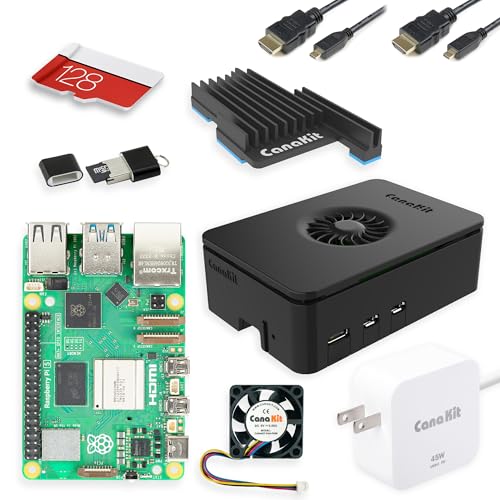
For a home lab that may run several lightweight services, this 8GB bundle combines a Raspberry Pi 5 with a 128GB microSD card preloaded with 64-bit Raspberry Pi OS. The kit also includes a low-noise bearing fan, a mega heat sink, a 45W PD power supply, a case, a card reader, and two 6-foot display cables supporting up to 4K at 60p. That makes it the most complete listed setup for getting started without sourcing those parts separately. The main constraint is the 128GB card; consider the larger-card option if you expect a growing local data store.
Bottom line: Pick this for a balanced, ready-to-start lab with 8GB RAM and included cooling.
CanaKit Pi 5 MAX 256GB, 8GB

The 256GB preloaded microSD card distinguishes this 8GB kit from the 128GB CanaKit option, giving a home lab more room for software and locally stored files before storage expansion. It includes a Raspberry Pi 5 with 64-bit Pi OS, a Turbine White case, low-noise bearing fan, mega heat sink, 45W PD power supply, card reader, and two 6-foot display cables supporting up to 4K at 60p. The RAM and cooling match the other 8GB bundle, so the deciding factor is card capacity, not a faster processor. A microSD card is still a single storage device, not a redundant backup.
Bottom line: Choose this when the included 256GB card matters more than matching the 128GB bundle.
CanaKit Pi 5 Essentials, 4GB

The 4GB RAM configuration sets this essentials kit apart from the 8GB bundles, making it a fit for a focused project rather than a broad collection of concurrent services. The product name identifies it as a CanaKit Raspberry Pi 5 Essentials Starter Kit, but its maker does not itemize the accessories, so avoid assuming it includes the same card, cooling, power supply, or display cables as the PRO and MAX bundles. For a home lab, simpler roles such as a single network utility or learning environment are a more conservative match for 4GB than multiple memory-heavy containers. Plan around what the kit actually contains.
Bottom line: Pick this for a small, focused setup where 4GB RAM is sufficient.
Choosing a Pi 5 for a home lab
RAM and storage capacity are the first choices for a Raspberry Pi 5 home lab. The 4GB kit is a reasonable starting point for a narrow role; 8GB gives more memory headroom when you want several lightweight services running together. Use a wired Ethernet connection for a server that needs steady LAN access, and reserve Wi-Fi for less critical workloads. A Pi is a single-board computer with USB storage and network connectivity, not a multi-bay server, so match the project to its compact scale.
Choose based on workload rather than a promise of performance: a DNS service or small home-automation controller is a different demand from multiple databases and containers. If persistent files matter, plan a backup destination separately from the system card. The card capacity alone does not provide redundancy, and a single device failure can take both the operating system and locally stored data offline.
RAM and storage for Pi 5 services
RAM is working memory, while the microSD card holds the operating system, applications, and files. More RAM helps when several processes are active at once; it does not make the included card larger. The 8GB kits here provide more headroom than the 4GB kit, and the 256GB card provides twice the capacity of the 128GB card.
For a lab that writes logs or databases frequently, consider placing write-heavy data on a separate USB SSD and keeping backups on another device. A microSD card is convenient for setup, but it is not a backup or a mirrored storage system. A useful decision rule: if your planned files and system image will approach the included card’s capacity, choose the 256GB configuration or plan external storage before deploying services.
Cooling and power in a compact server
Raspberry Pi 5 workloads can generate heat, so airflow matters in a case, especially during sustained CPU-heavy work. The two 8GB CanaKit bundles include a fan and heat sink; the details for the 4GB essentials kit do not establish the same cooling package. Keep the case vents unobstructed and avoid placing a running board in a sealed box or against soft material.
Power stability also matters for a device intended to stay on: the 8GB bundles include a 45W PD power supply. Connect storage and accessories with their power draw in mind, because an overloaded or unsuitable supply can cause instability. For always-on use, put the Pi and its storage where they can get airflow and where a brief power interruption will not damage important work.
Home lab roles and limits
A Raspberry Pi 5 is well suited to learning Linux, lightweight network services, and small home automation workloads. It is less suitable as the only home for large media libraries, multiple high-traffic services, or data that needs drive redundancy. Those uses call for storage and availability planning beyond a single board and microSD card.
Before installing services, sketch what must stay available and what can be rebuilt. Keep configuration backups, update the operating system and applications regularly, and avoid exposing administration interfaces directly to the public internet. For remote access, use a trusted VPN or another secure access method rather than opening management ports broadly. A modest Pi lab is most useful when its role and recovery plan are clear.
Frequently Asked Questions
How much RAM does a Pi 5 home lab need?
Four gigabytes can suit one or a few modest services, while 8GB offers more room for concurrent processes and containers. Choose according to the workload’s memory needs, not card capacity.
Is a microSD card enough for a Raspberry Pi server?
A microSD card can hold the operating system and light service data, but it is not a backup or redundant storage. For write-heavy databases or important files, use separate storage and maintain an independent backup.
Can a Raspberry Pi 5 run several Docker containers?
Yes, several lightweight containers can run on a Pi 5, but the practical number depends on each container’s memory and CPU use. With only 4GB RAM, keep the stack modest; 8GB provides more headroom.
Does a Pi 5 need active cooling for always-on use?
Active cooling is useful when a Pi 5 sustains heavier workloads or sits in a warm, enclosed area. Keep ventilation clear, and choose a case and cooling arrangement suited to the workload.
How should I back up a Pi home lab?
Keep a copy of important configuration and data on a separate device, not only on the Pi’s system card. For service data that changes often, schedule regular backups and verify that a restore works.