
Car and Driver IntelliDash Pro: Models Compared

IntelliDash Pro X10 is the best fit for most drivers seeking a Car and Driver IntelliDash Pro because it pairs a 10-inch screen with wireless Apple CarPlay and Android Auto. Choose a different model if you want a built-in dash camera, a 7-inch display, or Apple CarPlay without Android Auto.
These portable displays add phone-projection functions to a dashboard without replacing the vehicle’s built-in stereo.
We earn a commission if you buy through links on this page. As an Amazon Associate I earn from qualifying purchases. Products are compared on manufacturer specifications, not hands-on testing.
- Best overall: IntelliDash Pro X10 – Its 10-inch screen supports wireless Apple CarPlay and Android Auto.
- Best for drive recording: IntelliDash Eye Pro 10 – It combines wireless phone projection with front dash-cam recording and an included rear camera.
- Best for Apple CarPlay: IntelliDash Pro 7-inch – Its 7-inch IPS touchscreen is designed for wireless Apple CarPlay.
| Product | Best for | Screen size | Phone projection | Camera feature | Shop |
|---|---|---|---|---|---|
| IntelliDash Pro X10 | Large wireless display | 10 inches | Wireless Apple CarPlay and Android Auto | Backup-camera compatible | Check Price on Amazon |
| IntelliDash Eye Pro 10 | Recording and reversing | 10.26 inches | Wireless Apple CarPlay and Android Auto | Built-in front dash cam; rear camera included | Check Price on Amazon |
| IntelliDash Pro 7-inch | Apple CarPlay users | 7 inches | Wireless Apple CarPlay | — | Check Price on Amazon |
| Car and Driver IntelliDash 7-inch Wired | Wired phone projection | 7 inches | Apple CarPlay and Android Auto | — | Check Price on Amazon |
| IntelliDash Eye Pro 10 Baby Cam | Baby camera viewing | 10.26 inches | Wireless Apple CarPlay and Android Auto | Baby monitoring camera | Check Price on Amazon |
Car and Driver IntelliDash Pro models
Compare the screen size, phone compatibility and camera setup to find the IntelliDash model that fits your priorities.
IntelliDash Pro X10

IntelliDash Pro X10 stands out with a 10-inch touchscreen and wireless support for both Apple CarPlay and Android Auto. The portable display uses a 12V outlet and dashboard mount, so it is suited to drivers who want phone projection without replacing the vehicle’s stereo. It is also compatible with a backup camera. The dimensions are 9.5 by 4.5 by 1 inch, so check the available dashboard space and sightline before choosing it. The features do not identify an included camera, so verify camera inclusion if that is essential.
Bottom line: Pick this if you want a large wireless screen and support for either major phone platform.
IntelliDash Eye Pro 10

IntelliDash Eye Pro 10 adds recording hardware that separates it from the screen-focused options: it has a built-in front-facing HD dash cam and includes a rear camera with adjustable parking guidelines. Its 10.26-inch IPS touchscreen supports wireless Apple CarPlay and Android Auto, while audio can use Bluetooth, FM transmission, AUX or the built-in speaker. This model suits drivers who want phone projection and camera views in one unit. The camera-focused setup may be more than needed if you only want a basic navigation and media display.
Bottom line: Choose this if front recording and an included rear camera matter more than a simpler display.
IntelliDash Pro 7-inch

IntelliDash Pro 7-inch is the smaller IntelliDash Pro option, with a 7-inch IPS touchscreen and wireless Apple CarPlay. Its adhesive disk mount is intended to keep the display secured, and Bluetooth connects it to a smart device. The product features identify Apple CarPlay only, making it a fit for drivers who use an iPhone and prefer a more compact screen. That narrower platform support is a limitation for Android phone owners; choose a model that explicitly supports Android Auto if that is your phone’s system.
Bottom line: Choose this for wireless Apple CarPlay in a smaller 7-inch format.
Car and Driver IntelliDash 7-inch Wired
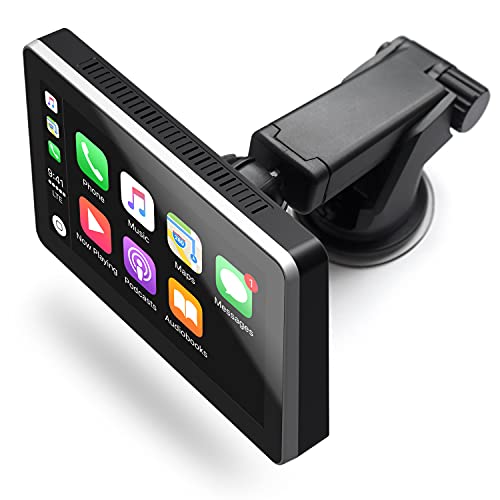
Car and Driver IntelliDash 7-inch Wired differs from the wireless Pro models by identifying its size as wired, while offering a 7-inch IPS touchscreen with Apple CarPlay and Android Auto. Bluetooth 4.0 and an FM transmitter provide connection and audio options, and Siri or Google Assistant can be used for voice control. It suits drivers who want both phone platforms in a compact display and do not require a wireless connection. The wired format is the tradeoff, so account for the phone cable’s route before settling on a mounting position.
Bottom line: Pick this if you want a 7-inch display with both phone platforms and accept a wired setup.
IntelliDash Eye Pro 10 Baby Cam

IntelliDash Eye Pro 10 Baby Cam pairs a 10.26-inch IPS screen and wireless Apple CarPlay and Android Auto with a baby-monitoring camera that sends a live view to the display. It also has a built-in front-facing HD dash cam and supports audio through Bluetooth, FM transmission, AUX or its built-in speaker. This model is for drivers who specifically want a live camera view of a child alongside phone projection. The baby-camera setup is a specialized feature; drivers who need a rear parking camera should choose a model that identifies one as included.
Bottom line: Choose this when a live baby-camera view is a priority alongside wireless phone projection.
How to choose a Car and Driver IntelliDash Pro
Start with phone compatibility, then choose the screen size and camera features you will actually use. Wireless Apple CarPlay and Android Auto are identified on the 10-inch and 10.26-inch models, while the 7-inch Pro supports wireless Apple CarPlay only. A 7-inch display is the more compact choice; the larger screens need more clear dashboard area and can be harder to position without obstructing the road view. Check the display’s diagonal size against the flat area available, and keep the screen outside the driver’s direct forward sightline. For reversing, distinguish a rear camera from a front-facing dash cam or a baby-monitor camera: those serve different purposes.
Mounting a portable dashboard display safely
Place a portable display where it remains visible without blocking the windshield view, instrument cluster, controls or airbag deployment areas. Dashboard and windshield mounts can put a screen at different heights, but either position must preserve a clear view of the road. A 10-inch-class screen needs more room than a 7-inch unit, so measure the intended mounting area before committing to a position. Avoid routing a 12V power cable across pedals, steering controls or airbag seams. If a camera is part of the setup, position it so it does not interfere with the driver’s view or distract the driver while moving; adjust settings and framing while parked.
Phone projection and audio connection choices
Wireless projection avoids a phone cable at the display, while wired projection requires a cable route that stays clear of driving controls. Audio paths vary: the product features identify Bluetooth, FM transmission, AUX or a built-in speaker on some models, but not every option applies to every unit. An AUX connection uses a physical audio input; FM transmission sends audio to a selected radio frequency, so choose an unused frequency to reduce interference. A built-in speaker avoids routing sound through the car stereo, but may not suit drivers who want vehicle-speaker playback. Confirm the projection type and preferred audio route before deciding.
Which IntelliDash camera setup fits your needs
Choose a camera by its job: a dash cam records the road ahead, a rear camera provides a view behind the vehicle, and a baby camera shows a child in the cabin. These views are not interchangeable. The Eye Pro with front and rear recording combines a built-in front camera with an included rear backup camera and parking guidelines; the baby-monitor variant names a live baby-camera feed and front dash cam. A backup camera can help during reversing, but it does not replace checking mirrors and surroundings. If you need a rear camera, verify that the model includes one rather than relying on compatibility alone.
Frequently Asked Questions
Do all IntelliDash Pro models support Android Auto?
No. The 7-inch IntelliDash Pro identifies wireless Apple CarPlay only. The X10 and Eye Pro models identify both wireless Apple CarPlay and Android Auto.
How large are the IntelliDash screens?
The models have 7-inch, 10-inch or 10.26-inch screens. Measure the intended mounting area and preserve a clear forward view before choosing a larger display.
Does the IntelliDash Pro X10 include a backup camera?
The X10 is described as backup-camera compatible, while the Eye Pro with front and rear recording identifies an included rear camera. If camera inclusion matters, confirm it before ordering.
Can a portable display block a driver’s view?
Yes, a poorly placed screen can obstruct the road view or controls. Mount it outside the driver’s forward sightline and away from airbag deployment areas, then check visibility from the normal driving position.
What is the difference between FM and AUX audio?
AUX sends audio through a wired connection to the vehicle’s audio input, while FM transmission uses a radio frequency. For FM, select an unused frequency to limit interference.