
Convert USB to USB-C: 3 Adapter Options Compared

UGREEN USB-A/USB-C Combo 4-Pack suits most people because its four adapters include both USB-A-to-USB-C and USB-C-to-USB-A directions. Choose a one-direction pack instead if you only need to connect a USB-C cable or accessory to a USB-A port.
These adapters change connector compatibility, not the capabilities of the devices and cables attached to them. For charging, check the adapter’s direction and power limits against your source and device.
We earn a commission if you buy through links on this page. As an Amazon Associate I earn from qualifying purchases. Products are compared on manufacturer specifications, not hands-on testing.
- Best overall: UGREEN USB-A/USB-C Combo 4-Pack – Includes two adapters in each direction and supports up to 10 Gbps and 3A, according to UGREEN.
- Best for basic charging: Basesailor USB-A to USB-C 3-Pack – Converts a USB-A port to a USB-C connection and supports USB 2.0 data up to 480 Mbps.
- Best for a four-pack: Elebase USB-A to USB-C 4-Pack – Provides four USB-A-to-USB-C adapters for charging and USB 2.0 data transfer.
| Product | Best for | Adapter direction | Data transfer | Pack count | Shop |
|---|---|---|---|---|---|
| UGREEN USB-A/USB-C Combo 4-Pack | Mixed port needs | Both directions | Up to 10 Gbps | 4 adapters | Check Price on Amazon |
| Basesailor USB-A to USB-C 3-Pack | Everyday sync | USB-A male to USB-C female | Up to 480 Mbps | 3 adapters | Check Price on Amazon |
| Elebase USB-A to USB-C 4-Pack | Four-port setups | USB-A male to USB-C female | USB 2.0 | 4 adapters | Check Price on Amazon |
USB to USB-C adapters
Check connector direction first, then compare speed and pack size for the devices you plan to connect.
UGREEN USB-A/USB-C Combo 4-Pack
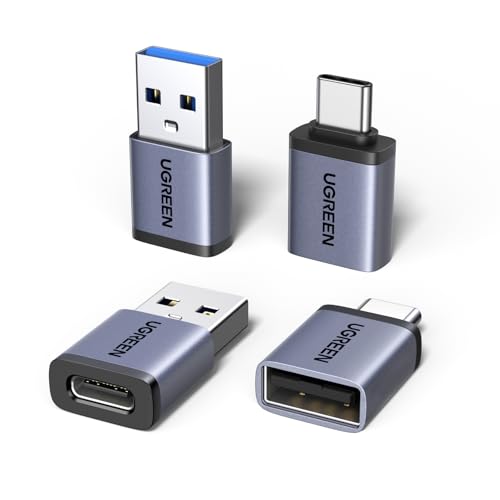
The two-way assortment is the key distinction: this pack has two USB-C male to USB-A female adapters and two USB-A male to USB-C female adapters. UGREEN says the adapters support data transfer up to 10 Gbps and charging up to 3A. That makes the pack useful when you need to connect USB-A accessories to a USB-C port as well as USB-C accessories to USB-A ports. The limitation is that the charging figure does not establish support for USB Power Delivery or other high-power charging protocols, so confirm the device and cable requirements before relying on fast charging.
Bottom line: Choose this if you need both connector directions in one pack.
Basesailor USB-A to USB-C 3-Pack

The USB 2.0 limit sets this pack apart from faster options: it converts a USB-A port to a USB-C female connection and supports data transfer up to 480 Mbps. The maker also gives a charging ceiling of 5V/2A, depending on the USB-A power source. That suits everyday charging or syncing where the source already has a USB-A port. The adapters do not carry video signals or support USB-C Power Delivery or PPS fast-charging protocols, so they are not the right choice for a high-power USB-C charger setup.
Bottom line: Pick this for USB 2.0 syncing and charging from a USB-A port.
Elebase USB-A to USB-C 4-Pack

The four-piece count is the main distinction, while the adapter direction is USB-A male to USB-C female. Elebase says these adapters support charging and USB 2.0 data transfer, and lists USB-C earphones, cables, flash drives and card readers among compatible accessory types. They can suit households or work areas that need several USB-A ports adapted for USB-C accessories. They do not transmit video, so avoid using them with HDMI or DisplayPort gear, video-capable hubs or docks that require video output.
Bottom line: Choose this if you want four adapters for USB-A ports and do not need video.
How to choose a USB to USB-C adapter
Start by matching the plug and socket to the two devices: USB-A-to-USB-C adapters have a USB-A plug and USB-C socket, while USB-C-to-USB-A adapters reverse that arrangement. USB-C describes the connector shape, not a guaranteed data speed or charging level. USB 2.0 supports up to 480 Mbps; USB 3.2 Gen 1 reaches up to 5 Gbps and Gen 2 up to 10 Gbps when the host, accessory and cable all support that tier. If you only need basic syncing, 480 Mbps can be sufficient; for large file transfers, choose a compatible faster connection. An adapter cannot make a slower port or cable faster.
Charging and video limits for USB-C adapters
USB-A-to-USB-C adapters are not a shortcut to USB-C Power Delivery: charging depends on the source port, adapter, cable and receiving device. USB Power Delivery uses negotiated power levels, and a USB-A source generally does not provide USB-C PD. A USB-C-shaped connector also does not ensure video output; video needs compatible ports and a cable or adapter that supports the relevant display mode. Treat an adapter that expressly excludes video as data-and-charging only. For high-power charging or display connections, use a cable or adapter designed for that specific protocol and confirm the device ports support it.
USB-A to USB-C adapter types compared
Choose by the direction of conversion and the job, rather than the connector name alone. A USB-A male to USB-C female adapter lets a USB-C cable or accessory connect to a USB-A port; a USB-C male to USB-A female adapter lets a USB-A accessory plug into a USB-C port. Combo packs contain both directions, which helps when you use a mix of old and new ports. The table separates common needs from the matching type; confirm that the adapter’s speed and charging limits also fit the connected equipment.
| Need | Adapter type | Key check |
|---|---|---|
| Use USB-C accessory with USB-A port | USB-A male to USB-C female | Source charging and data limits |
| Use USB-A accessory with USB-C port | USB-C male to USB-A female | Host port speed and compatibility |
| Switch between both port directions | Combo pack | Count of each direction |
Common mistakes when converting USB ports
The most common mistake is assuming that any USB-C socket supports every USB-C function. USB-C ports may differ in data rates, charging support and display capability, so check the device’s supported functions before choosing an adapter. Another mistake is treating a 10 Gbps claim as the speed of the entire setup: the host port, connected device and cable must each support that rate. For charging, do not infer USB PD support from a current rating alone; voltage, protocol and device compatibility matter too. Keep adapters away from video-dependent docks unless the adapter explicitly supports the required display signal.
Frequently Asked Questions
Can a USB-A to USB-C adapter transfer files?
Yes, if the adapter and both connected devices support data transfer. USB 2.0 tops out at 480 Mbps, while faster USB 3.x connections require compatible ports and cable as well.
Can these adapters connect a USB-C monitor?
Only if the adapter and connected ports support the needed video signal; USB-C connector shape alone does not guarantee display output. An adapter that excludes video cannot connect a display through HDMI or DisplayPort.
Which direction does a USB-A to USB-C adapter use?
A USB-A-to-USB-C adapter with a USB-A male plug goes into a USB-A port and provides a USB-C female socket. To connect a USB-A accessory to a USB-C host port, the adapter needs a USB-C male plug and USB-A female socket.
Does a 10 Gbps adapter make every transfer that fast?
No; 10 Gbps is a maximum, and the host port, accessory and cable must all support that speed. The slowest component in the connection limits the transfer rate.