
Dash Mounts for GPS Devices: 4 Options Compared

For most drivers, iSaddle Universal Friction Mount suits a broad range of GPS devices because its friction holder fits 4.3- to 9.6-inch screens. Choose 1Zero Matte Black GPS Clamp Dock instead for a spring clamp, or Portable Weighted GPS Dash Mount for a portable weighted base; the right mount depends on device fit and dashboard surface.
Dash mounts hold navigation devices on or above the dashboard, keeping them in view without relying on a windshield or vent attachment.
We earn a commission if you buy through links on this page. As an Amazon Associate I earn from qualifying purchases. Products are compared on manufacturer specifications, not hands-on testing.
- Best overall: iSaddle Universal Friction Mount – Its friction holder fits devices with 4.3- to 9.6-inch screens.
- Best for a clamp: 1Zero Matte Black GPS Clamp Dock – A spring-locked clamp and adhesive dashboard base secure compatible GPS units and phones.
- Best for portability: Portable Weighted GPS Dash Mount – The 1.38-inch-tall weighted base is designed to move between vehicles.
| Product | Best for | Mount style | Device fit | Dimensions | Shop |
|---|---|---|---|---|---|
| iSaddle Universal Friction Mount | Wide screen range | Friction base | 4.3–9.6 in screens | — | Check Price on Amazon |
| 1Zero Matte Black GPS Clamp Dock | Clamp-style holding | Adhesive clamp dock | GPS units and phones | 5.87 × 4.3 × 1.06 in | Check Price on Amazon |
| Portable Weighted GPS Dash Mount | Moving between cars | Weighted friction base | Garmin, TomTom, Magellan | 6.5 × 6.5 × 1.38 in | Check Price on Amazon |
| ChargerCity Friction Mount Kit | CarPlay and phones | Friction mount kit | 4–5 in GPS; CarPlay/phones | 7 × 4 × 7 in | Check Price on Amazon |
Dash Mounts for GPS Devices
Compare attachment styles and fit before choosing a dashboard mount for your GPS or phone.
iSaddle Universal Friction Mount
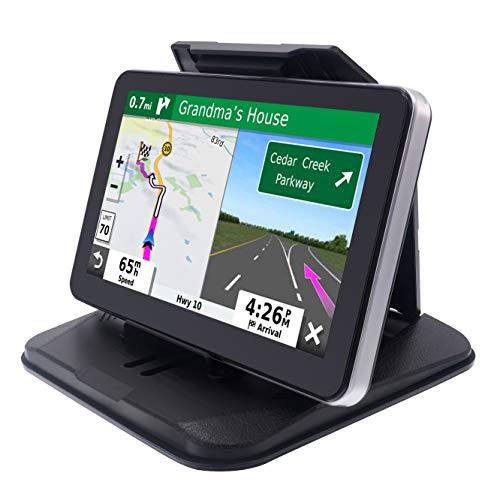
The iSaddle friction mount covers the widest screen range here, fitting devices from 4.3 to 9.6 inches. Its broad front cover is intended to reduce sun exposure while keeping the screen visible, and installation requires no tools or bracket. It suits drivers who want one holder for a GPS or phone within that size range. The limitation is that the fit claim is based on screen size alone; confirm your device’s dimensions and that its shape works with the holder before ordering.
Bottom line: Choose this for a screen-size range spanning 4.3 to 9.6 inches.
1Zero Matte Black GPS Clamp Dock
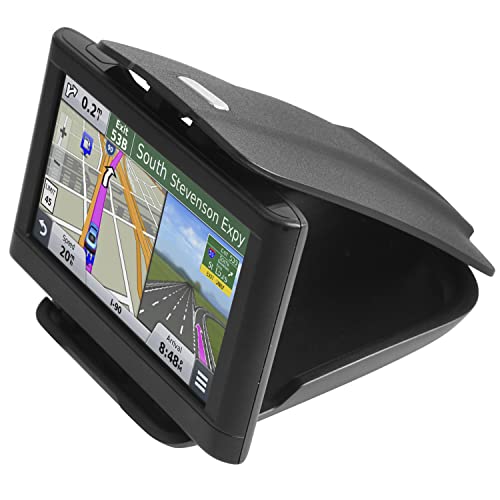
Its matte black clamshell folds flat when unused, and the 5.87-by-4.3-inch base has non-slip adhesive tape. The maker says the clamp holds devices securely even on bumpy roads. It suits drivers who want a reusable clamp-style holder for compatible Garmin, TomTom and other GPS units or smartphones. A limitation is that the GPS unit may need a suitable shape to sit in the clamp; check device fit before buying.
Bottom line: Pick this when you prefer a folding clamp dock over a weighted base.
Portable Weighted GPS Dash Mount
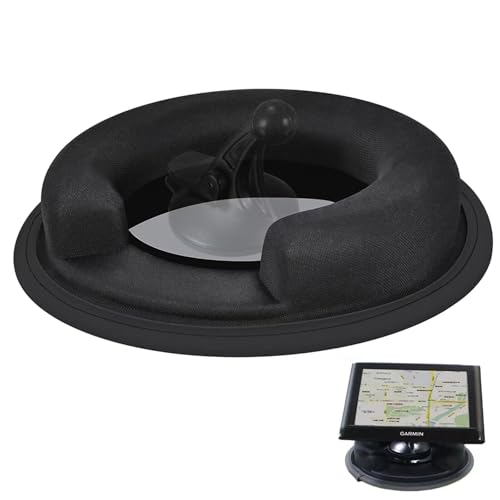
The portable weighted mount is the only beanbag-style base among these options, measuring 6.5 by 6.5 inches and standing 1.38 inches tall. Its non-skid base is designed to grip without leaving residue, and its compact size and 1.54-pound weight make it movable between vehicles. It suits drivers with a stable, reasonably flat dashboard and a GPS from a supported brand. Unlike the clamp-style 1Zero Matte Black GPS Clamp Dock, it relies on friction and weight rather than a spring grip, so it is not the choice if the dashboard is steep or the device is outside its intended small-to-medium fit.
Bottom line: Choose this for a portable weighted base on a stable dashboard.
ChargerCity Friction Mount Kit

The ChargerCity kit is built around a four-slot connection and a beanbag dash mount, distinguishing it from the single-piece holders in this group. It is intended for CarPlay, smartphones and GPS devices with 4- or 5-inch screens, and the full kit measures 7 by 4 by 7 inches. The maker says the mount stays attached while the vehicle is moving. It suits drivers who need a cradle-style connection for a smaller screen. The fit is narrower than iSaddle Universal Friction Mount’s 4.3- to 9.6-inch range, so larger devices are not a match.
Bottom line: Pick this for a 4- or 5-inch GPS or a phone using its four-slot connection.
How to choose a dashboard GPS mount
Choose by the attachment method first, then confirm device fit and usable dashboard space. Friction bases sit on a flat surface under their own weight; clamp mounts grip the device; suction cups attach to a smooth surface. A phone or GPS screen that is 4.3 to 9.6 inches falls within iSaddle Universal Friction Mount’s stated range, while a 4- or 5-inch GPS is the fit called out for ChargerCity Friction Mount Kit. Leave enough room to see the road and reach vehicle controls. Avoid placing a mount where it blocks the driver’s view or an airbag deployment zone. A broad or steeply sloped dashboard can change whether a weighted base stays stable, so measure the intended spot before choosing a footprint.
| Mount type | What holds it | Check before choosing |
|---|---|---|
| Friction base | Weight and surface grip | Dashboard stability and footprint |
| Clamp dock | Spring clamp plus adhesive base | Device shape and width |
| Suction cup | Suction and adhesive gel | Surface and matching cradle parts |
Screen size, base size and dashboard fit
Measure the device, not just its screen diagonal, before selecting a holder. Screen diagonal does not include bezels, case thickness or clamp clearance, so a device advertised within a mount’s screen range may still be too wide or thick. Dashboard footprint matters too: a 6.5-inch square base needs a relatively broad flat area, while a 5.87-by-4.3-inch base takes a different shape of space. Check the dash contour and the view from the driver’s seat; a mount that raises a screen into the windshield sightline can become a distraction. For low or sloped dashboards, verify the holder’s height and arm geometry rather than assuming every universal mount positions the screen well.
Weighted, clamp and suction mounts compared
Weighted mounts are easiest to move, clamp docks provide a direct grip on the device, and suction systems rely on a suitable surface and matching hardware. A weighted mount is a practical choice when the vehicle has a flat, stable dashboard; a clamp dock makes more sense when the device fits its jaws and a fixed adhesive base is acceptable. Suction mounts can place a GPS closer to the windshield, but a base-only replacement cannot hold a device by itself. For a phone, check whether the holder captures the phone itself or requires a separate cradle.
Safe placement and everyday use
Keep the GPS mount outside the driver’s forward sightline and away from airbag covers and deployment paths. NHTSA recommends placing objects so they do not obstruct the driver’s view or interfere with airbag operation. A low dashboard position is not automatically safe if it blocks an instrument display or requires a long glance away from traffic. Set the route before driving, and use voice guidance where available rather than handling the screen in motion. Mounting surfaces should be clean and dry for adhesive or suction attachment; residue, dust, heat and dashboard texture can weaken a bond. Recheck the mount after moving it between vehicles, especially before relying on a suction or weighted base on a different surface.
Frequently Asked Questions
How do I measure a GPS for a dash mount?
Measure the device’s width, height and thickness, including its case, and compare those measurements with the holder’s opening. Screen diagonal alone does not account for bezels or clamp clearance.
Where should a GPS mount sit on the dashboard?
Place the screen low enough to preserve the forward road view, but not over gauges, controls or an airbag cover. Federal guidance warns drivers to avoid objects that obstruct sightlines or interfere with airbag operation.
Do suction cup GPS mounts work on textured dashboards?
Suction cups generally need a smooth, clean, nonporous surface to form a seal. Textured or curved dashboards can prevent a seal, so use a compatible smooth mounting surface rather than relying on suction alone.
How often should I check a GPS dash mount?
Check the mount before each drive for movement, loose adhesive or a weakening suction seal. Heat, dust and dashboard texture can affect attachment, especially after repositioning.
Can a weighted GPS mount damage a dashboard?
A weighted base can shift or rub against the dashboard if the surface is sloped or the mount moves during driving. Keep the base on a stable, flat area and inspect the contact surface after repositioning.