
Digital Camera With Date and Time Stamp: 4 Options

For a digital camera with a date and time stamp, 4K Digital Vlogging Camera is the closest match for general compact shooting because its product name includes date stamping and it is presented as a point-and-shoot camera. Ultra-Compact 1080p Date-Stamp Camera also names a date-stamp and is aimed at beginners; choose it if pocket-size portability matters more than the broader vlogging emphasis.
KODAK PIXPRO FZ55 and KODAK PIXPRO FZ45 are compact alternatives with optical zoom, but confirm their date-stamping function before choosing either for this requirement.
We earn a commission if you buy through links on this page. As an Amazon Associate I earn from qualifying purchases. Products are compared on manufacturer specifications, not hands-on testing.
- Best overall: 4K Digital Vlogging Camera – Its product name includes date stamping and it is presented as a compact point-and-shoot camera.
- Best for beginners: Ultra-Compact 1080p Date-Stamp Camera – It names a date-stamp and is described as pocket-size with simple settings.
- Best for optical zoom: KODAK PIXPRO FZ55 – Its 5x optical zoom and 28mm wide-angle lens provide flexible framing.
| Product | Best for | Photo resolution | Zoom | Video | Shop |
|---|---|---|---|---|---|
| 4K Digital Vlogging Camera | Everyday vlogging | 64MP claimed | Powerful zoom; type unspecified | 4K claimed | Check Price on Amazon |
| Ultra-Compact 1080p Date-Stamp Camera | Pocket-size beginner use | 44MP claimed | 16x claimed | 1080p Full HD | Check Price on Amazon |
| KODAK PIXPRO FZ55 | Optical zoom flexibility | 16MP | 5x optical | 1080p Full HD | Check Price on Amazon |
| KODAK PIXPRO FZ45 | AA battery convenience | 16MP | 4x optical | 1080p Full HD | Check Price on Amazon |
Digital Cameras With Date and Time Stamp
Compare the date-stamp matches with compact cameras that offer other useful shooting features.
4K Digital Vlogging Camera
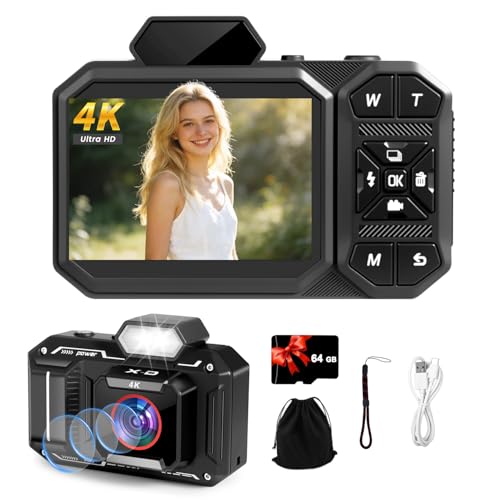
4K Digital Vlogging Camera combines date stamping in its product name with a 2.88-inch IPS screen and a focus on vlogging and everyday photography. The camera includes a 64GB card according to its name and is framed for beginners and travel use. The main limitation is that the zoom type and range are not clear, which matters if you need predictable framing for distant subjects.
Bottom line: Choose this if you want a date-stamp match with a screen and vlogging emphasis.
Ultra-Compact 1080p Date-Stamp Camera
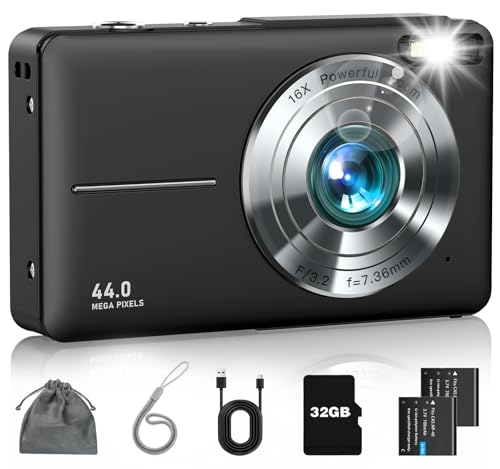
Ultra-Compact 1080p Date-Stamp Camera is the pocket-size choice for buyers who want a date-stamp, with a lanyard, 32GB card, anti-shake function, and filters. The maker claims 44MP photos and Full HD 1080p video, and describes simple settings for kids, teens, and beginners. Its compact, beginner-oriented focus differs from 4K Digital Vlogging Camera’s vlogging emphasis. The title claims 16x zoom but does not identify it as optical, so that figure should not be treated as equivalent to an optical zoom range. Choose another camera if optical reach is essential.
Bottom line: Choose this when compact carry and beginner-oriented controls are the priority.
KODAK PIXPRO FZ55
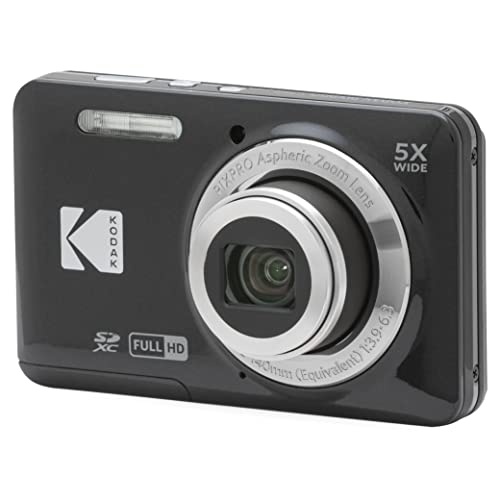
KODAK PIXPRO FZ55 stands apart with a specified 5x optical zoom and a 28mm wide-angle lens, useful for adjusting framing without relying on a digital zoom claim. Its 16MP sensor, 2.7-inch LCD, 1080p video, and rechargeable lithium-ion battery make it a general compact camera for travel and everyday clips. It supports Class 10 SD, SDHC, and SDXC cards up to 512GB. Date stamping is not the feature that distinguishes this model in the product name, so confirm that function before selecting it specifically for visible dates on photos.
Bottom line: Choose this for stated optical zoom if you confirm date stamping first.
KODAK PIXPRO FZ45

KODAK PIXPRO FZ45 uses two AA alkaline batteries, unlike KODAK PIXPRO FZ55’s rechargeable lithium-ion battery, and specifies 4x optical zoom through a 27mm wide-angle lens. It also has a 16MP sensor, a 2.7-inch LCD, Full HD 1080p video, and support for Class 10 SD, SDHC, or SDXC cards up to 512GB. The AA format may suit a buyer who wants replaceable batteries for a trip. It is a general compact camera rather than a clear date-stamp match, so verify the stamp function if that is essential.
Bottom line: Choose this for AA power and optical zoom after verifying date-stamp support.
How to Choose a Camera With a Date-Stamp
Choose a camera that explicitly offers a date-stamp setting if you need the date printed visibly on the photo. A date-stamp is typically burned into the image pixels, while EXIF metadata stores capture time separately and can be read or changed with photo software. The distinction matters: an embedded stamp is easy to see but difficult to remove cleanly; metadata is less visible and easier to edit. Before an event, enable the stamp and take a test photo to check its placement and legibility. If you need an exact time record, set the clock and time zone first, since a camera using the wrong clock can mark every image incorrectly.
Setting the Camera Clock and Date
Set the camera’s date, time, and time zone before the first shoot, then verify them after a battery change or reset. A clock set several hours off can place images on the wrong calendar date, especially when traveling across time zones. Most cameras store capture time in EXIF metadata; a visible stamp may draw from the same internal clock. Take one test image and inspect both the visible mark and the file’s capture time if accurate records matter. Avoid changing the camera clock mid-event unless necessary, because images from the same session can then carry inconsistent timestamps.
Optical Zoom and Digital Zoom Compared
Optical zoom changes lens magnification, while digital zoom crops and enlarges part of the image. A camera with 4x or 5x optical zoom therefore has a lens range; a bare zoom number does not establish that it is optical. Wide-angle focal lengths around 27mm to 28mm are useful for fitting more of a scene into the frame, such as a group or indoor setting. For distant subjects, prioritize a clearly identified optical zoom range rather than relying on a large-sounding digital zoom figure. Keep the lens wide for groups and step closer when you want a tighter portrait.
Matching a Compact Camera to Your Use
Match the camera to what you record most: a 2.7-inch or larger screen can help with framing, while a pocket-size body is convenient for everyday carry. For video, 1080p Full HD is sufficient for common sharing and playback; 4K captures more image detail but uses more storage per minute. Memory-card compatibility also matters: check the camera’s supported card type and capacity, and carry a spare card for long trips. For travel, an AA-powered camera and a rechargeable-battery camera have different power needs; bring the matching batteries or charger rather than assuming they are interchangeable.
Frequently Asked Questions
Does a camera date-stamp show up on every photo?
A visible date-stamp usually appears only after the camera’s stamp setting is enabled. Take a test photo first, since placement and appearance vary by camera.
Can I remove a date-stamp after taking a photo?
A stamp embedded in the image pixels is difficult to remove without altering nearby image content. EXIF capture-time metadata is separate and can generally be edited with photo software.
Should I use the date-stamp or photo metadata?
Use a visible stamp when you need the date readable directly on the image, and metadata when you want a record that does not cover part of the photo. A stamp can obscure image detail, especially near the bottom edge.
How do I keep camera timestamps accurate while traveling?
Set the camera’s time zone and local time whenever you cross zones, then take a test image. A clock several hours off can assign the wrong date to a late-night photo.
Does a higher zoom number mean better optical reach?
No; check whether the zoom is explicitly identified as optical. Digital zoom enlarges a crop, while optical zoom changes lens magnification.