
Ender 3 Pro Direct Drive Upgrade: 3 Kits Compared

For an Ender 3 Pro direct drive upgrade, Creality Ender 3 Direct Drive Kit is the most complete match because its kit includes a stepper motor, hotend kit, cables, and accessories. Choose Creality Sprite SE Direct Drive Kit if you want a dual-gear Sprite extruder that works with the original hotend; choose UniTak3D Split Conversion Bracket only if you already have a compatible extruder and hotend, since it is a bracket rather than a complete upgrade.
We earn a commission if you buy through links on this page. As an Amazon Associate I earn from qualifying purchases. Products are compared on manufacturer specifications, not hands-on testing.
- Best overall: Creality Ender 3 Direct Drive Kit – Includes the stepper motor, hotend kit, cables, and accessories for a more complete conversion.
- Best for dual-gear extrusion: Creality Sprite SE Direct Drive Kit – The Sprite SE kit adds a dual-gear extruder and is compatible with the original hotend.
- Best for an existing extruder: UniTak3D Split Conversion Bracket – The split conversion bracket is a mount-only option for compatible setups.
| Product | Best for | Printer fit | Included hardware | Dimensions | Shop |
|---|---|---|---|---|---|
| Creality Ender 3 Direct Drive Kit | Complete conversion | Ender 3, Ender 3 V2, Ender 3 Pro | Motor, hotend kit, cables, accessories | 2.9 × 3.7 × 4.9 in | Check Price on Amazon |
| Creality Sprite SE Direct Drive Kit | Dual-gear extruder | Ender 3, Ender 3 V2, Ender 3 Pro, others | Dual-gear extruder; hotend not included | — | Check Price on Amazon |
| UniTak3D Split Conversion Bracket | Existing extruder | Ender 3 Pro, Ender 3, Ender 3 V2 | Bracket only; extruder and hotend excluded | 2.36 × 2.36 × 3.94 in | Check Price on Amazon |
Ender 3 Pro direct drive upgrades
These options range from a complete extrusion kit to a bracket for a compatible extruder you already own.
Creality Ender 3 Direct Drive Kit

Unlike a bracket-only conversion, this Creality kit includes a 42-40 stepper motor, hotend kit, cables, and accessories. The manufacturer says it supports 1.75 mm filament, including TPU, PLA, and other flexible filaments. Its compatibility includes the Ender 3 Pro, Ender 3, and Ender 3 V2, and the kit is described as reversible between Bowden and direct drive setups. It suits buyers who want more of the conversion hardware together. The tradeoff is that the kit’s size is 2.9 × 3.7 × 4.9 inches, so check clearance around the printer carriage before installation.
Bottom line: Choose this if you want a more complete conversion kit with a motor and hotend hardware.
Creality Sprite SE Direct Drive Kit

The Sprite SE kit is the dual-gear extruder option, while Creality Ender 3 Direct Drive Kit includes a hotend kit. Creality says the Sprite SE fits the Ender 3 Pro as well as several other Creality models, and that installation uses one component and an isolation column. The extruder is compatible with the original hotend, which suits owners who want to retain that part and upgrade the extrusion assembly. The hotend is not included, so this is not a complete hotend replacement. Confirm that your printer still has its original hotend before choosing this route.
Bottom line: Choose this if you want a dual-gear extruder and plan to keep the original hotend.
UniTak3D Split Conversion Bracket
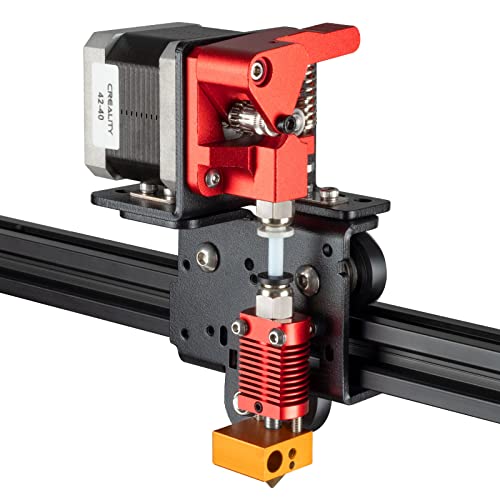
This UniTak3D option is a split conversion bracket, not a complete extruder kit like Creality Ender 3 Direct Drive Kit or Creality Sprite SE Direct Drive Kit. The manufacturer lists Ender 3 Pro compatibility, along with Ender 3, Ender 3 V2, and Voxelab Aquila, while excluding Ender 3 Max, Neo models, and Titan extruders. The bracket suits a buyer who already has a compatible extruder and hotend and needs a mount for conversion. Its dimensions are about 2.36 × 2.36 × 3.94 inches. Because the extruder and hotend are excluded, factor in those parts before treating this as a full upgrade.
Bottom line: Choose this only if you already have an extruder and hotend that fit the bracket.
How to choose an Ender 3 Pro direct drive upgrade
Choose by how much of the extrusion assembly you need to replace: a direct drive setup moves the extruder close to the hotend, shortening the filament path compared with a Bowden arrangement. A complete kit can include the motor and hotend hardware, an extruder kit may reuse the stock hotend, and a bracket provides only the mount. Direct drive commonly uses shorter retraction than Bowden setups; about 0.5–2 mm is a useful starting range, compared with roughly 4–6 mm for many Bowden printers. Tune retraction after conversion rather than carrying over a long Bowden setting, which can cause unnecessary filament movement. If you already have a compatible extruder and hotend, a bracket may be enough; otherwise, choose an option that includes the hardware you lack.
| Need | Option type |
|---|---|
| Motor and hotend hardware | Complete direct drive kit |
| Extruder, retaining stock hotend | Extruder kit |
| Compatible extruder and hotend already owned | Conversion bracket |
Check Ender 3 Pro compatibility and clearance
Check the exact printer variant and extruder before choosing a mount; a shared Ender 3 name does not guarantee every bracket fits. The bracket option here excludes Neo and Max models and Titan extruders, while the two Creality kits list Ender 3 Pro compatibility. Also check the carriage area: a direct drive assembly adds mass and may extend beyond the original arrangement. If the upgrade can collide with the frame or limit carriage travel, resolve that before installation. After fitting, confirm that the nozzle can still reach the full printable area and that the filament path stays clear through the entire X-axis motion. Turn off and unplug the printer before working on wiring, and let the hotend cool fully to avoid burns.
What changes after converting from Bowden to direct drive
Direct drive shortens the distance between the drive gears and hotend, which can make flexible filament feeding easier to control than a long Bowden path. The tradeoff is added mass on the moving carriage; ringing or ghosting may become more visible if acceleration is too high for the new assembly. Start with the printer’s existing motion settings, then reduce acceleration if corners show repeated echoes. Retraction also needs retuning: begin near 0.5–2 mm for a typical direct drive arrangement, then adjust in small steps based on stringing and extrusion gaps. These are starting ranges, not guaranteed settings; hotend geometry and filament affect the result.
Frequently Asked Questions
Does a direct drive upgrade support TPU on an Ender 3 Pro?
A direct drive setup shortens the unsupported filament path, which can help flexible TPU feed more reliably than a long Bowden tube. TPU still needs compatible hardware and suitable print settings; the Creality kit here specifies support for 1.75 mm filament including TPU.
How much retraction should direct drive use?
About 0.5–2 mm is a common starting range for direct drive, rather than the roughly 4–6 mm often used with Bowden setups. Tune in small steps because filament and hotend design change the result.
Can I keep the stock hotend with a direct drive upgrade?
Yes, the Sprite SE kit is described as compatible with the original hotend. A complete kit that includes a hotend, such as Creality Ender 3 Direct Drive Kit, is a different route if you also want to replace that part.
Do I need to change Ender 3 Pro retraction settings?
Usually, yes: direct drive uses a shorter filament path, so a long Bowden retraction setting may pull too much filament. Start around 0.5–2 mm and adjust gradually while checking for stringing or gaps.