
Seagate External Hard Disk 4TB: Portable and Desktop Drives

For most people seeking a Seagate 4TB external hard disk, Seagate Portable 4TB HDD is the straightforward pick: it has 4TB of storage, a portable design, and plug-and-play USB 3.0 setup.
These are external hard disk drives (HDDs), which store data on spinning magnetic platters; choose a portable model for mobility and a desktop model for a fixed setup.
We earn a commission if you buy through links on this page. As an Amazon Associate I earn from qualifying purchases. Products are compared on manufacturer specifications, not hands-on testing.
- Best overall: Seagate Portable 4TB HDD – A 4TB portable drive with plug-and-play setup and an included 18-inch USB 3.0 cable.
- Best for USB-C connection: Seagate Expansion Portable 4TB – The product name identifies a Micro-B-to-USB-C connection and the drive has 4TB capacity.
- Best for desk storage: Seagate Expansion Desktop 4TB – This 4TB desktop drive includes a power supply and USB 3.0 connection.
| Product | Best for | Form factor | Connection | Shop |
|---|---|---|---|---|
| Seagate Portable 4TB HDD | Everyday portable storage | Portable | USB 3.0 | Check Price on Amazon |
| Seagate Expansion Portable 4TB | USB-C connection | Portable | Micro-B to USB-C | Check Price on Amazon |
| Seagate Expansion Desktop 4TB | Fixed desk storage | Desktop | USB 3.0 | Check Price on Amazon |
Seagate 4TB External Hard Disk Drives
Compare the portable and desktop options by connection, setup, and where you plan to keep the drive.
Seagate Portable 4TB HDD

For a simple portable setup, Seagate Portable 4TB HDD pairs 4TB of storage with an included 18-inch USB 3.0 cable. It is designed for Windows or Mac computers, and the maker says it can be set up by connecting it to a computer for automatic recognition, then dragging and dropping files. No software is required for that setup. The compact enclosure measures about 4.61 × 3.15 × 0.58 inches.
Bottom line: Pick this for straightforward 4TB portable storage with a USB 3.0 cable included.
Seagate Expansion Portable 4TB

Its compact drive is intended for home, school, work, and travel, and the maker says it works with most Windows and macOS systems. The maker also says Rescue Data Recovery Services are included. At about 4.61 × 3.35 × 0.79 inches, it is portable but slightly thicker than a slim pocket drive. Choose another option if you need a desktop drive with its own power supply; verify that the connector and cable arrangement suits your computer before choosing this one.
Bottom line: Choose this when its Micro-B-to-USB-C cable connection fits your setup.
Seagate Expansion Desktop 4TB
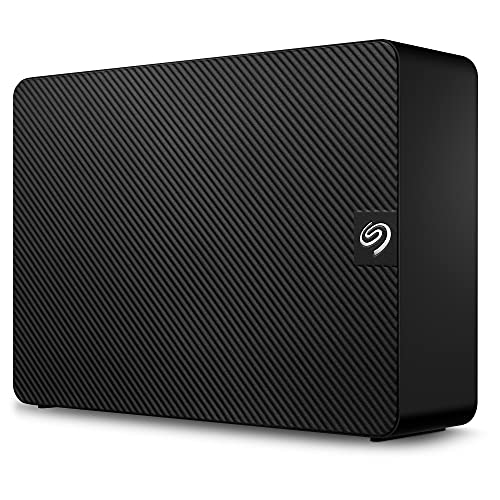
Unlike the portable drives, Seagate Expansion Desktop 4TB is a desktop model with a separate power supply, so it suits a fixed workspace better than a bag. It offers 4TB capacity and USB 3.0 file transfer, with drag-and-drop storage when connected. The maker says Windows and Mac computers recognize it automatically; Time Machine use requires reformatting. Its dimensions convert to about 7.04 × 4.92 × 1.65 inches. The need for external power is the main tradeoff: choose a portable model if you want a drive designed around a simpler travel setup.
Bottom line: Pick this for a desk-based 4TB setup where a power supply is acceptable.
How to choose a Seagate 4TB external hard disk
Choose the drive type by where it will be used and how it connects. Portable HDDs are smaller and easier to carry; desktop HDDs are larger and commonly require a power adapter, as Seagate Expansion Desktop 4TB does. HDDs use spinning platters rather than flash memory, so they are a practical fit for bulk file storage but are more sensitive to shocks while operating than solid-state drives. For a drive you will move often, prefer a portable enclosure and keep it still during file transfers. If it will stay at one workstation, a desktop model can make sense when an outlet and desk space are available.
Connection shape and operating-system setup are separate checks: confirm that the cable and port match, and account for any reformatting required by a particular backup utility.
Portable versus desktop 4TB hard drives
Portable models prioritize carrying convenience, while desktop models prioritize a fixed installation and may need their own power source. The three options differ in connector details and power arrangement, so use the table to narrow the choice before checking device compatibility.
| Need | Choice | Reason |
|---|---|---|
| Easy everyday portable storage | Seagate Portable 4TB HDD | Portable 4TB USB 3.0 setup with an included 18-inch cable |
| Micro-B-to-USB-C cable path | Seagate Expansion Portable 4TB | That connection is specified in the product name |
| Stationary desk setup with outlet access | Seagate Expansion Desktop 4TB | Desktop format with a separate power supply |
Allow enough room around a desktop drive for its enclosure and cables, and avoid placing any HDD where it can fall or be bumped during operation.
USB connections and Mac backup setup
Match the physical connector and the cable to the computer port; a connector that fits physically does not guarantee every device or operating-system combination will work. For Mac Time Machine, Seagate Expansion Desktop 4TB requires reformatting according to its product features. Reformatting erases existing files, so copy anything you need elsewhere before beginning. Keep a separate backup of important files: one external hard disk alone is a single storage copy, and a drive failure or accidental deletion can still remove data.
When connecting a drive to another device, such as a router or game console, check that device’s supported storage formats and USB requirements rather than assuming computer compatibility carries over.
Safe handling and reliable HDD storage
Keep a hard disk drive level and still while it is reading or writing files; spinning platters and a moving read/write head make drops or jolts a risk. Disconnect the drive using the computer’s eject function before unplugging it, especially during transfers, to reduce the chance of interrupted writes. Store the drive in a dry place and protect its cable and connector from strain. For important files, keep another copy on a different device or in a separate location rather than treating a single 4TB drive as a complete backup plan. A recovery service may help in some cases, but it is not a substitute for maintaining another copy.
Frequently Asked Questions
Can a 4TB external hard drive work with Mac computers?
The Seagate portable options here are described as compatible with Windows and macOS. For Time Machine, the Expansion Desktop requires reformatting, which erases existing data, so preserve needed files before doing so.
How much usable space does a 4TB hard drive provide?
A 4TB drive is sold using decimal capacity: 4 trillion bytes. A computer may show a smaller number of gibibytes because operating systems often display capacity using binary units and reserve some space for formatting.
Should I leave an external hard drive plugged in?
A drive can remain connected while you use it, but eject it before unplugging and avoid moving an HDD during file transfers. For a portable drive kept unused, disconnecting it reduces exposure to accidental knocks and electrical events.
Can I use an external hard drive as my only backup?
No; one drive is only one copy, and drive failure, loss, or accidental deletion can affect it. Keep at least one additional copy on a separate device or in another location, especially for irreplaceable files.