
G Anica Camera: 4 Dash Cams Compared by Coverage

360° Front and Inside Dash Cam is the closest match for a G Anica camera search because it records the front road in 4K and the cabin in 2.5K, with a 185° cabin lens. Choose a different model if you need rear or side coverage, or a lower-resolution front-and-inside camera.
We earn a commission if you buy through links on this page. As an Amazon Associate I earn from qualifying purchases. Products are compared on manufacturer specifications, not hands-on testing.
- Best overall: 360° Front and Inside Dash Cam – Records the road and cabin simultaneously at 4K and 2.5K.
- Best for five-view coverage: IIWEY N9 5-Channel Dash Cam – Records front, rear, left, right and cabin in 1080p.
- Best for basic cabin recording: 1080p Dual Front and Inside Dash Cam – Captures front and inside video at 1080p.
| Product | Best for | Camera views | Resolution | Included storage | Shop |
|---|---|---|---|---|---|
| 360° Front and Inside Dash Cam | Rideshare cabin coverage | Front and cabin | 4K + 2.5K | 32GB card | Check Price on Amazon |
| IIWEY N9 5-Channel Dash Cam | Multi-angle coverage | Front, rear, left, right, cabin | 1080p | 128GB card | Check Price on Amazon |
| HKOIZBL Front and Rear Dash Cam | Front and rear recording | Front and rear | 4K + 2.5K | 32GB card | Check Price on Amazon |
| 1080p Dual Front and Inside Dash Cam | Simple dual recording | Front and inside | 1080p | No card included | Check Price on Amazon |
Front-and-inside dash cams compared
Choose by the views you need covered and the resolution or storage included with each camera.
360° Front and Inside Dash Cam

360° Front and Inside Dash Cam pairs a 4K front camera with a 2.5K cabin camera, making it the closest fit here for drivers who need both road and passenger footage. Its 146° front lens and 185° fisheye cabin lens target broad views of the road and cabin, while infrared cabin lighting and WDR are intended for low-light recording and glare handling. GPS, WiFi app access, a G-sensor and parking mode are also included in its feature set. The limitation is its two-view arrangement: choose a model with dedicated rear and side cameras if those angles are essential.
Bottom line: Pick this if road and cabin recording matter more than rear or side coverage.
IIWEY N9 5-Channel Dash Cam

IIWEY N9 5-Channel Dash Cam covers more directions than a front-and-cabin dual camera, with five views: front, rear, left, right and cabin. All five record in 1080p, and the package includes a 128GB card plus 12 infrared LEDs for night vision. Its WiFi 6 app and GPS add connected features, but the camera has a specific power requirement: use its original car charger, or a compatible hardwire kit or OBD cable. A USB-C-to-USB-C charging cable will not power it. This model suits drivers who prioritize broad vehicle coverage over the higher front and cabin resolutions of 360° Front and Inside Dash Cam.
Bottom line: Choose it when side and rear views are priorities and 1080p is sufficient.
HKOIZBL Front and Rear Dash Cam

HKOIZBL Front and Rear Dash Cam swaps cabin recording for a rear camera, pairing 4K front video with 2.5K rear video. The lens angles are 170° front and 150° rear, and the package includes a 32GB card, WiFi app control, a G-sensor and 24-hour parking mode. This layout is a better match for drivers focused on events behind the car rather than passenger activity. Its two-camera setup does not provide dedicated cabin or side views, so it will not replace an inside-facing camera for rideshare documentation.
Bottom line: Pick this if you want front-and-rear views instead of cabin footage.
1080p Dual Front and Inside Dash Cam
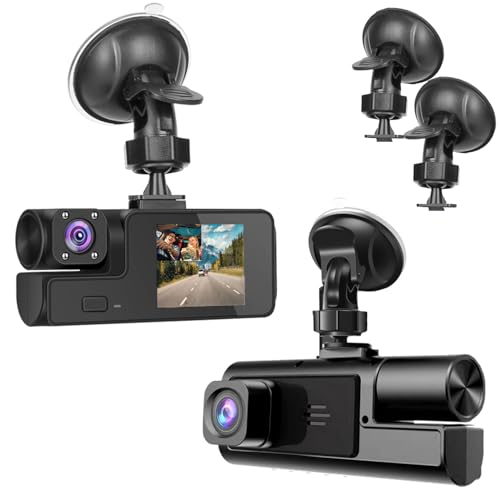
1080p Dual Front and Inside Dash Cam is a simpler front-and-inside option that records both views at 1080p. Its features include a 170° wide angle, WDR, a G-sensor, loop recording and night vision; installation uses a windshield suction cup and a cigarette-lighter power connection. Unlike 360° Front and Inside Dash Cam, it does not include a memory card, so buyers need to account for storage separately. The lower-resolution recording may suit basic cabin documentation, but drivers who need more image detail or included storage should compare it with the 4K-and-2.5K dual camera.
Bottom line: Choose it for straightforward 1080p front-and-cabin video if you have storage.
How to choose a front-and-inside dash cam
Start with the views you need: a dual front-and-cabin camera records passenger activity, while a five-channel system can add rear and side views. Resolution is not the only factor in useful footage; field of view, lighting and where the camera is mounted also affect what appears in frame. A very wide lens covers more area but can make distant details smaller. For rideshare use, prioritize a cabin-facing view and check whether its lens angle covers the seats you need; select a multi-angle system if side or rear incidents matter more. Match the included storage to how long you expect clips to remain available, and confirm what storage format the camera accepts before ordering.
Front, cabin, rear and side camera layouts
Camera count describes coverage, not necessarily image detail: the five-view system here records each view in 1080p, while two dual-camera options pair a 4K front view with 2.5K cabin or rear video. A cabin camera points into the vehicle; a rear camera points through or toward the back window, so these views answer different needs. Side cameras can show areas a front-and-rear pair may miss. Use this comparison to narrow the layout before weighing extras such as GPS, app access or parking mode.
| Need | Useful layout | Trade-off |
|---|---|---|
| Passenger activity | Front and cabin | Does not add dedicated rear or side views |
| Events behind the car | Front and rear | Does not record the cabin |
| Broad vehicle coverage | Front, rear, left, right and cabin | More views can mean lower resolution per view |
Resolution, night vision and usable footage
Higher resolution can preserve more image detail, but it does not guarantee that a plate or face will be readable: distance, motion, glare, focus and windshield reflections all matter. Infrared cabin lighting is designed to illuminate the interior without relying on visible cabin lights, while WDR balances bright and dark areas; neither feature removes every night-time limitation. Keep the windshield clean and mount the lens where the required scene remains unobstructed. A wide-angle lens is useful for broad coverage, but avoid judging a camera only by the largest angle number because the edges of a fisheye view can appear distorted.
Storage, loop recording and parking mode
Dash cams typically record in short clips and use loop recording to replace older unlocked footage when storage fills; impact events may be locked by a G-sensor. Check that important clips are saved or exported promptly, since a locked-file limit or card error can still affect retention. Parking mode may require continuous power while the vehicle is off, often through a compatible hardwire connection; verify the camera’s power method and your vehicle’s setup before relying on it. One included 32GB card holds less footage than a 128GB card at the same recording settings, and multiple high-resolution streams can use storage faster.
Frequently Asked Questions
Does a front-and-inside dash cam record the rear road?
Not necessarily: a cabin-facing lens records inside the vehicle, while a rear camera records behind it. Choose a front-and-rear layout if rear-road footage is required.
What does a dash cam G-sensor do?
A G-sensor detects sudden movement or impact and can lock the corresponding clip against normal loop replacement. It does not guarantee that every relevant event will be detected, so check how the model handles sensitivity and locked files.
How much storage does a dual dash cam need?
A 32GB card is included with two of these models, while the five-channel camera includes 128GB; the 1080p dual camera includes no card. Higher resolution and more simultaneous views consume storage faster, so capacity affects how much footage stays available.
Can a dash cam record while the car is parked?
Parking recording depends on the camera’s parking mode and continued power after the ignition is off. Some installations use a hardwire kit or OBD cable, so confirm compatible power and installation requirements before relying on overnight recording.
Where should a dash cam be mounted on the windshield?
Mount the camera where it has a clear view through the windshield without blocking the driver’s view. Clean and dry the glass before attaching a suction mount, and check local rules on windshield-mounted devices.