
Google Pixel Tablet Keyboard Cases Compared by Fit

For most people, Dexnor Cantilever Keyboard Case is the strongest fit because it combines a trackpad with a floating cantilever stand for adjustable viewing. Choose EIP Magnetix Detachable Keyboard Case or SAMTUNK 7-Color Keyboard Case instead if a backlit keyboard matters more, or Touch Keyboard Case with Trackpad if you want a trackpad and stylus holder.
These cases pair a keyboard with a protective tablet cover; all four options here are made for the 11-inch Google Pixel Tablet, not the Pixel Slate.
We earn a commission if you buy through links on this page. As an Amazon Associate I earn from qualifying purchases. Products are compared on manufacturer specifications, not hands-on testing.
- Best overall: Dexnor Cantilever Keyboard Case – A trackpad and floating cantilever stand make it the most complete typing setup in this group.
- Best for dock use: EIP Magnetix Detachable Keyboard Case – Its detachable magnetic keyboard and speaker-dock compatibility suit buyers who want to remove the keyboard.
- Best for trackpad use: Touch Keyboard Case with Trackpad – A precision trackpad and stylus holder suit tablet workflows that need cursor control.
- Best for color backlighting: SAMTUNK 7-Color Keyboard Case – It has seven-color backlighting and a mouse, plus three viewing angles.
| Product | Best for | Trackpad | Backlighting | Stand or dock feature | Shop |
|---|---|---|---|---|---|
| Dexnor Cantilever Keyboard Case | Flexible desk typing | Yes | Yes | Floating cantilever stand | Check Price on Amazon |
| EIP Magnetix Detachable Keyboard Case | Dock-compatible typing | — | 7-color | Adjustable angle; dock compatible | Check Price on Amazon |
| Touch Keyboard Case with Trackpad | Cursor and stylus use | Precision trackpad | — | Speaker-dock compatible | Check Price on Amazon |
| SAMTUNK 7-Color Keyboard Case | Colorful backlighting | — | 7-color | Three viewing angles | Check Price on Amazon |
Google Pixel Tablet Keyboard Cases
Compare these 11-inch keyboard cases by cursor control, lighting, and how the case supports the tablet.
Dexnor Cantilever Keyboard Case

The floating cantilever stand distinguishes this case, while a trackpad adds cursor control for laptop-style work. Its magnetic detachable case is made for the 11-inch Google Pixel Tablet and is compatible with the speaker dock; a stylus holder and backlit keyboard are also included. Dexnor says the trackpad is disabled when the tablet uses 2.4 GHz Wi-Fi and advises confirming 5 GHz Wi-Fi availability before purchase. That network condition matters if you rely on the trackpad, and makes this a less straightforward choice for a 2.4 GHz-only setup.
Bottom line: Choose this if you want an adjustable cantilever stand and can use 5 GHz Wi-Fi for the trackpad.
EIP Magnetix Detachable Keyboard Case
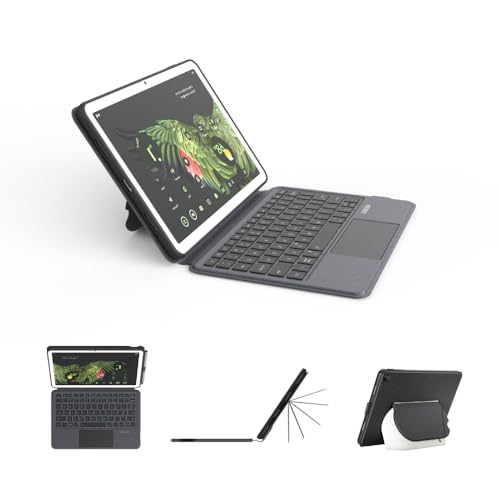
Speaker-dock compatibility is the key distinction of this case, whose keyboard detaches magnetically from the cover. The 11-inch Pixel Tablet fit, adjustable viewing angle, and seven-color backlighting make it a useful option for switching between typing and tablet use. EIP says a recent Android update may cause Bluetooth issues because the tablet shares bandwidth between Bluetooth and Wi-Fi; it recommends improving Wi-Fi signal or turning Wi-Fi off if connection trouble occurs. Choose another option if you need a trackpad, since one is not established for this model.
Bottom line: Pick this if speaker-dock compatibility and a removable backlit keyboard matter more than a trackpad.
Touch Keyboard Case with Trackpad

A precision trackpad and stylus holder set this case apart for users who need both cursor control and a place for a pen. The magnetic Bluetooth keyboard detaches, and the cover is designed for the 11-inch Google Pixel Tablet, including 2023 and 2024 versions. The trackpad supports clicks, pinching, sliding, and scrolling, according to the product maker. Backlighting is not a deciding feature established for this option, so choose another model if illuminated keys are essential for typing in dim rooms.
Bottom line: Choose this for a detachable keyboard, trackpad gestures, and a stylus holder.
SAMTUNK 7-Color Keyboard Case
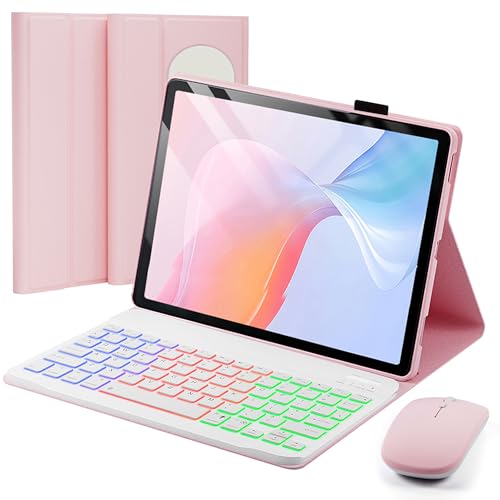
Three viewing angles and a bundled mouse distinguish this pink case from the trackpad-focused alternatives. Its magnetic keyboard detaches, offers seven-color rainbow backlighting, and is designed for the 11-inch Google Pixel Tablet in the 2023/2024 versions. The mouse provides a separate cursor-control option, but the features do not establish a trackpad for the keyboard itself. Buyers who want cursor gestures directly on the keyboard should favor a trackpad-equipped option instead.
Bottom line: Pick this for seven-color keys, multiple viewing angles, and a separate mouse.
How to choose a Google Pixel Tablet keyboard case
Start with the input method: a built-in trackpad keeps cursor control on the case, while a separate mouse needs its own space. Next, decide whether the keyboard should detach magnetically; that makes it easier to use the tablet without keys attached. Backlighting is useful in dim rooms, but it does not replace a stand that holds the screen at a comfortable angle. For a desk setup, choose a model with an adjustable stand; for mixed tablet and typing use, prioritize a removable keyboard. Confirm the model fit: these choices target the 11-inch Pixel Tablet and are not for the 12.3-inch Pixel Slate.
Trackpad and Wi-Fi compatibility
Check the wireless conditions before choosing a trackpad case, because keyboard and cursor features may not behave identically on every network setup. For Dexnor Cantilever Keyboard Case, the maker says the trackpad is disabled on 2.4 GHz Wi-Fi and advises checking that 5 GHz is available. That is a meaningful decision rule: if your tablet must stay on 2.4 GHz, choose a case without reliance on its trackpad or use another cursor method. EIP also flags possible Bluetooth issues related to Wi-Fi sharing on the Pixel Tablet. If wireless input is essential, verify that the keyboard pairs and reconnects as expected in your own setup.
Keyboard case features compared
Choose by the feature that changes your workflow most: integrated cursor control, keyboard removal, lighting, or viewing adjustment. A detachable magnetic keyboard is useful when you want to switch between typing and tablet handling; a trackpad avoids carrying a separate mouse. A stand matters for sustained typing because it holds the screen upright rather than flat. The comparison below focuses on those functional differences, not cosmetic variations.
| Need | Feature to prioritize |
|---|---|
| Cursor gestures at the case | Integrated trackpad |
| Remove keys for tablet use | Magnetic detachable keyboard |
| Typing in dim light | Backlit keys |
| Change screen position | Adjustable stand or multiple angles |
Check fit and daily handling
Match the case to the exact tablet before ordering: an 11-inch Google Pixel Tablet case is not interchangeable with a 12.3-inch Pixel Slate case. A magnetic detachable keyboard can reduce bulk when removed, but the cover remains part of the setup, so consider whether its dimensions suit your bag and desk. For the speaker dock, prefer a model whose compatibility is explicitly identified, such as EIP Magnetix Detachable Keyboard Case or Dexnor Cantilever Keyboard Case. Also consider whether you want a separate mouse or a trackpad; carrying both adds another device, while a trackpad keeps the control surface with the keyboard.
Frequently Asked Questions
Will a Pixel Slate keyboard case fit the Pixel Tablet?
No; the Pixel Slate is 12.3 inches, while these cases are made for the 11-inch Pixel Tablet. Check the device model before choosing a case.
Does the Dexnor trackpad work on 2.4 GHz Wi-Fi?
Dexnor says the trackpad function is disabled on 2.4 GHz Wi-Fi. It advises checking that a 5 GHz Wi-Fi signal is available if trackpad use matters.
Can a detachable keyboard case be used without its keyboard?
A magnetic detachable design lets you remove the keyboard while leaving the case on the tablet. The tablet can then be handled without the keyboard attached.
Is a trackpad or separate mouse better for tablet typing?
A trackpad keeps cursor control on the keyboard case, while a separate mouse needs its own surface and must be carried separately. Choose based on available desk space and whether you want a separate accessory.
Do backlit tablet keyboards help in a dark room?
Backlit keys illuminate the keyboard in dim surroundings, which can make key positions easier to see. They do not illuminate the tablet screen, so screen brightness remains a separate setting.