
Hikity Android Car Stereo Options Compared by Fit

For a broadly compatible aftermarket setup, Hikity 7-inch Double-DIN is the most flexible Hikity Android car stereo here because it is a 7-inch double-DIN unit rather than a vehicle-specific kit. Choose Hikity Elantra 2014–2016 9-inch or Hikity Accent / Verna / Solaris 9-inch instead when you own the matching Hyundai, since each is designed for a defined model range; verify the dashboard and wiring fit before ordering.
We earn a commission if you buy through links on this page. As an Amazon Associate I earn from qualifying purchases. Products are compared on manufacturer specifications, not hands-on testing.
- Best overall: Hikity 7-inch Double-DIN – Its 7-inch double-DIN format is the broadest fit among these options, with wireless CarPlay and Android Auto.
- Best for Elantra owners: Hikity Elantra 2014–2016 9-inch – Designed for the 2014–2016 Hyundai Elantra and includes 4GB RAM with 64GB storage.
- Best for Accent owners: Hikity Accent / Verna / Solaris 9-inch – The 9-inch unit is designed for Hyundai Accent, Verna and Solaris models from 2010–2016.
| Product | Best for | Screen size | RAM / storage | Vehicle fit | Shop |
|---|---|---|---|---|---|
| Hikity 7-inch Double-DIN | Standard double-DIN | 7 in | 4GB / 64GB | Double-DIN | Check Price on Amazon |
| Hikity Elantra 2014–2016 9-inch | Elantra owners | 9 in | 4GB / 64GB | Hyundai Elantra 2014–2016 | Check Price on Amazon |
| Hikity Accent / Verna / Solaris 9-inch | Accent owners | 9 in | 2GB / 64GB | Hyundai Accent / Verna / Solaris 2010–2016 | Check Price on Amazon |
Hikity Android car stereo options
Compare these three Hikity models by dashboard fit, screen size and memory before choosing.
Hikity 7-inch Double-DIN

Unlike the vehicle-specific 9-inch units, this Hikity stereo uses a 7-inch double-DIN format and is the broadest-fit choice in this group. Its Android 15 system has an 8-core chip, 4GB RAM and 64GB storage; the feature set includes wireless CarPlay and Android Auto, MirrorLink, DSP, Bluetooth, GPS and Wi-Fi. It suits a dashboard with a matching double-DIN opening. Double-DIN openings are nominally about 4 by 7 inches, but dash trim, mounting depth and wiring still affect fit, so measure before buying. The smaller screen may not suit buyers who prefer a 9-inch vehicle-matched display.
Bottom line: Choose this if your dash accepts a 7-inch double-DIN stereo and you want a broadly adaptable format.
Hikity Elantra 2014–2016 9-inch
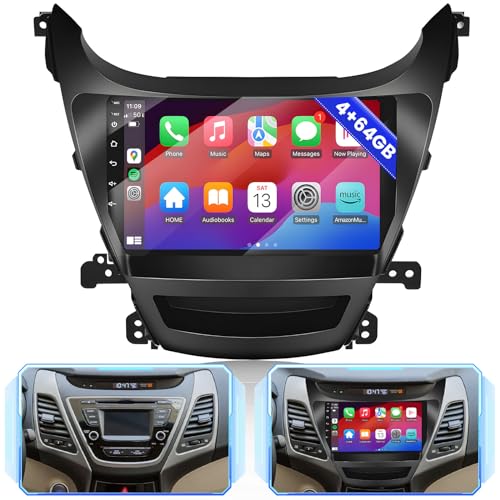
This Elantra-specific model stands out for its 4GB RAM and 64GB storage paired with a 9-inch IPS touchscreen. It is designed for Hyundai Elantra 2014–2016 models and supports wired and wireless CarPlay and Android Auto, plus DSP, GPS navigation, Wi-Fi, FM/RDS and steering-wheel controls. Choose it when the vehicle range and dashboard frame match. The maker says the stereo does not support the car’s original amplifier by itself; buyers who need that integration must obtain a separate protocol box and harness. Its vehicle-specific design makes it less suitable than a standard double-DIN unit for other cars.
Bottom line: Pick this for a matching Elantra when the larger screen and 4GB RAM matter.
Hikity Accent / Verna / Solaris 9-inch

This model is the only option here explicitly supplied with a vehicle-specific dash kit and wiring for Hyundai Accent, Verna and Solaris models from 2010–2016. It pairs a 9-inch HD IPS touchscreen with 2GB RAM and 64GB storage, and supports wired and wireless CarPlay and Android Auto, MirrorLink, DSP, Wi-Fi and GPS navigation. It suits owners whose dash frame matches the original; compare the frame shape and confirm the vehicle year before selecting it. The 2GB of RAM is less than the 4GB in the other Hikity options, a distinction that matters to buyers who prioritize memory headroom.
Bottom line: Choose this for a matching Accent, Verna or Solaris when the included vehicle-specific kit fits.
How to choose an Android car stereo by dashboard fit
Start with the dash opening and vehicle-specific trim, not the screen diagonal. A nominal double-DIN opening is about 4 by 7 inches, while a single-DIN opening is about 2 by 7 inches; a 7-inch screen describes the display, not the dash opening. Vehicle-specific kits can use shaped trim and matching wiring, but compatibility still depends on model year, trim and original equipment. Measure the opening and check the rear clearance before choosing a universal unit. A simple rule: if your dash does not have a double-DIN opening, do not assume a 7-inch double-DIN stereo will fit without a suitable dash kit.
| Need | Choice |
|---|---|
| General double-DIN format | 7-inch unit |
| Matching Hyundai Elantra 2014–2016 | Elantra-specific 9-inch unit |
| Matching Accent, Verna or Solaris 2010–2016 | Vehicle-specific 9-inch unit |
Wiring and amplifier compatibility
Factory wiring and audio equipment can change what an aftermarket stereo needs. The Elantra unit’s maker says an original amplifier requires a separate protocol box and harness, so confirm whether your car has that amplifier before choosing it. Vehicle-specific harnesses can preserve functions such as steering-wheel controls only when the correct interface and wiring are present; do not assume a plug shape alone guarantees compatibility. Disconnect the negative battery terminal before working on car stereo wiring, and avoid probing wiring with power connected. If the vehicle has factory navigation, a backup camera or amplified audio, check how each factory component connects before removing the original radio.
Screen size, memory and phone integration
Screen size and memory answer different questions: a larger display changes viewing area, while RAM affects how much the system can keep active. These choices include 7-inch and 9-inch screens, with either 2GB or 4GB RAM and 64GB storage. CarPlay and Android Auto display supported phone apps through the stereo; they do not make every phone app available while driving. Wireless connection avoids a USB cable for supported phones, while wired connection can be useful when wireless pairing is unavailable. Choose the screen only after confirming dash fit, then weigh memory and connection style against how you plan to use navigation and audio.
Frequently Asked Questions
How do I check whether a car stereo fits my dashboard?
Measure the dash opening and compare its shape with the stereo’s mounting format and trim kit. A nominal double-DIN opening is about 4 by 7 inches, but rear depth and vehicle-specific brackets can still prevent a clean fit.
Does a 9-inch car stereo fit every double-DIN dash?
No; a 9-inch display may need a vehicle-specific fascia even when the radio body uses a familiar mounting format. Confirm the dash kit and available depth for your exact vehicle and year.
Can I keep my factory amplifier with an aftermarket stereo?
Sometimes, but an interface may be required to connect the stereo to the factory amplifier. For the Elantra model here, the maker says a separate protocol box and harness are needed for the original amplifier.
Is wireless CarPlay different from wired CarPlay?
Both provide phone-to-stereo CarPlay, but wireless pairing avoids a USB cable while wired use depends on a cable connection. Phone compatibility and the stereo’s connection setup determine which method works.
Should I disconnect the battery before installing a car stereo?
Yes; disconnect the negative battery terminal before handling stereo wiring to reduce the risk of a short circuit. Keep wiring insulated and do not probe powered circuits.