
K1 Max Extruder Upgrade: 3 DXC Kits Compared

For a K1 Max extruder upgrade, choose Creality DXC Extruder Kit if smart filament-break detection matters alongside compatibility with the K1 Max. The three options are DXC extruder kits that also name other K1-series printers as compatible.
Choose a different type of replacement if your printer has a modified multicolor system: the DXC kit maker says it is not compatible with that setup. Before servicing any extruder, let the hotend cool to avoid burns.
We earn a commission if you buy through links on this page. As an Amazon Associate I earn from qualifying purchases. Products are compared on manufacturer specifications, not hands-on testing.
- Best overall: Creality DXC Extruder Kit – Names K1 Max compatibility and smart filament-break detection.
- Best for pressure adjustment: Creality DXC Extruder with Adaptive Pressure – Its features include an adaptive pressure rocking arm.
- Best for compact dimensions: Phaetus K1 DXC Extruder – Provides dimensions of 38.5 × 23 × 55 mm.
| Product | Best for | Compatible printers | Gear or feed feature | Shop |
|---|---|---|---|---|
| Creality DXC Extruder Kit | Break detection | K1 SE, K1C, K1, K1 Max | Dual gear; helical meshing | Check Price on Amazon |
| Creality DXC Extruder with Adaptive Pressure | Pressure adjustment | K1, K1 Max, K1C, K1 SE | Dual gear; adaptive pressure | Check Price on Amazon |
| Phaetus K1 DXC Extruder | Dimension reference | K1 SE, K1, K1C, K1 Max | Dual gear; helical drive | Check Price on Amazon |
K1 Max extruder upgrade kits
Compare the DXC options by printer compatibility, feed design and the distinguishing feature each one emphasizes.
Creality DXC Extruder Kit
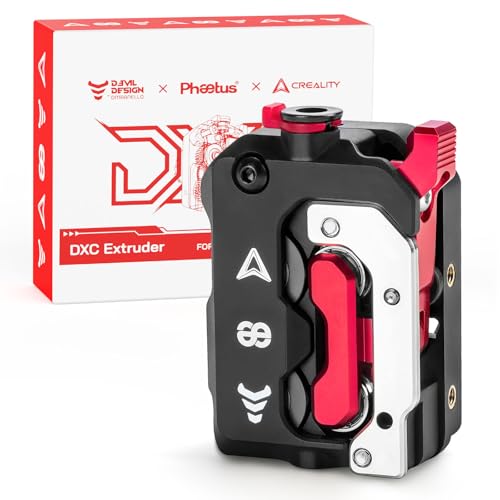
Smart filament-break detection distinguishes this Creality DXC kit from the other options, and the maker says it works with the K1 Max without flashing. The kit uses a dual-gear feed and helical screw meshing; the maker says its design reduces filament wear by 60% compared with traditional structures and increases lifespan threefold. That combination suits owners seeking a direct K1 Max-compatible extruder with break detection. The key limitation is setup compatibility: the maker says the DXC is not compatible with printers modified with a multicolor system, so check for that modification before choosing it.
Bottom line: Choose this if you want a K1 Max-compatible DXC with smart filament-break detection.
Creality DXC Extruder with Adaptive Pressure
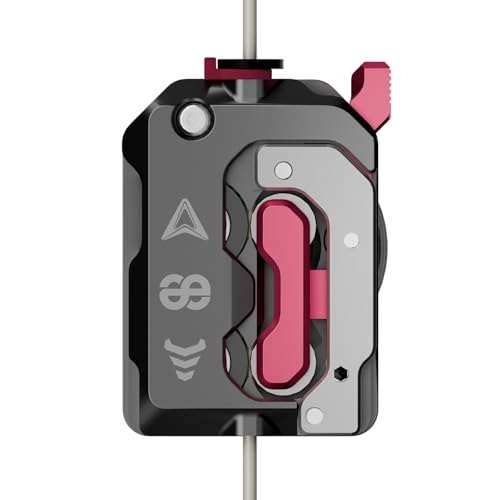
An adaptive pressure rocking arm is the defining feature of this DXC option, unlike the other two kits, whose features focus on break detection or dimensions. It also lists K1 Max compatibility, a synchronized dual-gear system and helical gearing. The maker says the helical system reduces filament wear by 60% versus traditional straight-cut gears. This option suits buyers who specifically want the pressure-adjusting arm called out in its features. Its product name also mentions open cooling and a smart sensor, but the maker does not explain their operation; buyers prioritizing a particular sensor behavior should confirm that before choosing.
Bottom line: Pick this if the adaptive pressure arm is the feature you want.
Phaetus K1 DXC Extruder

Published dimensions set this Phaetus DXC option apart: it measures 38.5 × 23 × 55 mm, with a net weight of 67 g. It names K1 Max compatibility and describes plug-and-play integration without firmware rooting, plus smart filament-break detection. The maker says its coated gears extend service life threefold and its helical dual-drive reduces filament wear by 60% compared with traditional straight-cut gears. This kit suits buyers comparing physical dimensions as well as the feature set. The dimensions may help assess clearance, but they do not establish fit with every printer modification or accessory.
Bottom line: Choose this if you want dimensions and weight alongside the K1 Max fit.
How to choose a K1 Max extruder upgrade
Start with printer compatibility and any modifications, then compare the feature that matters for your setup. Extruders grip and push filament toward the hotend, where the filament is melted; a dual-gear arrangement drives the filament from two sides rather than relying on one driven gear. Gear shape and pressure affect how the filament is engaged, but the kit descriptions do not establish print-quality results for a particular printer or material.
Use this decision guide to narrow the options by a clearly named feature. The DXC kits share the K1 Max fit, so the useful distinction is what each kit specifically calls out.
| Need | Option to consider |
|---|---|
| Smart filament-break detection | Creality DXC Extruder Kit or Phaetus K1 DXC Extruder |
| Adaptive pressure arm | Creality DXC Extruder with Adaptive Pressure |
| Dimensions and weight | Phaetus K1 DXC Extruder |
Do not assume that a feature name means identical operation across different kits; verify the feature you rely on before fitting the extruder.
K1 Max fit and multicolor modifications
Each of these three DXC options names the K1 Max among its compatible printers, but that compatibility does not cover every modified setup. One kit expressly warns against use on printers modified with a multicolor system; treat that as an important compatibility check for DXC choices rather than assuming an unmodified printer and a modified one are equivalent.
Before ordering, check whether your K1 Max still has its original filament path and extruder arrangement, and whether a multicolor conversion changed either. Extruder kits can differ in mounting geometry, wiring and sensor connections even when they target the same printer family. The maker gives no dimensions for two options, so if clearance or an accessory is a concern, confirm the needed fit before ordering. A fit claim alone does not verify compatibility with aftermarket changes.
What dual gears and helical gearing change
Dual-drive gears engage filament on two sides, while helical teeth meet progressively as the gears turn. These are mechanical descriptions of how filament is gripped and fed; they do not by themselves guarantee a particular surface finish or eliminate feeding problems. Filament diameter, gear alignment, pressure and resistance in the filament path can all affect feeding, so an extruder swap is only one part of diagnosing inconsistent extrusion.
All three options describe dual-gear feeding, while their additional called-out features differ. For a setup issue, check whether filament can move freely through the path and whether the drive gears are aligned and clean before treating a new extruder as the only solution. Use filament specified for the printer, and avoid forcing filament through a hotend that is obstructed.
Safe installation and extruder care
Let the hotend cool before working around the extruder because the hotend and recently melted filament can cause burns. Turn the printer off before disconnecting extruder wiring, keep loose tools and fingers clear of moving parts, and follow the printer’s service procedure when removing the assembly. The DXC descriptions emphasize compatibility and gearing but do not give a maintenance interval, so inspect the filament path and drive gears when feeding becomes inconsistent rather than assuming a fixed replacement schedule.
After installation, check that the filament path is unobstructed and that the drive gears engage the filament without crushing it. A sensor or detection feature is not a substitute for supervision during printing or for correcting a jam. If the printer has been converted to a multicolor system, resolve compatibility before installation; a nominal K1 Max fit does not override the multicolor limitation.
Frequently Asked Questions
Are these DXC extruders compatible with the K1 Max?
A printer modified with a multicolor system is an exception for the DXC kit, so check the setup before choosing one.
What does dual-gear feeding mean on an extruder?
A dual-gear extruder grips and drives filament from two sides. Gear alignment and a clear filament path still matter for consistent feeding.
Can I install an extruder while the hotend is hot?
No; let the hotend cool before servicing the extruder because hot surfaces and melted filament can burn skin. Turn off the printer before disconnecting wiring.
What should I check if filament slips after installation?
Check that the filament path is clear and that the drive gears engage the filament squarely. A jam or poor alignment can disrupt feeding even with a dual-gear extruder.