
Kodak Slide N Scan: Models Compared by Features

The standard Kodak Slide N Scan is the closest match for most buyers because it combines a 22MP sensor with a 5-inch LCD and support for 135, 110 and 126 film. Choose a Max model instead if its particular screen or workflow better fits your needs; choose a different type of product if you need a scanner for another purpose.
We earn a commission if you buy through links on this page. As an Amazon Associate I earn from qualifying purchases. Products are compared on manufacturer specifications, not hands-on testing.
- Best overall: Kodak Slide N Scan 22MP – It specifies a 22MP sensor, 5-inch LCD and adapters for three film formats.
- Best for tray workflow: Kodak Slide N Scan Max – Its quick-feed tray and direct SD/SDHC saving support scanning without a computer.
- Best for a large display: Kodak Slide N Scan Max 7-Inch (Renewed) – Its tilting 7-inch LCD is the largest screen among these Kodak models.
| Product | Best for | Screen | Sensor resolution | Film formats | Shop |
|---|---|---|---|---|---|
| Kodak Slide N Scan 22MP | Broad format support | 5-inch LCD | 22MP | 135, 110, 126; 50mm slides | Check Price on Amazon |
| Kodak Slide N Scan Max | Computer-free scanning | — | — | 135, 110, 126 | Check Price on Amazon |
| Kodak Slide N Scan Max 7-Inch (Renewed) | Large-screen preview | 7-inch tilting LCD | 13MP | — | Check Price on Amazon |
Kodak Slide N Scan Film Scanners
Compare the Kodak models by screen, stated resolution and the supported film formats or workflow features.
Kodak Slide N Scan 22MP
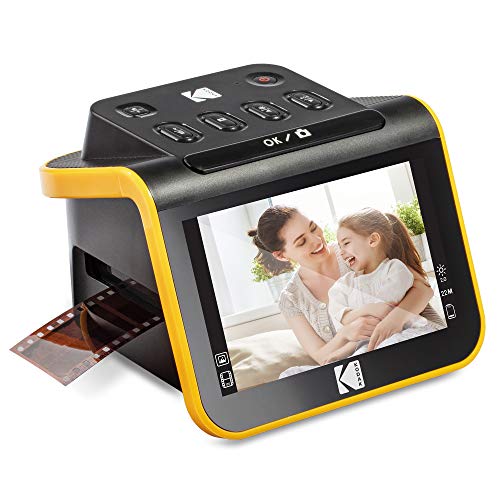
The standard Slide N Scan is the only model here whose feature set names adapters for 135, 110 and 126 film plus a 50mm slide holder. Its 22MP sensor and 5-inch LCD support previewing and editing before saving JPEG photos to an SD card. The included quick-feeding tray is intended for continuous loading, and the scanner connects to a PC or Mac. The SD card is not included, so plan for separate storage. This is a practical fit when format coverage matters more than a larger screen.
Bottom line: Choose this if you want the clearest film-format coverage and a 5-inch preview screen.
Kodak Slide N Scan Max

The Slide N Scan Max emphasizes direct card saving and quick-feed operation rather than a screen size or sensor resolution. It supports 135, 110 and 126 film and saves to SD or SDHC cards up to 32GB, so the described workflow does not require a computer. One-touch editing is also part of its name, though the maker does not define the editing controls. Buyers who need a specific resolution or screen size should compare those requirements carefully; neither is established here. Its 32GB card limit is the key distinction for storage planning.
Bottom line: Choose this for direct SD/SDHC saving when a computer-free workflow is the priority.
Kodak Slide N Scan Max 7-Inch (Renewed)

The renewed Slide N Scan Max stands apart with a tilting 7-inch LCD, making the preview screen larger than the 5-inch display on Kodak Slide N Scan 22MP. Its 13MP sensor supports conversion of color and black-and-white negatives, while the quick-feed tray is designed for continuous loading without repositioning each frame. Gallery mode is included for viewing photos on the scanner. The maker does not establish supported film formats, so confirm the formats you need before choosing it. Its renewed condition and larger screen make it a distinct option for buyers who prioritize on-device viewing.
Bottom line: Choose this if a tilting 7-inch display matters more than confirmed format coverage.
How to choose a Kodak Slide N Scan
Start with the film formats in your archive, then decide whether screen size or computer-free saving matters more. A 35mm frame measures 24 by 36 mm, while 110 and 126 are distinct film formats; matching the holder to the film is essential for a usable scan. Preview screens help with framing and checking orientation, but screen size alone does not establish scan resolution. JPEG is a common delivery format for sharing and general archiving, while an SD card gives you a separate copy to transfer. Choose Kodak Slide N Scan 22MP when format support is central, Kodak Slide N Scan Max when its SD/SDHC workflow fits, or Kodak Slide N Scan Max 7-Inch (Renewed) when a tilting large screen is the deciding feature.
Film formats and holder fit
Match the physical film format to the scanner holder before starting a batch. The 135 format is commonly known as 35mm film, and slide mounts need to fit their holder without forcing or bending them. The standard model explicitly names adapters for 135, 110 and 126 films and a 50mm slide holder; Kodak Slide N Scan Max names 135, 110 and 126 support. For the renewed Max, verify format compatibility before ordering if your collection includes a particular film type. Keep negatives and slides clean, handle film by its edges, and avoid inserting curled or damaged film into a feed path. A quick-feed design can reduce repeated repositioning, but it does not remove the need to check each frame’s alignment.
Screen size, resolution and storage
Separate preview convenience from image resolution when comparing scanners. A 7-inch LCD provides more on-device viewing area than a 5-inch screen, but sensor megapixels describe a different specification and do not alone guarantee detail or color quality. For storage, Kodak Slide N Scan Max specifies SD/SDHC cards up to 32GB; the standard model requires an SD card that is sold separately. Choose a card capacity based on the number of frames and file sizes you expect to keep, and transfer finished scans to a second storage location rather than relying on one removable card. If you need a particular output resolution, identify that requirement before selecting a model whose resolution is not specified here.
Scanning negatives and slides carefully
Clean film and a correctly seated holder matter because dust and misalignment can appear in every saved image. Use a soft, appropriate cleaning brush and keep fingers off the image area; the standard model includes a cleaning brush. Work in small batches and preview the first frame after changing film type so you can catch a wrong holder or orientation before scanning more. Store original negatives and slides away from heat, moisture and direct sunlight, even after digitizing them. Digital copies make viewing easier, but they do not replace careful preservation of the originals.
Frequently Asked Questions
What film formats does the standard Kodak Slide N Scan support?
The standard model names 135, 110 and 126 film, plus 50mm slides. Its package features also name adapters for the three film formats and a 50mm slide holder.
Can the Kodak Slide N Scan scan without a computer?
The standard model saves JPEG photos directly to an SD card, and the Max model specifies direct SD/SDHC saving. The SD card is separate for the standard model, and the Max supports cards up to 32GB.
What does a quick-feed tray do on a film scanner?
A quick-feed tray lets film move through for continuous loading rather than requiring repositioning for each frame. Check the preview after loading a new strip or format to confirm alignment.
Is the 7-inch Kodak Slide N Scan screen a higher resolution?
A 7-inch screen describes display size, not sensor resolution. The renewed Max names a 13MP sensor; screen size and sensor megapixels should be compared as separate specifications.
How should I prepare old slides before scanning?
Remove loose dust with a suitable soft brush and handle slides by their edges to avoid fingerprints. Make a short test scan after selecting the holder to catch orientation or alignment errors.