
KSGER T12 STM32 V31S Stations Compared by Setup

For a complete KSGER T12 STM32 V3.1S setup, choose KSGER T12 STM32 V3.1S Thin Panel if you want an S1 handle and a thin front panel, or KSGER T12 STM32 V3.1S CNC Panel for the CNC front panel and 907 handle; both kits list a 50°C–480°C temperature range. Choose KSGER STM32 V2.1S T12 Controller only if you need a controller rather than a complete station, since it is a V2.1S unit that requires a separate 24V supply.
T12 stations heat an iron tip directly through an integrated heater assembly, so the handle and tip compatibility matter as much as the controller.
We earn a commission if you buy through links on this page. As an Amazon Associate I earn from qualifying purchases. Products are compared on manufacturer specifications, not hands-on testing.
- Best overall: KSGER T12 STM32 V3.1S Thin Panel – A complete V3.1S kit with an S1 handle, thin front panel and three included T12 tips.
- Best for CNC panel: KSGER T12 STM32 V3.1S CNC Panel – Pairs the V3.1S controller with a 907 handle and CNC front panel.
- Best for controller replacement: KSGER STM32 V2.1S T12 Controller – A V2.1S controller-only option for buyers who already have a compatible T12 setup and separate 24V supply.
| Product | Best for | Controller and form | Included handle | Temperature range | Shop |
|---|---|---|---|---|---|
| KSGER T12 STM32 V3.1S Thin Panel | S1 handle kit | V3.1S station | S1 | 50°C–480°C | Check Price on Amazon |
| KSGER T12 STM32 V3.1S CNC Panel | 907 handle kit | V3.1S station | 907 | 50°C–480°C | Check Price on Amazon |
| KSGER STM32 V2.1S T12 Controller | Controller replacement | V2.1S controller only | — | 150°C–480°C | Check Price on Amazon |
KSGER T12 STM32 V3.1S stations
Compare the complete V3.1S kits by handle and front-panel style, then consider the controller-only alternative if you already have the rest of the setup.
KSGER T12 STM32 V3.1S Thin Panel
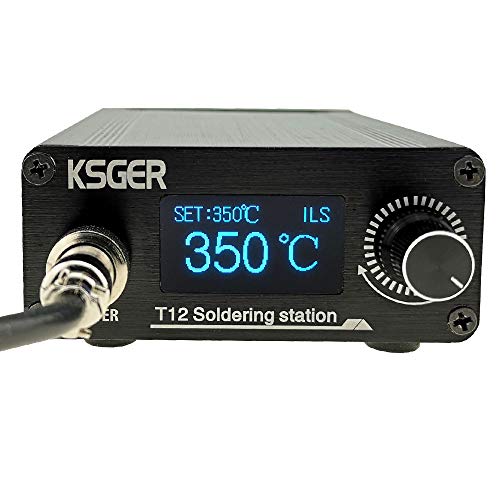
The thin-front-panel V3.1S kit is the complete-station choice with an S1 handle, unlike the CNC panel kit, which includes a 907 handle. Its package also includes T12-K, C1 and JL02 tips. The unit measures 130 × 88 × 38 mm and accepts 110–240V input; the maker claims it reaches 300°C in 8 seconds and lists 72W output, with 120W maximum. Auto-sleep and auto-standby are included. The package does not include a power plug, so this kit suits buyers prepared to provide one and verify it matches their power setup.
Bottom line: Pick this kit if you want the S1 handle and thin front panel.
KSGER T12 STM32 V3.1S CNC Panel

The CNC panel kit distinguishes itself with a 907 handle and CNC front panel rather than the S1 handle and thin panel of the other complete kit. It includes T12-K, ILS and D24 tips, giving this package a different starting tip set. The station measures 137 × 88 × 38 mm and accepts 110–240V input. The maker lists 72W output, up to 120W maximum, and claims heating to 300°C in 8 seconds; auto-sleep and auto-standby are also listed. A power plug is not included, a practical limitation for buyers who expect a ready-to-connect kit.
Bottom line: Choose this option for the CNC panel, 907 handle and included ILS and D24 tips.
KSGER STM32 V2.1S T12 Controller

The V2.1S is a controller unit, not a complete T12 station, so it is an alternative only for someone assembling or replacing part of a setup. It has an OLED display, 72W output and a 150°C–480°C temperature range; the maker claims it reaches 300°C in 8 seconds. It requires 24V input and a separate T12 power supply, unlike the complete V3.1S kits with 110–240V input. The package does not include a handle or tips in the description, so confirm your existing parts are compatible before choosing a controller-only unit.
Bottom line: Choose this only when you need a V2.1S controller and already have or will source the compatible hardware.
How to choose a KSGER T12 station
Choose by completeness first, then by handle and included tips: the V3.1S kits are complete stations, while the V2.1S option is a controller only. A T12 iron uses a cartridge-style tip assembly with the heater and temperature sensor integrated into the tip, which is why the handle and cartridge family must match. The two complete kits both list 110–240V input and include three tips, but their handles and tip assortments differ. If you already own a handle, check its connector and compatibility before buying a controller or kit; a matching T12 tip family alone does not guarantee every handle fits every station.
Temperature range and soldering setup
The complete V3.1S models list 50°C–480°C, while the V2.1S controller lists 150°C–480°C, so the controller has a higher minimum setting. For many common electronics joints, a tip setting around 300°C–350°C is a practical starting range; larger joints or lead-free solder may need more heat, while fine pads and small components can need less. The maker claims the complete stations and the controller heat to 300°C in 8 seconds, but that figure does not mean every tip or workpiece reaches soldering temperature equally quickly. Match the tip shape to the joint and use the lowest setting that forms a reliable joint without prolonged heating.
Power, plug and safe operation
Check the power arrangement before choosing: the V3.1S kits accept 110–240V input, while the V2.1S controller requires a separate 24V T12 power supply. The two complete kits explicitly do not include a power plug, so confirm the required plug and safe connection before ordering. Soldering tips can become hot enough to burn skin and ignite nearby materials; use a stable iron stand, keep the hot tip away from cords and combustibles, and let the iron cool before storage. Soldering can also create irritating fumes, so work with ventilation that carries fumes away from your breathing zone rather than leaning over the joint.
What the package includes
Compare the handle and tips rather than assuming every T12 kit contains the same accessories. The thin panel V3.1S package has an S1 handle with T12-K, C1 and JL02 tips; the CNC panel V3.1S package has a 907 handle with T12-K, ILS and D24 tips. Those tip codes identify different cartridge shapes, which affect access to pads, pins and larger joints. A broad chisel tip can transfer heat across a larger contact area than a fine point, while a narrow tip can reach tighter spaces. If your work involves fine-pitch parts or large ground planes, choose the included shapes accordingly and check compatibility before purchasing extras.
Frequently Asked Questions
Can the V2.1S controller run on 110V input?
The V2.1S controller requires 24V input, not direct 110V mains input. It also needs a separate T12 power supply, so do not connect it to mains without the correct supply.
What does the V3.1S kit include?
The thin panel kit includes an S1 handle and T12-K, C1 and JL02 tips; the CNC panel kit includes a 907 handle and T12-K, ILS and D24 tips. Neither complete kit includes a power plug.
What temperature should I use for electronics soldering?
A setting around 300°C–350°C is a practical starting range for many electronics joints. Larger joints and lead-free solder can require more heat, while small pads may need less; adjust to the joint and tip rather than relying on one fixed setting.
How do I choose a T12 tip shape?
Choose a shape that contacts the joint across a useful area: a chisel can transfer heat efficiently to pads and pins, while a fine point can reach confined areas. Match the cartridge family to the handle and allow room to reach the joint without touching neighboring components.
How should a soldering iron be stored safely?
Place the hot iron in a stable stand and keep its tip clear of cords, paper and other combustibles. Let the iron cool before storage; the tip can cause burns even when the station is switched off.