
LCD Screens for PC Cases: Four Models Compared

For an LCD screen for a PC case, the Lian Li 8.8-inch display suits buyers who want a customizable secondary screen with flexible mounting; choose a sensor panel instead if system monitoring is the priority. These screens add information or visuals inside a build, but connection type and mounting method determine whether a model fits your setup.
We earn a commission if you buy through links on this page. As an Amazon Associate I earn from qualifying purchases. Products are compared on manufacturer specifications, not hands-on testing.
- Best overall: Lian Li US88 v1 8.8-inch LCD – Its 8.8-inch screen can show stats, media or custom visuals and supports flexible mounting.
- Best for sensor widgets: darkFlash V92 9.2-inch Sensor Panel – The 9.2-inch panel shows system readings and connects over USB-C or an internal 9-pin header.
- Best for wide resolution: Thermalright Trofeo Vision 9.16-inch – Its 9.16-inch screen has a 1920×480 resolution and USB-C connection.
- Best for magnetic mounting: Thermalright Trofeo Vision White 6.86-inch – The 6.86-inch display uses a magnetic panel and offers 1280×480 resolution.
| Product | Best for | Screen size | Resolution | Connection | Shop |
|---|---|---|---|---|---|
| Lian Li US88 v1 8.8-inch LCD | Custom visuals | 8.8 in | — | 9-pin or Type-A USB | Check Price on Amazon |
| Thermalright Trofeo Vision 9.16-inch | Wide resolution | 9.16 in | 1920×480 | USB-C | Check Price on Amazon |
| darkFlash V92 9.2-inch Sensor Panel | System widgets | 9.2 in | 1920×462 | USB-C or internal 9-pin | Check Price on Amazon |
| Thermalright Trofeo Vision White 6.86-inch | Magnetic mounting | 6.86 in | 1280×480 | USB-C / motherboard 9-pin | Check Price on Amazon |
LCD Screens for PC Cases Compared
Compare each screen’s size, resolution and connection to find one that suits your build and intended use.
Lian Li US88 v1 8.8-inch LCD

The Lian Li US88 v1 stands out for flexible mounting and use as a secondary display. Its 8.8-inch screen connects through a 9-pin port or Type-A USB, and L-Connect 3 provides preset themes, modular information and options to add personal videos or photos. It suits builders who want to mix system data with custom visuals rather than use a screen only for monitoring. Lian Li says the display can operate independently as a secondary monitor. The installation has a specific screw requirement: use the specified H screws for the stand and screen, not the longer G screw.
Bottom line: Choose this if customizable visuals and flexible mounting matter more than a published resolution.
Thermalright Trofeo Vision 9.16-inch
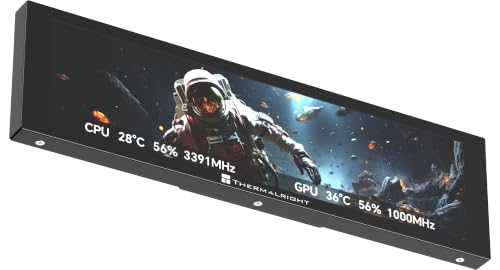
The Thermalright Trofeo Vision 9.16-inch model pairs the largest resolution here, 1920×480, with a USB-C connection. Its wide format can show system stats or personalized visuals, while the TRCC app offers preset themes and DIY customization. Thermalright says the screen monitors CPU and GPU temperatures, fan speed and memory usage, among other readings, and that setup works with most Windows systems without complicated drivers. This option suits a build with a USB-C connection and a preference for a broad dashboard. The USB-C-only connection listed for this model is less flexible than options that also support an internal 9-pin header.
Bottom line: Pick this for a wide 1920×480 display when USB-C is the connection you want.
darkFlash V92 9.2-inch Sensor Panel
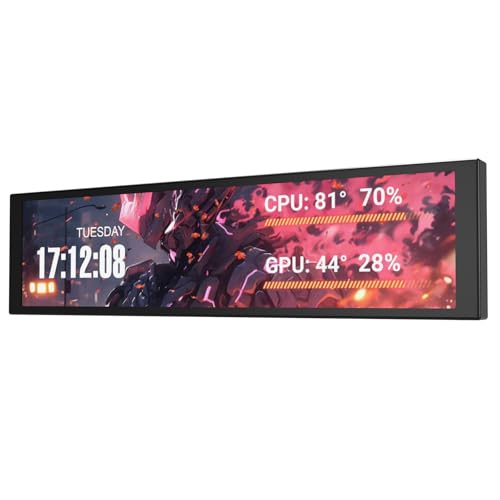
The darkFlash V92 is specifically a sensor panel rather than a standard extended monitor. Its 9.2-inch IPS LCD has a 1920×462 resolution and an aluminum body measuring 242.4 × 63.1 × 12 mm. The software supports system readings and custom widgets, and the screen can connect through USB-C or an internal motherboard USB 2.0 9-pin header; no HDMI or DisplayPort connection is required. It suits builders who want case-facing monitoring while keeping GPU video outputs free. Choose another type if you need a conventional extended desktop monitor, since this model is identified as a dedicated sensor panel.
Bottom line: Choose this for a dedicated sensor panel with either external USB-C or internal-header connection.
Thermalright Trofeo Vision White 6.86-inch

The white Thermalright Trofeo Vision differs with a magnetic panel design, which allows screw-free attachment and removal. Its 6.86-inch IPS screen has a 1280×480 resolution and connects through USB Type-C, with screen power and data supplied by a motherboard 9-pin USB connection. TRCC software supports system-parameter monitoring and static or dynamic images, according to Thermalright. This smaller display suits builds where a removable panel and white finish are useful. Its 6.86-inch screen is substantially smaller than the 9.16-inch Thermalright option, so it offers less display area for a dashboard or custom visuals.
Bottom line: Pick this for a removable magnetic panel and a white finish.
How to choose an LCD screen for a PC case
Start with the screen’s job: a sensor panel focuses on system readings, while a secondary display can also show media or desktop content. Then compare resolution and physical size together; a larger diagonal does not guarantee more pixels or more room for readable widgets. Connection matters too: a USB-C cable uses an external port, while a 9-pin USB 2.0 header uses an internal motherboard connection. Check which connection your build can spare before choosing. If you want to keep GPU video outputs free, favor a screen that uses USB rather than HDMI or DisplayPort. For custom images, verify that the control software supports the content and layout you want.
This model list includes both sensor-focused and customizable display options, so choose by function before comparing screen dimensions.
Mounting and connection fit inside a PC case
Mounting method determines where a case screen can sit and whether it can be removed without tools. A magnetic panel is suited to a compatible metal mounting surface; a stand or other mounting hardware offers a different placement approach. Measure the available panel area before selecting a screen: compare the screen’s width and height with the clear space, not just its diagonal measurement. The V92 body is 242.4 × 63.1 × 12 mm, while the white Trofeo panel measures 187.2 × 72.1 × 21 mm. Leave room for cables and airflow rather than pressing a screen against a fan or blocking an intake. If using a motherboard header, confirm that an internal 9-pin USB connection is available.
Sensor panel or secondary display
Choose a sensor panel when the main goal is to see system readings through the case window; choose a secondary display when custom visuals or general display use matters more. The V92 is explicitly a dedicated sensor panel, while the Lian Li screen is described as an independently operating secondary monitor that can show hardware stats, media or custom visuals. Resolution also shapes the layout: a 1920×480 screen has a wide, shallow format, while 1280×480 has fewer horizontal pixels for arranging content. Use this quick distinction when deciding what kind of screen belongs in the build.
| Need | Screen type to consider | Why |
|---|---|---|
| System readings and widgets | Sensor panel | Designed around hardware monitoring |
| Custom images or media | Secondary display | Supports broader visual use |
| Removable panel placement | Magnetic screen | Attaches and detaches without screws |
Common PC case screen setup mistakes
The most avoidable mistake is buying for diagonal size alone: measure the mounting area and check the display’s full width and height first. A second mistake is assuming every USB connection is interchangeable; internal 9-pin headers and external USB-C or Type-A ports require different available connections. Leave enough space for the cable route and keep vents clear, since a screen should not obstruct cooling airflow. Mounting hardware also matters: the Lian Li installation instructions specify H screws for its stand and screen and warn against the longer G screw. For other models, match the included mounting approach to the case surface before assembling the build.
Frequently Asked Questions
Can a PC case LCD screen work without HDMI?
Yes, some case displays use USB rather than HDMI or DisplayPort. The darkFlash V92 supports USB-C or an internal 9-pin USB 2.0 header, while the Lian Li screen supports a 9-pin port or Type-A USB.
What does a 1920×480 screen resolution mean?
It means the display has 1,920 pixels across and 480 pixels vertically, making a wide, shallow layout. Compare resolution alongside physical screen size because diagonal inches alone do not tell you how many pixels fit on the display.
How do I know if a case screen will fit?
Measure the clear mounting area in width and height, then leave room for the cable and airflow. For example, the darkFlash V92 body measures 242.4 × 63.1 × 12 mm, so the mounting space must accommodate its footprint.
Can I use a motherboard 9-pin USB header for a case screen?
A screen designed for an internal 9-pin USB header can connect there if the motherboard has an available header. Check header availability before assembly; models using external USB-C or Type-A instead need the corresponding port.
What is the difference between a sensor panel and a secondary display?
A sensor panel is intended to show system readings such as temperatures, usage or fan speeds, while a secondary display can serve broader visual uses. Choose based on whether hardware monitoring or custom content is the priority.