
Lightning 30-Pin Adapter Apple: 3 Options Compared

For a Lightning-to-30-pin adapter that supports charging, syncing, and audio output, choose INCORIC Lightning to 30-Pin Adapter, 0.2 m; Lightning to 30-Pin Charging Adapter is a charging-and-syncing option without audio, while INVERY DockLinQ Pro Bluetooth Receiver is a Bluetooth receiver rather than a cable adapter.
Choose Lightning to 30-Pin Charging Adapter if you only need charging or data syncing, and choose INVERY DockLinQ Pro Bluetooth Receiver only if you want wireless playback through a compatible 30-pin music dock.
We earn a commission if you buy through links on this page. As an Amazon Associate I earn from qualifying purchases. Products are compared on manufacturer specifications, not hands-on testing.
- Best overall: INCORIC Lightning to 30-Pin Adapter, 0.2 m – Supports charging, syncing, analog audio output, and USB audio.
- Best for charging: Lightning to 30-Pin Charging Adapter – Supports charging and data syncing but not audio output.
- Best for wireless playback: INVERY DockLinQ Pro Bluetooth Receiver – Adds Bluetooth to compatible 30-pin music docks, including specified Bose SoundDock models.
| Product | Best for | Connection | Audio support | Charging and syncing | Shop |
|---|---|---|---|---|---|
| INCORIC Lightning to 30-Pin Adapter, 0.2 m | Audio and charging | Lightning male to 30-pin female | Analog and USB audio | Charging and syncing | Check Price on Amazon |
| Lightning to 30-Pin Charging Adapter | Charging and syncing | Lightning male to 30-pin female | No audio output | Charging and syncing | Check Price on Amazon |
| INVERY DockLinQ Pro Bluetooth Receiver | Wireless dock audio | 30-pin receiver to Bluetooth | Bluetooth audio | — | Check Price on Amazon |
Lightning 30-pin adapter options
Match the connector type and audio needs before choosing an adapter or receiver.
INCORIC Lightning to 30-Pin Adapter, 0.2 m

Unlike the charging-focused alternative, INCORIC Lightning to 30-Pin Adapter, 0.2 m supports analog audio output and USB audio as well as charging and syncing. The 0.2 m cable connects a Lightning device to a 30-pin accessory, and the maker says it is MFi certified, with a TPE covering and a copper core. That combination suits someone who wants to keep using an older dock or audio accessory, provided the accessory works with this adapter.
Compatibility can vary across legacy accessories, so this adapter is not a guarantee that every 30-pin feature will work. Its short cable also adds a small amount of reach rather than placing a device far from the dock.
Bottom line: Pick this if you need audio output along with charging or syncing.
Lightning to 30-Pin Charging Adapter

For charging and syncing without audio, Lightning to 30-Pin Charging Adapter is the more focused cable-style option. Its 8-pin Lightning male connector mates with a 30-pin female port, and the maker says it is MFi certified. The limitation is important: audio output is not supported, so a speaker dock will not play music through this adapter.
Choose it for a compatible older charger or dock when sound is not part of the job. Anyone who needs music playback or audio streaming should choose an adapter with audio support instead; this one is not a substitute for a wireless receiver.
Bottom line: Pick this for charging or syncing when audio is unnecessary.
INVERY DockLinQ Pro Bluetooth Receiver
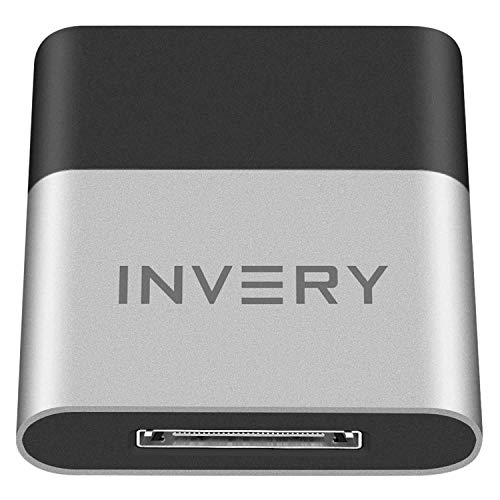
Unlike the two Lightning-to-30-pin cable adapters, INVERY DockLinQ Pro Bluetooth Receiver is a Bluetooth receiver that plugs into a 30-pin music dock. The maker names Bose SoundDock, SoundDock I, SoundDock II, Portable SoundDock, and SoundDock 10 among compatible docks, and says it can pair with two devices. It suits someone who wants wireless audio from a phone or tablet through a supported speaker dock.
This is not a Lightning charging or syncing adapter, and the maker says it is not compatible with cars or motorcycles. Confirm that your dock is a supported music dock before choosing it; a 30-pin port alone does not establish compatibility.
Bottom line: Pick this only to add Bluetooth audio to a compatible 30-pin music dock.
How to choose a Lightning-to-30-pin adapter
Start with the job: charging, syncing, and audio are separate capabilities, not automatic consequences of matching connector shapes. The 30-pin dock connector belongs to older Apple accessories, while Lightning is an 8-pin connector used on compatible Apple devices. A cable adapter can bridge those connections, but an accessory may rely on a particular audio or control function. If you need music, select an adapter that explicitly supports audio; if charging alone is enough, a charging-only model may fit. Confirm that the exact dock or accessory accepts an adapter before ordering, especially for speakers or accessories with controls.
As a practical rule, if audio playback is required, rule out adapters that say “no audio” before considering other features. A Bluetooth receiver is a different solution: it adds wireless playback to a compatible dock, rather than converting a Lightning port for charging or syncing.
Audio, charging, and syncing differences
Adapter claims should be read function by function: audio output, charging, and data syncing are distinct. A 30-pin speaker dock may need audio support, while a charging stand may only need power; a computer connection may require syncing. The two cable adapters here separate on audio: INCORIC Lightning to 30-Pin Adapter, 0.2 m supports analog and USB audio output, while Lightning to 30-Pin Charging Adapter excludes audio output. INVERY DockLinQ Pro Bluetooth Receiver receives Bluetooth audio at a compatible 30-pin dock and is not a Lightning cable adapter.
This table helps match the connection to the intended task. A port shape by itself does not prove a legacy accessory will work, so verify the accessory model when compatibility matters.
| Need | Suitable type | Check before use |
|---|---|---|
| Charging or syncing | Lightning-to-30-pin cable adapter | Accessory compatibility |
| Wired audio output | Adapter that explicitly supports audio | Dock or accessory compatibility |
| Wireless dock playback | Bluetooth receiver for 30-pin dock | Supported dock model |
Legacy dock compatibility and fit
A 30-pin connector is common to many older Apple docks, but connector fit does not guarantee that every dock function will work through an adapter. Accessories may use the connection for charging, audio, syncing, or controls, and not every converter supports all of them. Start by identifying the accessory’s model and the function you need, then compare that with the adapter’s support. For example, charging-only support does not meet a music-playback need.
Also distinguish a dock connector from a vehicle connection: a Bluetooth receiver meant for a home music dock may not work in a car or motorcycle system. If the dock model is not among the receiver’s compatible examples, verify compatibility rather than assuming any 30-pin port will accept it.
Safe use with older charging accessories
Inspect connector pins and cable insulation before connecting older charging accessories; bent contacts, corrosion, or split insulation are reasons to stop using the accessory. Align the Lightning plug with the port and do not force a connection, since a poor fit can damage the connector. Keep charging equipment dry and discontinue use if a cable or adapter becomes unusually hot, smells burnt, or shows visible damage.
Adapters do not replace a sound charging setup: use an undamaged charger and cable intended for the connected device, and disconnect power before cleaning a dock. Avoid selecting a charging-only adapter for a task that requires audio or syncing, because physically connecting the ports does not add unsupported functions.
Frequently Asked Questions
Can a Lightning-to-30-pin adapter play music?
Some adapters support audio output, while others are charging-only. Choose one that explicitly names audio support if you want wired playback through a compatible dock.
Will every 30-pin dock work with an adapter?
No, a matching 30-pin connector does not guarantee every dock function will work. Check the dock model and the adapter’s supported functions, particularly for audio playback and controls.
Does a charging-only adapter sync data?
A charging-only label does not by itself guarantee syncing; check whether data syncing is also supported. The charging-and-syncing adapter here supports both, but does not support audio output.
Can Bluetooth work with a 30-pin speaker dock?
A Bluetooth receiver can add wireless audio to a compatible 30-pin music dock. Check the dock model, since a 30-pin port alone does not confirm receiver compatibility.
How can I tell whether an adapter is MFi certified?
Look for an explicit MFi certification claim for the specific adapter. Certification does not mean every legacy accessory function is supported, so separately confirm audio, charging, or syncing needs.