
Lightning to Female USB Adapter: 3 Options Compared

For a Lightning to female USB adapter with MFi certification and USB 3.0 OTG support, MFi Lightning to USB Camera Adapter is the strongest match for camera, storage and other peripheral connections. Choose 2-Pack Lightning Male to USB Female OTG if you want a two-piece set and use iOS 13 or later; choose MFi Lightning USB Adapter with Charging Port if charging access matters while a USB peripheral is connected.
These adapters connect USB accessories to a Lightning-equipped iPhone or iPad; check that your device and accessory work with the adapter before choosing.
We earn a commission if you buy through links on this page. As an Amazon Associate I earn from qualifying purchases. Products are compared on manufacturer specifications, not hands-on testing.
- Best overall: MFi Lightning to USB Camera Adapter – MFi certification, USB 3.0 OTG support and compatibility with cameras, card readers and other peripherals.
- Best for a two-pack: 2-Pack Lightning Male to USB Female OTG – Includes two adapters and specifies iOS 13 or later support.
- Best for charging access: MFi Lightning USB Adapter with Charging Port – Adds a charging port alongside its USB 3.0 female OTG connection.
| Product | Best for | Pack count | Extra port | Shop |
|---|---|---|---|---|
| MFi Lightning to USB Camera Adapter | Broad peripheral use | 1 adapter | None mentioned | Check Price on Amazon |
| 2-Pack Lightning Male to USB Female OTG | Two-adapter set | 2 adapters | None mentioned | Check Price on Amazon |
| MFi Lightning USB Adapter with Charging Port | Charging while connected | 1 adapter | Charging port | Check Price on Amazon |
Lightning to Female USB Adapters
Compare these options by certification, pack size and whether you need a charging connection.
MFi Lightning to USB Camera Adapter

Unlike the two-pack and charging-port models, this MFi-certified adapter combines a short cable with USB 3.0 OTG support. Its uses include cameras, card readers, flash drives, USB headphones, guitars and MIDI keyboards, as well as mice. The maker says it supports JPEG and RAW photos and H.264 and MPEG-4 video. Choose it when certification and a broad range of listed peripherals matter more than a charging port. The cable is 5.9 inches long, so buyers who need a direct plug-in dongle may prefer a different form.
Bottom line: Pick this if certification and a range of peripheral types are priorities.
2-Pack Lightning Male to USB Female OTG
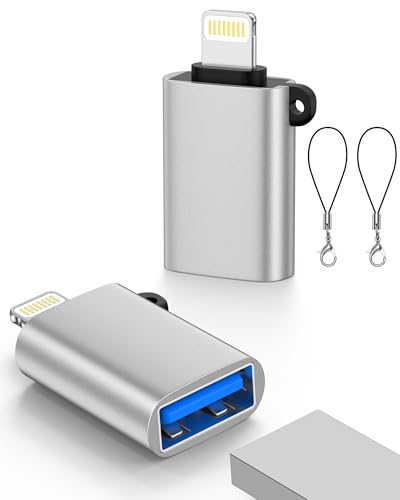
The main distinction here is the two-piece set, rather than a charging port or an MFi certification claim. This Lightning-male to USB female adapter is intended for camera, card-reader and flash-drive connections, and the maker specifies iOS 13 or later. Files from connected peripherals are managed through the Files app, according to the maker. It may suit someone who wants a spare adapter or separate adapters for different bags. Thick or full-coverage cases can obstruct the connector, so case users may need to remove the case for a stable fit.
Bottom line: Choose this when having two adapters is more useful than an added charging port.
MFi Lightning USB Adapter with Charging Port
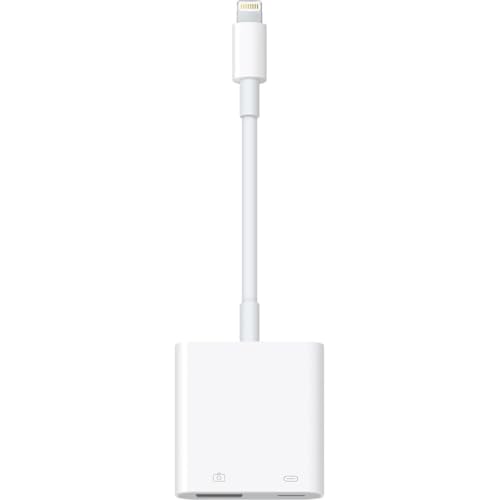
This adapter is the only option here with a charging port, which separates it from the basic OTG connectors. It is MFi-certified and has a USB 3.0 female connection for accessories such as card readers, flash drives, keyboards, mice and gamepads. The maker says it works without an app and supports copying photos and videos from a camera. Choose it when you want charging access while connecting a peripheral. The specifications do not establish charging speed or power delivery, so buyers who need a particular charging rate should verify that requirement before choosing.
Bottom line: Choose this if a separate charging connection is essential during peripheral use.
How to Choose a Lightning to Female USB Adapter
Start with the accessory you intend to connect: a camera or card reader, a flash drive, or a keyboard may call for different file or peripheral support. USB-A female adapters accept a USB-A male plug; a USB-C-only accessory needs a compatible connector or separate adapter. Check whether the adapter is MFi-certified if certification is a purchase requirement, and distinguish a USB data port from a charging port. A charging port does not by itself establish charging speed or power delivery. For photo transfers, confirm the iPhone or iPad has the needed software support and available storage, and expect to manage transferred files through the Files app when the adapter maker specifies that workflow.
Check Lightning Connector and Case Fit
A Lightning male plug must seat fully in the device port, and a thick case can block that connection. When the plug does not seat firmly with the case on, remove the case before deciding the adapter is incompatible; the two-adapter set specifically warns that thick or full-coverage cases may interfere. Inspect both ends before connecting: Lightning belongs at the phone or tablet, while the USB female opening accepts the matching USB plug. A USB-C accessory cannot fit a USB-A female opening directly. Keep the port and plug free of debris, and do not force a connector that resists insertion, since a forced fit can damage the device port or accessory.
What USB Accessories Can You Connect
Camera adapters commonly serve as a bridge for photo import, but support for one accessory does not guarantee support for every USB device. The adapter types name cameras, card readers and flash drives; some also name keyboards, mice, headphones, MIDI devices or gamepads. Use this guide to match the use to your task before connecting anything.
| Need | What to check |
|---|---|
| Photo transfer | Camera or card-reader support and file access on your device |
| Storage access | Flash-drive support and a compatible file workflow |
| Keyboard or mouse | Peripheral support for that specific accessory |
| Use while charging | A dedicated charging port, plus required charging rate |
Accessories that draw power can have different requirements from simple storage devices. If an accessory does not connect reliably, verify its compatibility and power needs rather than assuming every USB peripheral is supported.
Use and Care for a Lightning USB Adapter
Connect the adapter gently and disconnect it by holding the plug or adapter body, not by pulling a cable sideways. Keep the Lightning plug dry and free of pocket lint; a dirty or obstructed port can prevent a solid connection. For file transfers, leave the device unlocked when needed and use its file-management tools to locate imported items. Do not remove a storage accessory during an active copy, because interrupting a transfer can leave files incomplete. A charging pass-through port is useful only if it meets the device and accessory’s power needs; the presence of that port alone does not promise a particular charging speed.
Frequently Asked Questions
Can a Lightning to USB adapter connect a flash drive?
Yes, the adapter must support flash drives and the drive must work with the iPhone or iPad. For the two-adapter set, the maker directs users to manage connected files through the Files app.
Do these adapters work with every iPhone?
No adapter should be assumed to work with every Lightning device and peripheral. The two-pack specifies iOS 13 or later, and the device and accessory compatibility should be checked before connecting.
Can I charge my iPhone while using a USB accessory?
Only the option with a charging port provides a separate charging connection among these three. Its charging speed is not established here, so verify the required rate if that matters.
Why will my Lightning adapter not fit with a case on?
A thick or full-coverage case can block the Lightning plug from seating fully. Remove the case and try again without forcing the connector.
Do I need an app to transfer camera photos?
The charging-port model’s maker says it works without an app, and the two-pack directs users to the Files app for connected files. The available workflow can vary with the adapter and accessory.