
Logitech G29 E Brake: 4 PC Handbrakes Compared

For a Windows PC setup, Aikeec USB Handbrake with Clamp is the closest match for a Logitech G29 e brake because it names G29 compatibility and includes a clamp. USB handbrakes 64-Bit PC USB Handbrake, CXCESNS 16-Bit USB Handbrake, and ZHSYMX USB Handbrake with Clip and Plate are alternatives with different sensor or fit restrictions.
Choose by platform first: the USB options here are PC-only. A sim racing handbrake is a separate control that adds a lever input for braking or drifting in supported games.
We earn a commission if you buy through links on this page. As an Amazon Associate I earn from qualifying purchases. Products are compared on manufacturer specifications, not hands-on testing.
- Best overall: Aikeec USB Handbrake with Clamp – Names G29 support and includes a clamp for mounting.
- Best for adjustable fit: CXCESNS 16-Bit USB Handbrake – Offers adjustable handle height and angle with a 16-bit Hall sensor.
- Best for a 64-bit sensor: 64-Bit PC USB Handbrake – Names a 64-bit non-contact Hall sensor and supports G29.
| Product | Best for | Sensor | Mounting or adjustment | Shop |
|---|---|---|---|---|
| Aikeec USB Handbrake with Clamp | Clamped PC setup | Hall sensor | Clamp included | Check Price on Amazon |
| 64-Bit PC USB Handbrake | 64-bit sensor | 64-bit Hall sensor | — | Check Price on Amazon |
| CXCESNS 16-Bit USB Handbrake | Adjustable lever | 16-bit Hall sensor | Height and angle adjustable | Check Price on Amazon |
| ZHSYMX USB Handbrake with Clip and Plate | Steel construction | 64-bit non-contact sensor | Clip and plate | Check Price on Amazon |
Logitech G29 E Brake Options
These handbrakes differ most in platform compatibility, sensor claims, and how they mount or adjust.
Aikeec USB Handbrake with Clamp
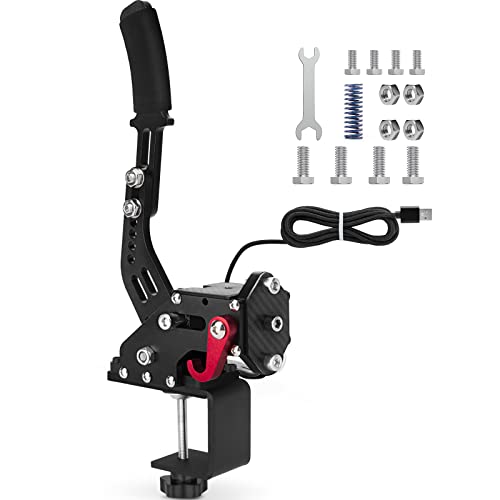
Aikeec USB Handbrake with Clamp is the direct G29 fit among these USB handbrakes and comes with a clamp, making it a practical pick for a desk or rig where a clamp mount works. It connects as a separate USB control and is intended for Windows PC use. The manufacturer names games including Assetto Corsa, DiRT Rally 2, ETS2/ATS, and Forza Horizon 4/5/6.
Bottom line: Pick this if you want a G29-compatible USB handbrake with a clamp for Windows.
64-Bit PC USB Handbrake

64-Bit PC USB Handbrake stands out for its 64-bit non-contact Hall sensor and long, 13.8-inch body, which may matter when matching a handbrake to a crowded rig. It works as an independent USB device and names the G29 among supported wheels. The manufacturer also names Assetto Corsa, iRacing, DiRT, ETS2/ATS, and Forza Horizon 5, while explicitly excluding Forza Horizon 4.
Bottom line: Choose this for the 64-bit sensor and broad PC game compatibility.
CXCESNS 16-Bit USB Handbrake

CXCESNS 16-Bit USB Handbrake is the option here that specifically offers handle height and angle adjustment, so it can be tailored to a particular seating or mounting position. Its manufacturer describes a 16-bit non-contact Hall sensor, auto-calibration, and a metal-heavy body, and names G29, G920, and G923 compatibility. The length is about 4 inches, distinct from the longer listed body dimensions of other options. It remains a PC USB handbrake, so verify that the game and platform recognize separate USB controls before choosing it.
Bottom line: Choose this if lever position adjustment matters most.
ZHSYMX USB Handbrake with Clip and Plate

ZHSYMX USB Handbrake with Clip and Plate combines a fixing clip and plate with a low-carbon-steel control system, giving it a different mounting and construction description from the clamp-included model. The manufacturer names G29, G920, G923, and other Logitech wheels, and says it works with Windows 10 and earlier systems including Windows 11. Its compatibility list specifically excludes Assetto Corsa and iRacing, which makes game support a meaningful selection factor for those players. Choose it only when your intended game is among its supported options.
Bottom line: Choose this if steel construction and a clip-and-plate mount suit your rig.
How to choose a G29 handbrake
Start with platform and game compatibility, then compare sensor and mounting. A standalone USB lever is a separate controller rather than a handbrake plugged into the G29 wheel; the computer and game must recognize and map that controller. USB handbrakes in this group are for Windows PC. For drifting, the lever’s progressive input matters more than the sensor bit-depth claim alone. If your game is Assetto Corsa or iRacing, avoid the option whose maker excludes those games; if you play Forza Horizon 4, avoid the model that excludes it. Confirm the mount can attach to your desk or rig before ordering.
Use this decision guide to narrow the type:
| Need | Choose |
|---|---|
| G29 with a clamp mount | Aikeec USB Handbrake with Clamp |
| Adjustable lever angle or height | CXCESNS 16-Bit USB Handbrake |
| Forza Horizon 4 support named | Aikeec USB Handbrake with Clamp |
USB handbrake setup and mapping
A USB sim handbrake needs an available USB port, device recognition in the operating system, and a separate handbrake axis or button assignment in the game. Calibrate the lever in the game’s controller settings and check that pulling it moves the intended input smoothly before a race. Games differ in whether they accept a separate handbrake peripheral alongside a wheel, so compatibility with a wheel model does not automatically establish compatibility with every title or console. PC-only USB models here exclude console use; do not assume an adapter changes that. Keep the cable clear of pedals and moving wheel parts, and secure the base before applying force so the lever cannot shift suddenly.
Handbrake mounting and lever reach
Mount position affects how naturally a driver can reach the lever while keeping the other hand on the wheel. Adjustable-height and angle levers offer more positioning flexibility, while a clip-and-plate mount may need a different surface or attachment method. Measure the available footprint and the distance from the seat before selecting a unit: a 13.8-inch body takes more room than a 4-inch-long body. Leave clearance so the lever does not hit a shifter, keyboard, or seat side during a full pull.
Hall sensors and safe use
Hall-effect sensors detect magnetic position without the sliding electrical contact used in a potentiometer, which removes that contact as a wear point but does not make the assembly maintenance-free. A 16-bit or 64-bit claim describes signal resolution, not guaranteed accuracy or game performance; calibration, mounting rigidity, and the game’s input curve still matter. The handbrake is a force-operated control, so tighten its mount and keep fingers clear of pinch points around the pivot and spring. Use only a firmly attached lever and stop if the base shifts or a cable catches. A stiffer spring can increase the force needed to pull, so position the unit where it can be operated without twisting the wrist.
Frequently Asked Questions
Does a G29 handbrake plug into the wheel?
The USB models connect independently to a Windows PC rather than plugging into the G29. The game must recognize and map the handbrake as a separate control.
Will every G29-compatible handbrake work in Assetto Corsa?
No; compatibility varies by model and game. The ZHSYMX unit explicitly excludes Assetto Corsa, while other USB options name it as supported.
What does a 64-bit handbrake sensor mean?
A 64-bit sensor label refers to the claimed resolution of the input signal, not a promise of greater in-game accuracy. Calibration, lever mounting, and the game’s input settings also affect control.
How should I mount a sim racing handbrake?
Attach the base firmly to a surface that fits its clamp or plate, then leave room for the full lever stroke. Measure the available space first; a 13.8-inch-long unit needs more body clearance than a 4-inch-long unit.