
LONGER Ray5 Laser Engraver: 5 Models Compared

For most hobby projects, LONGER Ray5 10W, 400 × 400 mm is the best starting point because its 10W laser pairs with a 400 × 400 mm work area. Choose a higher-power model for more cutting capacity, or a different Ray5 version if its work area better fits your project.
Laser engravers use a focused beam to mark or cut compatible materials, and the right model depends on material thickness, workspace, and safety setup.
We earn a commission if you buy through links on this page. As an Amazon Associate I earn from qualifying purchases. Products are compared on manufacturer specifications, not hands-on testing.
- Best overall: LONGER Ray5 10W, 400 × 400 mm – Its 10W laser and 400 × 400 mm work area suit a broad range of hobby projects.
- Best for cutting: LONGER Ray5 40W, 385 × 385 mm – The 40W model claims cuts up to 30 mm black acrylic and 20 mm wood in a single pass.
- Best for compact work area: LONGER Ray5 20W, 400 × 365 mm – Its 400 × 365 mm area is narrower than the 400 × 400 mm versions.
| Product | Best for | Laser power | Work area | Maximum speed | Shop |
|---|---|---|---|---|---|
| LONGER Ray5 10W, 400 × 400 mm | General hobby use | 10W | 400 × 400 mm | 24,000 mm/min | Check Price on Amazon |
| LONGER Ray5 40W, 385 × 385 mm | Higher-power cutting | 40W | 385 × 385 mm | 24,000 mm/min | Check Price on Amazon |
| LONGER Ray5 20W, 400 × 365 mm | Narrower projects | 20W | 400 × 365 mm | 10,000 mm/min | Check Price on Amazon |
| LGT Ray5 10W, 400 × 400 mm | Fine-spot engraving | 10W | 400 × 400 mm | — | Check Price on Amazon |
| LONGER Ray5 20W | Color engraving | 20W | — | — | Check Price on Amazon |
LONGER Ray5 Laser Engravers Compared
Compare the Ray5 models by laser power, working area, and the projects each is intended to handle.
LONGER Ray5 10W, 400 × 400 mm

LONGER Ray5 10W, 400 × 400 mm combines a 10W laser with a 400 × 400 mm work area, making it a broad-use choice among these Ray5 variants. Its product name also gives a 3.5-inch touchscreen and offline use, while its features describe dual-beam engraving and a 0.06 × 0.06 mm spot. The maker claims speeds up to 24,000 mm/min. This model suits signs, gifts, and other projects that fit its bed. Its 10W rating is lower than the 20W and 40W alternatives, so buyers prioritizing cutting capacity should compare those models instead.
Bottom line: Choose this for a large work area and general-purpose 10W engraving.
LONGER Ray5 40W, 385 × 385 mm

LONGER Ray5 40W, 385 × 385 mm stands apart with a 40W module and air assist, alongside a 385 × 385 mm working area. The maker claims a single-pass cut through up to 30 mm black acrylic or 20 mm wood, and engraving on 0.15 mm stainless steel; results depend on material and setup. It also has a 3.5-inch touchscreen and 32-bit control board. This model is aimed at buyers whose projects call for its higher power. Its bed is smaller than the 400 × 400 mm Ray5 versions, so check the project footprint before choosing it.
Bottom line: Pick this when higher laser power matters more than a slightly larger bed.
LONGER Ray5 20W, 400 × 365 mm
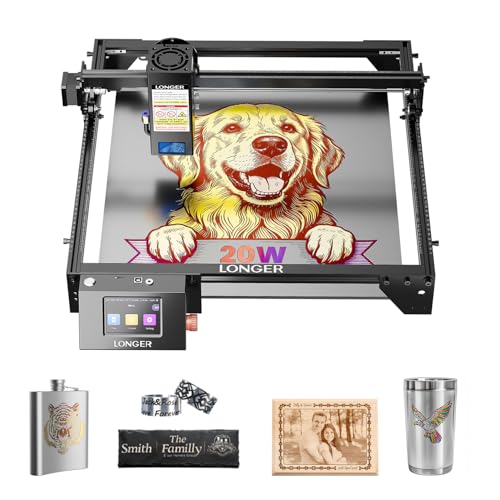
LONGER Ray5 20W, 400 × 365 mm offers 20W power in a 400 × 365 mm work area, so it has the same 400 mm length as some alternatives but less width. A 3.5-inch color touchscreen and four connection modes are among its controls. Its maker gives a maximum processing speed of 10,000 mm/min, while the product name gives 24,000 mm/min; verify the speed specification before ordering if throughput is a deciding factor. The narrower bed can suit long, slim pieces. Buyers working with wider panels should compare a 400 × 400 mm version.
Bottom line: Choose this for 20W power when a 365 mm bed width is sufficient.
LGT Ray5 10W, 400 × 400 mm

LGT Ray5 10W, 400 × 400 mm is another 10W Ray5 with a 400 × 400 mm area, but its product text emphasizes a 0.06 × 0.06 mm spot and compressed-spot engraving. The maker claims cutting capacity up to 20 mm wood and 30 mm acrylic; material type, focus, and number of passes can affect results. This version suits buyers who value the small spot and full-size work area. Its maximum speed is not clear from the product facts, so throughput-focused buyers should compare a model with a speed and confirm the intended material thickness.
Bottom line: Pick this for a 10W Ray5 when the fine spot is your priority.
LONGER Ray5 20W

LONGER Ray5 20W is the 20W Ray5 option whose product text highlights a built-in 256-color palette and 0.01 mm engraving precision. The maker claims single-pass cutting up to 15 mm pine wood, 0.05 mm stainless steel, and 8 mm acrylic, with multiple-pass capacity claims for thicker wood and acrylic. Its name also identifies a 3.5-inch touchscreen. This model suits buyers interested in its color-engraving feature and stated cut capacities. The work area and maximum speed are not included in its product facts, so confirm the usable bed dimensions before planning larger pieces.
Bottom line: Choose this for the color-engraving capability and 20W power.
How to choose a LONGER Ray5 laser engraver
Start with the thickest material you expect to cut, then compare the maker’s cut claims and work area rather than choosing by wattage alone. Laser power, focus, material composition, and pass count all affect results; plywood glue and acrylic color can change how a material responds. A work area of 400 × 400 mm fits larger flat projects than a 385 × 385 mm bed, while a 400 × 365 mm bed sacrifices width. For a project wider than 365 mm, eliminate that narrower bed before comparing other features. For occasional engraving on thin stock, a 10W variant may be enough; choose a higher-power version only when its cutting claim matches the actual material and thickness you plan to process.
Ray5 work area and material fit
Measure the flat workpiece, not just the design, and leave room for clamps and alignment; a nominal work area is not necessarily the usable clearance around every fixture. The Ray5 beds range from 385 × 385 mm to 400 × 400 mm, with one 400 × 365 mm option. Keep a safety margin around the design so the beam path does not cross a clamp or the frame. Material fit also depends on thickness and flatness: bowed boards can fall outside the focus plane, reducing consistency. Before committing to a cut, use a small scrap from the same material and check the focus and settings. Do not assume a cut claim for one material transfers to another, even at the same thickness.
Laser engraver safety and setup
Enclose the work area and use eye protection rated for the laser’s wavelength and optical density; a visible beam can still cause serious eye injury. Keep the machine attended while running because wood, paper, and other workpieces can ignite, and keep an appropriate fire extinguisher nearby. Use ventilation or fume extraction: engraving and cutting can release irritating or hazardous smoke, particularly from plastics. Never process PVC or vinyl, which can release corrosive chlorine-containing fumes. Clear the bed of scrap and combustible debris between jobs, and pause the machine if smoke builds up or the material flames. An air-assist feature can help clear debris from a cut, but it does not replace supervision, ventilation, or fire precautions.
Ray5 model differences at a glance
Use the project’s limiting requirement—cutting capacity, bed width, or a special engraving feature—to narrow the choices. The table compares the clearest distinguishing use from each model’s claims.
| Need | Ray5 option | Reason to consider |
|---|---|---|
| Large general-purpose work area | LONGER Ray5 10W, 400 × 400 mm | 10W and 400 × 400 mm bed |
| Higher-power cutting | LONGER Ray5 40W, 385 × 385 mm | 40W module and air assist |
| 20W with less bed width | LONGER Ray5 20W, 400 × 365 mm | 400 × 365 mm working area |
| Fine-spot 10W engraving | LGT Ray5 10W, 400 × 400 mm | 0.06 × 0.06 mm spot claim |
| Color-engraving feature | LONGER Ray5 20W | Built-in 256-color palette claim |
Frequently Asked Questions
How much clearance should I leave around an engraving design?
Leave enough room for the workpiece and clamps without placing hardware in the laser path. Measure the full piece against the bed dimensions, then leave a margin for alignment and any fixtures; a project wider than 365 mm will not fit the 400 × 365 mm bed.
Can a diode laser engraver cut every color of acrylic?
No; diode lasers do not interact equally with all acrylic colors, and clear acrylic is particularly difficult for many visible or near-infrared diode systems to cut. Test a small offcut of the same color and thickness, and use a process intended for that material if it does not cut cleanly.
What materials should I never laser engrave?
Do not laser engrave PVC or vinyl because heating them can release corrosive chlorine-containing fumes. Avoid unidentified plastics, and check the material composition before running a job; ventilation does not make an unsuitable material safe.
Does more laser power always mean faster engraving?
No; power is only one factor, alongside speed, focus, material, and the desired surface result. For example, a higher-power module may help with cutting, while fine engraving on thin stock can depend more on spot size and settings.
How often should I clean a laser engraver lens?
Inspect the lens before a job and clean it when dust or residue is visible, using a lens-safe method that does not scratch its coating. Smoke residue can reduce beam transmission, so frequent cutting of resinous wood may call for more frequent inspection than occasional engraving.