
M-Audio Fast Track Ultra: Interface and Cables Compared

The M-Audio Fast Track Ultra interface suits recording setups that need four preamps and six balanced outputs over USB 2.0. Choose a cable or replacement adapter instead if you already own the interface and need an accessory; confirm the adapter’s electrical specifications before connecting it.
We earn a commission if you buy through links on this page. As an Amazon Associate I earn from qualifying purchases. Products are compared on manufacturer specifications, not hands-on testing.
- Best overall: M-Audio Fast Track Ultra 8×8 Interface – The 8×8 USB 2.0 interface includes four preamps and six balanced analog outputs.
- Best for USB connection: SLLEA 3.3-ft USB 2.0 Cable – The 3.3-foot USB 2.0 cable specifies an A-male to B-male connection.
- Best for replacement power: 5V Fast Track Ultra Replacement Adapter – This replacement adapter is identified for the Fast Track Ultra and has a 5V output.
| Product | Best for | Type | Connection or output | Length | Shop |
|---|---|---|---|---|---|
| M-Audio Fast Track Ultra 8×8 Interface | Recording interface | USB audio interface | USB 2.0; six balanced outputs | — | Check Price on Amazon |
| Accessory USA 3.3-ft USB Cable | Replacement cable | USB cable | — | 3.3 ft | Check Price on Amazon |
| SLLEA 3.3-ft USB 2.0 Cable | A-to-B cable | USB 2.0 cable | USB-A male to USB-B male | 3.3 ft | Check Price on Amazon |
| 5V Fast Track Ultra Replacement Adapter | Replacement adapter | Power adapter | 5V DC output | — | Check Price on Amazon |
M-Audio Fast Track Ultra interface and accessories
Start with the interface if you need recording hardware; choose an accessory only to replace or connect existing equipment.
M-Audio Fast Track Ultra 8×8 Interface

The Fast Track Ultra is the recording interface in this group, while the other matching options are accessories. It combines USB 2.0 with MX Core DSP technology and four preamps using M-Audio Octane technology; the maker also specifies six balanced analog outputs and Mac and PC compatibility. That set of connections may suit a recording setup that needs several preamps and separate output paths. Its limitation is that the maker does not establish compatibility with a particular current operating-system version, so check driver support for your computer before relying on it.
Bottom line: Choose it when you need the 8×8 interface itself and its four preamps.
Accessory USA 3.3-ft USB Cable
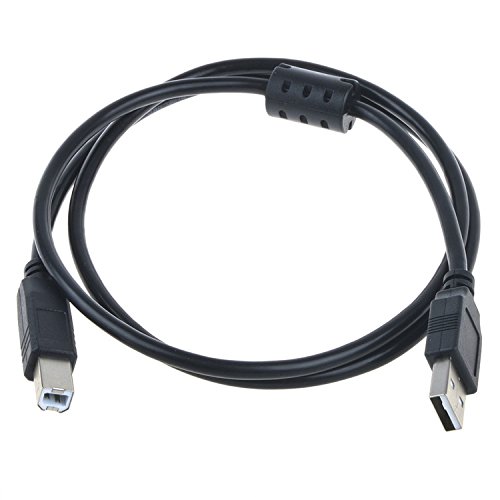
The Accessory USA option is a replacement cable, not an audio interface, and its compatibility claim includes the Fast Track Ultra. At 3.3 feet, it is suited to a short connection between nearby equipment. The maker describes it as a non-OEM replacement with OVP, OCP, and SCP protections and CE, FCC, and RoHS certifications.
Bottom line: Choose it if you need a short replacement cable and have confirmed its connector ends.
SLLEA 3.3-ft USB 2.0 Cable

The SLLEA cable is the clearest match when the needed connection is USB-A to USB-B: it specifies male plugs at both ends and a 3.3-foot length. It is an accessory rather than the Fast Track Ultra interface, and its USB 2.0 compatibility also includes USB 1.0 and 1.1 devices. A short cable can keep a desktop setup tidy, but the fixed length may not reach equipment placed farther apart. Measure the route between ports before selecting a 3.3-foot cable.
Bottom line: Choose it for a confirmed USB-A-to-USB-B connection within 3.3 feet.
5V Fast Track Ultra Replacement Adapter

The 5V adapter is the only power-supply option here identified for the Fast Track Ultra; it is a replacement, not the original interface. Its input is specified as 100–240V AC at 50–60Hz, and the maker describes overvoltage, overcurrent, and short-circuit protection. Those figures alone are not enough to confirm a safe match: output current, connector size, and polarity must also agree with the interface’s requirements. Verify those electrical and physical specifications before connecting the adapter.
Bottom line: Choose it only after confirming the required current, connector, and polarity.
How to choose Fast Track Ultra gear
Choose the interface for recording hardware, a USB cable for data connection, or a power adapter for replacement power. The Fast Track Ultra’s 8×8 designation describes its interface category, while its hardware includes four preamps and six balanced analog outputs. For cable choice, match connector type first and length second: a 3.3-foot cord is about 1 meter and works only when the devices can sit within reach. For an adapter, matching the 5V output alone is not enough; output current, polarity, and plug dimensions must also match. Before buying legacy recording equipment, verify that a compatible driver supports the computer’s operating system.
USB cable fit and length
A USB cable must match both ends of the connection, not just the device name. The SLLEA cable specifies USB-A male to USB-B male, while the Accessory USA cable’s connector ends are not identified in its product name or features. Measure the actual cable path, including space to route it without pulling on the plugs; 3.3 feet is approximately 1 meter. USB 2.0 is backward-compatible with USB 1.0 and 1.1 at the standard level, but a device’s operating-system driver still affects whether the audio interface works. Avoid assuming that a cable’s general USB compatibility proves the interface itself is supported.
Replacement power adapter checks
A replacement adapter has to match the device’s complete electrical requirements, not just its voltage. The Fast Track Ultra adapter option specifies a 5V output and 100–240V AC input, but a safe match also requires the correct output current, polarity, and connector dimensions. Check the marking on the original adapter or device before connecting a replacement; stop if any of those values differ or cannot be confirmed. AC input range describes the wall-power side, while DC output describes the powered device side. Do not confuse the 9V adapter for the Fast Track Pro with a Fast Track Ultra power supply.
Interface connections and setup limits
An audio interface routes microphone or instrument signals into a computer and sends computer audio to connected outputs. The Fast Track Ultra combines four preamps with six balanced analog outputs, so buyers should plan around their input needs and the destinations for their output channels rather than the 8×8 label alone. Balanced outputs use a different cable connection from USB and need compatible receiving equipment. For a computer setup, check operating-system and driver support before planning a recording workflow; older USB hardware can have driver constraints even when its USB connector physically fits. Leave strain relief on both data and audio cables to reduce wear on ports.
Frequently Asked Questions
What does 8×8 mean on an audio interface?
An 8×8 interface designation refers to its input and output channel capacity, not necessarily eight preamps or eight physical sockets of one kind. For the Fast Track Ultra, the maker separately identifies four preamps and six balanced analog outputs.
Will any USB 2.0 cable work with the Fast Track Ultra?
No; the cable needs matching connector ends as well as USB compatibility. The SLLEA option specifies USB-A male to USB-B male, so confirm that matches the computer and interface ports before connecting it.
Can I use a 5V adapter with the Fast Track Ultra?
Use a 5V adapter only if its other electrical and physical specifications also match the interface. Confirm output current, polarity, and plug size before connecting it; the 5V figure by itself is not sufficient.
How long is a 3.3-foot USB cable in meters?
A 3.3-foot cable is approximately 1 meter long. Measure the routed distance between the computer and interface so the cable can reach without tension at either connector.
Does the Fast Track Ultra work with current computers?
Compatibility depends on driver support for the computer’s operating system, not only on having a USB port. Confirm the appropriate driver supports your specific operating-system version before building a setup around the interface.