
Mach E Dash Cam: 4 Models Compared by Coverage

For a Mach-E dash cam, choose GATGIT OEM-Style 4K Mach-E Dash Cam if you want a single 4K camera with an OEM-style fit and a 64GB card; choose Fitcamx Front 4K + Rear 1080P Mach-E Dash Cam if recording behind the vehicle matters, since it adds 1080P rear coverage.
These integrated cameras are designed for specific Mach-E model years rather than the gas-powered Mustang, so verify your vehicle’s year and style before choosing.
We earn a commission if you buy through links on this page. As an Amazon Associate I earn from qualifying purchases. Products are compared on manufacturer specifications, not hands-on testing.
- Best overall: GATGIT OEM-Style 4K Mach-E Dash Cam – It combines 4K video, an OEM-style fit and a 64GB card for Mach-E models from 2021–2026.
- Best for rear coverage: Fitcamx Front 4K + Rear 1080P Mach-E Dash Cam – It records 4K video in front and 1080P video at the rear, with a 128GB card.
- Best for a single camera: Fitcamx OEM-Style 4K Mach-E Dash Cam – It offers 4K recording and a 64GB card in an OEM-style design for Mach-E models from 2021–2026.
- Best for 2021–2025: Fitcamx 4K Mach-E Dash Cam, 2021–2025 – It offers 4K recording and an OEM-style fit for specified Mach-E trims, without an SD card.
| Product | Best for | Coverage | Video resolution | Included card | Shop |
|---|---|---|---|---|---|
| GATGIT OEM-Style 4K Mach-E Dash Cam | Integrated 4K | Front | 4K | 64GB | Check Price on Amazon |
| Fitcamx OEM-Style 4K Mach-E Dash Cam | Single-camera 4K | Front | 4K at 30 fps | 64GB | Check Price on Amazon |
| Fitcamx Front 4K + Rear 1080P Mach-E Dash Cam | Front and rear | Front and rear | 4K front, 1080P rear at 30 fps | 128GB | Check Price on Amazon |
| Fitcamx 4K Mach-E Dash Cam, 2021–2025 | 2021–2025 fit | Front | 4K at 30 fps | No card | Check Price on Amazon |
Mach E Dash Cams
Compare the model-year fit, camera coverage and included storage before choosing an integrated Mach-E camera.
GATGIT OEM-Style 4K Mach-E Dash Cam
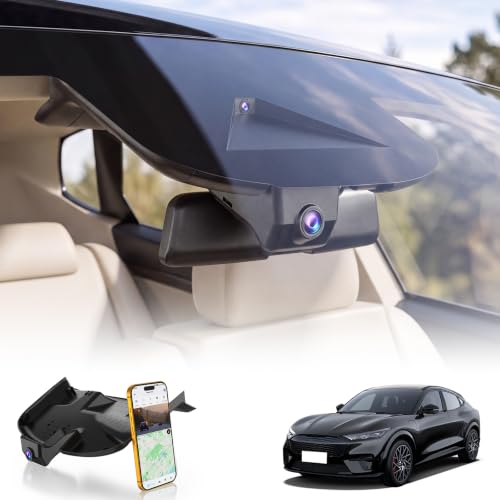
For a single-camera setup, this option pairs 4K video with a 64GB card and an OEM-style design for 2021–2026 Ford Mustang Mach-E models. Its fit includes Select, Premium, California Route 1, Rally, GT and First Edition trims. The maker says it plugs into the vehicle’s factory connector and records automatically, without a suction cup or adhesive mount. It suits drivers seeking an integrated front camera rather than rear coverage. The key limitation is that the features do not describe rear recording, so choose a dual-camera option if you want video from behind the car.
Bottom line: Choose it for an integrated, single-camera 4K setup with a card included.
Fitcamx OEM-Style 4K Mach-E Dash Cam

This Fitcamx option specifies 2160P video at 30 frames per second, an f/1.6 lens and a 64GB card, making its recording rate more explicit than the single-camera alternatives. It is designed for 2021–2026 Mach-E models and is not for the gas-powered Mustang. The maker describes an OEM-style fit with built-in Wi-Fi and an app, along with loop recording and a G-sensor. It suits buyers who want one integrated front camera and a frame rate. The limitation is coverage: the features describe a front camera, not a rear camera.
Bottom line: Choose it if a 30-fps recording rate matters for a single front camera.
Fitcamx Front 4K + Rear 1080P Mach-E Dash Cam

This is the only dual-camera option here: it records 4K video in front and 1080P at the rear, and comes with a 128GB card. The maker identifies compatibility with 2021–2026 Ford Mustang Mach-E models and describes an integrated design without wires visible from the driver’s seat. Wi-Fi, an app, loop recording and a G-sensor are also specified. It suits drivers who want evidence from both directions rather than a higher-resolution rear view. The trade-off is the lower rear resolution compared with the front, so choose a front-only unit if rear coverage is not a priority.
Bottom line: Choose it when recording behind the vehicle matters more than matching front and rear resolution.
Fitcamx 4K Mach-E Dash Cam, 2021–2025

This Fitcamx 4K camera is the only option here specifically limited to 2021–2025 Mach-E models, including GT, Select and Premium trims. It specifies 2160P video at 30 frames per second, Wi-Fi, an app, loop recording and a G-sensor, with an OEM-style position behind the rear-view mirror. The maker says it uses a CMOS sensor and f/1.6 lens. It suits owners whose vehicle falls within the year range and who already have compatible storage. The main limitation is that no SD card is included; select another option if you want a card bundled with the camera.
Bottom line: Choose it for a 2021–2025 Mach-E if you already have a suitable SD card.
How to choose a Mach-E dash cam
Start with coverage: choose a dual-channel camera if you need footage of both the road ahead and the view behind the vehicle. A front camera records only its own field of view; rear coverage requires a rear camera and usually a cable routed to the back of the cabin. Resolution is not the same as coverage: 4K front video cannot capture what a rear camera would see. Among these options, only Fitcamx Front 4K + Rear 1080P Mach-E Dash Cam specifies rear recording, at 1080P, alongside 4K front video.
Next, match the model year and vehicle precisely. The Ford Mustang Mach-E is not the same vehicle as the gas-powered Mustang, and some camera housings are vehicle-specific. A card included in the box also affects setup: verify that the camera supports the card type and capacity you plan to use before relying on it.
Mach-E camera fit and installation
Vehicle-specific integrated cameras are shaped to fit around an existing sensor or mirror housing, so fit depends on the exact vehicle and model year rather than a universal windshield mount. Match the year range and trim to your Mach-E; do not assume a Mustang-branded camera fits a Mach-E. GATGIT OEM-Style 4K Mach-E Dash Cam, Fitcamx OEM-Style 4K Mach-E Dash Cam and Fitcamx Front 4K + Rear 1080P Mach-E Dash Cam give a 2021–2026 fit range, while Fitcamx 4K Mach-E Dash Cam, 2021–2025 specifies 2021–2025.
For a rear camera, allow for a cable route from the front unit to the rear glass; the cable should not cross an airbag deployment path or obstruct the driver’s view. Before installation, identify the vehicle’s airbag locations and confirm that the camera housing clears the windshield sensors. A built-in app or Wi-Fi connection can help transfer clips, but it does not replace checking that recording works after installation.
Loop recording, G-sensors and memory cards
Loop recording generally uses the card’s available space by replacing older unlocked clips when the card fills. A G-sensor detects a sudden movement or impact and can mark or lock a clip, but the exact trigger and file protection behavior vary by camera. Check that a protected clip remains saved after a short test drive, since locked files can also consume card space.
Use a card type and capacity that the camera supports; a larger card is not automatically compatible. Format the card in the camera when setting it up and periodically check that new clips are being saved. These steps matter whether a card is bundled or purchased separately, especially for Fitcamx 4K Mach-E Dash Cam, 2021–2025, which does not include an SD card.
Choosing front-only or dual-camera coverage
A front-only dash cam is the simpler choice if your priority is recording the road ahead; choose a dual-camera system if you also want a view behind the car. The rear channel in a dual setup typically records at a lower resolution than the front, so compare each channel rather than relying on a single headline resolution. In this group, Fitcamx Front 4K + Rear 1080P Mach-E Dash Cam specifies 4K front and 1080P rear video.
Rear installation adds a camera and a cable route to the rear glass, which can take longer than fitting an integrated front unit. If you do not want to route a cable through the cabin, a front-only camera avoids that extra installation step. Keep the rear lens clear of tint bands, defroster lines and obstructions where possible, since these can affect the recorded view.
Frequently Asked Questions
Does a Mach-E dash cam fit a gas Mustang?
No; a Mach-E-specific camera is designed for the electric Mach-E, not the gas-powered Mustang. Check the vehicle name and model-year range before selecting a camera.
Is a rear camera worth adding to a Mach-E?
A rear camera is useful if you want a recording of the view behind the vehicle as well as the road ahead. In this comparison, the dual setup records 1080P at the rear and 4K in front.
What does loop recording do on a dash cam?
Loop recording typically replaces older unlocked files when the memory card fills. A G-sensor may lock a clip after a sudden movement, so periodically check protected files to keep space available.
Can a dash cam cable cross an airbag?
No; keep the cable out of airbag deployment paths and away from the driver’s field of view. Identify the vehicle’s airbag locations before routing cable along trim.
Do Mach-E dash cams include memory cards?
Some do and some do not: the options here include 64GB or 128GB cards, while one comes without an SD card. Confirm the camera supports your card’s type and capacity before setting it up.