
Mini 1300 Antenna Analyzer: Five Models Compared

For continuous 0.1–1300 MHz coverage with a 4.3-inch touchscreen and multiple test modes, choose MINI1300 4.3-inch Analyzer; its frequency span and display are the deciding factors. Choose another model if you need included SMA calibration pieces or want a 3-inch screen instead.
Antenna analyzers measure an antenna system’s SWR and related RF characteristics across selected frequencies, helping identify where tuning may be needed.
We earn a commission if you buy through links on this page. As an Amazon Associate I earn from qualifying purchases. Products are compared on manufacturer specifications, not hands-on testing.
- Best overall: MINI1300 4.3-inch Analyzer – It pairs 0.1–1300 MHz coverage with a 4.3-inch touch display and single-point, sweep and TDR modes.
- Best for calibration: Upgraded Mini1300 with SMA Kit – It includes labeled SMA open, short and load calibration components.
- Best for compact size: Mini1300 3-inch Portable Analyzer – Its dimensions are 133 × 85 × 29 mm, and it has a 3-inch touchscreen.
| Product | Best for | Frequency range | Display | Measurement modes | Shop |
|---|---|---|---|---|---|
| MINI1300 4.3-inch Analyzer | Core analyzer modes | 0.1–1300 MHz | 4.3-inch touch LCD | Single-point, sweep, TDR | Check Price on Amazon |
| Upgraded Mini1300 with SMA Kit | Calibration included | 0.1–1300 MHz | 4.3-inch TFT touch | Single-point, sweep, TDR | Check Price on Amazon |
| 2024 Upgraded Mini1300 with SMA Kits | Feeder length checks | 0.1–1300 MHz | 4.3-inch TFT touch | Single-point, scan, feeder length | Check Price on Amazon |
| Mini1300 3-inch Portable Analyzer | Smaller display | 1–1300 MHz | 3-inch TFT touch | Single-point, sweep | Check Price on Amazon |
| Mini1300 Touchscreen Analyzer with SMA Kit | Smith chart display | 0.1–1300 MHz | 4.3-inch touchscreen | Single-point, sweep, TDR | Check Price on Amazon |
Mini 1300 Antenna Analyzers
Compare frequency coverage, display size and measurement modes to match an analyzer to your antenna work.
MINI1300 4.3-inch Analyzer

MINI1300 4.3-inch Analyzer combines continuous 0.1–1300 MHz coverage with a 4.3-inch touch LCD, single-point measurement, frequency sweep and TDR mode. It suits operators who want one device for HF, VHF and UHF checks without needing calibration accessories bundled in the package. The SWR range is 1.0–1999 in single-point mode and 1.0–20.0 in scan mode. One important limitation is that its firmware cannot be updated; choose another option if firmware updating is a requirement.
Bottom line: Choose it for broad band coverage and the three core measurement modes.
Upgraded Mini1300 with SMA Kit

Upgraded Mini1300 with SMA Kit stands apart by including labeled SMA open, short and load calibration pieces, useful when calibration components are needed alongside the analyzer. It covers 0.1–1300 MHz and supports single-point, sweep and TDR measurements; the feature description also names impedance and return-loss measurements. This suits users who want calibration tools in the same package for antenna tuning or RF diagnostics. The 4.3-inch screen matches the larger-screen alternatives, so its main distinction is the included calibration kit rather than a different coverage span.
Bottom line: Pick it when included SMA calibration components are a priority.
2024 Upgraded Mini1300 with SMA Kits

2024 Upgraded Mini1300 with SMA Kits specifically adds feeder-length testing to its functions, alongside single-frequency testing, frequency scanning and standing-wave measurements. Its 0.1–1300 MHz range covers HF, VHF and UHF continuously, and the 4.3-inch touchscreen provides a menu interface. The package description includes SMA open, short and load calibration kits, which can support direct calibration. This model suits buyers who need to check feeder length as part of their workflow; the feature set does not call out TDR by name, so those seeking that named mode may prefer a model that does.
Bottom line: Choose it for feeder-length testing and the included calibration kit.
Mini1300 3-inch Portable Analyzer

Mini1300 3-inch Portable Analyzer is the smaller-display alternative, with a 3-inch TFT touchscreen and stated dimensions of 133 × 85 × 29 mm. It covers 1–1300 MHz and offers single-point and frequency-sweep modes for SWR, impedance and return-loss analysis. This suits buyers who value its more compact stated dimensions and do not need coverage below 1 MHz. Compared with the 0.1–1300 MHz models, its lower frequency limit is higher, and its features do not name TDR mode.
Bottom line: Pick it if a 3-inch screen and 1 MHz lower limit suit your work.
Mini1300 Touchscreen Analyzer with SMA Kit
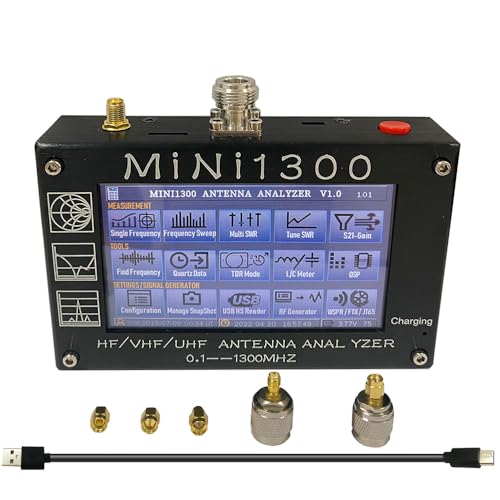
Mini1300 Touchscreen Analyzer with SMA Kit distinguishes itself by naming numeric output, curve graphs and a Smith chart as display options, as well as TDR, sweep and single-point modes. It covers 0.1–1300 MHz and includes SMA open, short and load calibration components. The described combination suits users who want graphical impedance analysis and calibration accessories with HF, VHF and UHF coverage.
Bottom line: Choose it for the named Smith chart view and included SMA kit.
How to choose a Mini 1300 analyzer
Choose based on your lowest test frequency, measurement modes and calibration needs. The Mini 1300 models here cover either 0.1–1300 MHz or 1–1300 MHz, so work below 1 MHz rules out the narrower span. A sweep shows how readings change across a frequency range, while a single-point mode checks one selected frequency; TDR can help assess cable or feeder behavior. SMA open, short and load standards are commonly used for one-port calibration, which helps compensate for measurement-system effects. Match the included modes and accessories to your workflow rather than assuming every unit has the same functions.
A practical rule: if your work includes frequencies below 1 MHz, select a model whose range begins at 0.1 MHz. If you need to measure feeder length, prioritize a model that names that function directly.
Understanding SWR ranges and readings
SWR expresses how well an antenna system’s impedance matches its feed line; 1:1 is the ideal match, while higher readings indicate more reflected energy. A reading is frequency-specific, so a sweep helps show whether the match changes across the band rather than relying on one spot measurement. The analyzer’s SWR range also matters: the two ranges given for some models differ between single-point and scan modes. Do not treat an SWR number as a complete antenna diagnosis: feed-line loss, connectors and measurement setup can affect readings, and impedance or return-loss views add context.
For antenna adjustments, compare readings at the operating frequencies that matter to you and keep the test setup consistent. Disconnect transmitters before attaching an analyzer; never transmit into a measurement instrument unless its documentation explicitly permits it.
Calibration and connection choices
One-port calibration commonly uses open, short and load standards at the end of the cable or adapter chain that will connect to the device under test. Calibration at the instrument alone does not account for every cable or adapter after that point, so include the actual connection path when practical. SMA is a connector interface, and an SMA kit only fits directly when the analyzer and test leads use compatible connectors. Keep calibration parts clean and avoid stressing small coaxial connectors, which can affect repeatability.
Use the same cable and adapters for calibration and the antenna measurement, and recalibrate after changing the test path. Calibration pieces are setup references, not protection against transmitting power; detach transmitters before measurement.
Measurement modes and common mistakes
A single-point measurement answers a narrow question at one frequency, while a frequency sweep reveals trends across a span. TDR uses reflected signal timing to indicate changes along a cable path; it is not interchangeable with a simple SWR sweep. Feeder-length testing is a separate named capability on one model here, so check for that function when length rather than match is the goal. A Smith chart plots impedance relationships and can be more informative than SWR alone, but it takes familiarity to interpret.
Common mistakes include measuring through an unaccounted adapter, calibrating at a different point from the antenna connection, and assuming the maximum frequency span means equal performance at every frequency. Keep the test setup stable and consult the analyzer’s operating guidance for safe connection and calibration practice.
Frequently Asked Questions
What does an antenna analyzer measure?
An antenna analyzer measures RF properties such as SWR and impedance over chosen frequencies. Some models also show return loss or a Smith chart, which can add context beyond a single SWR value.
Why use a frequency sweep instead of one reading?
A sweep shows how a measurement changes across a frequency span, while a single-point check reports one selected frequency. Use a sweep when you need to see whether the antenna match shifts across the band.
What do open short and load calibration pieces do?
Open, short and load pieces provide known reference conditions for one-port calibration. Calibrating through the cable and adapters used for the measurement can account for more of that test path.
Can an antenna analyzer measure coax cable length?
Some analyzers provide TDR or a dedicated feeder-length function to examine cable behavior or estimate length. Check that the specific model names the mode you need, since a basic SWR sweep is not the same measurement.
Should a transmitter stay connected during testing?
No, disconnect transmitters before connecting an antenna analyzer. Transmit power can damage measurement equipment unless the analyzer is explicitly designed to tolerate it.