
Mobile as Home Phone: Cell-Linked Cordless Options

For using your cell service around the house, Panasonic Link2Cell KX-TGD864W is the closest match because its Link2Cell Bluetooth pairing routes calls from up to two cell phones through cordless handsets.
Choose a cellular desk phone instead if you want a dedicated SIM-based desktop unit, or a basic mobile if portability matters more than answering through room-to-room handsets.
We earn a commission if you buy through links on this page. As an Amazon Associate I earn from qualifying purchases. Products are compared on manufacturer specifications, not hands-on testing.
- Best overall: Panasonic Link2Cell KX-TGD864W – Link2Cell pairs with up to two cell phones so calls can be made and received through cordless handsets.
- Best for a desk: Opis Technology 60s Mobile 4G Rotary – This 4G rotary-style cellular phone uses a SIM and has a desktop form.
- Best for portability: Easyfone T200 4G Feature Phone – This basic 4G mobile focuses on calls and texts and includes speed-dial keys.
| Product | Best for | Connection | Handsets or SIM | Notable call feature | Shop |
|---|---|---|---|---|---|
| Panasonic Link2Cell KX-TGD864W | Cell phone pairing | Bluetooth to cell phones | 4 handsets | Pairs up to 2 phones | Check Price on Amazon |
| Opis Technology 60s Mobile 4G Rotary | Retro desk calling | 4G cellular | SIM required | Talk and text | Check Price on Amazon |
| Easyfone T200 4G Feature Phone | Portable basic calls | 4G cellular | SIM included | SOS and speed dial | Check Price on Amazon |
| VTech VG131-11 DECT Cordless Phone | Cordless landline calls | DECT 6.0 landline | 1 handset | Full-duplex speakerphone | Check Price on Amazon |
| VTech CS6719-2 Two-Handset Phone | Two-room landline use | DECT 6.0 landline | 2 handsets | Intercom and conference | Check Price on Amazon |
Mobile as Home Phone Options
These devices handle home calling in different ways, so start by deciding whether you want to route calls from an existing cell phone or use a dedicated cellular handset.
Panasonic Link2Cell KX-TGD864W

For routing calls from a mobile phone to cordless handsets around the home, this system is the clearest fit: Panasonic says Link2Cell Bluetooth pairs with up to two cell phones to make and receive calls through its handsets. The four-handset configuration suits a home where calls should be reachable in several rooms, and the answering machine adds a separate way to catch missed landline calls. Bilingual Talking Caller ID announces calls in English or Spanish. Buyers who want one standalone cellular desk phone instead of pairing an existing mobile should choose a different form factor.
Bottom line: Pick this if you want to use one or two cell phones through cordless handsets in multiple rooms.
Opis Technology 60s Mobile 4G Rotary

Unlike a handset system that relays a nearby mobile phone, this rotary-style desktop phone is itself a cellular device: it is unlocked GSM, uses a SIM and supports talk and text without internet. Its metal bell and desk-oriented shape suit a fixed calling spot, while stated carrier compatibility includes AT&T and T-Mobile along with several listed mobile virtual network operators. It is a more direct choice for someone wanting a dedicated desk phone on cellular service. It is not a multi-handset home system, so it will not place cordless receivers around the house.
Bottom line: Choose this for a dedicated SIM-based cellular phone that stays on a desk.
Easyfone T200 4G Feature Phone

This is the portable option rather than a home handset base: the Easyfone T200 is a basic mobile focused on calls and texts, with no internet access or camera. Its SOS button and programmable speed-dial keys can make frequent contacts quicker to reach, and the included SpeedTalk prepaid SIM is described as running on the T-Mobile network. A 1,050 mAh battery is claimed to provide more than 120 hours of standby. It suits someone who wants a simple phone that can move between rooms or leave the house, but it does not relay calls from another cell phone to cordless receivers.
Bottom line: Pick this if a simple portable mobile matters more than multiple room handsets.
VTech VG131-11 DECT Cordless Phone

Unlike the cellular choices, this VTech is a conventional cordless phone system with one handset, not a mobile phone or a cell-linking setup. Its DECT 6.0 connection, full-duplex speakerphone and illuminated display and keypad suit a home that already has compatible landline service and needs a single handset. The maker claims an outdoor operating range up to 1,000 feet, but walls and layout affect real-world reach.
Bottom line: Choose this only if you want a basic cordless landline handset, not mobile-call pairing.
VTech CS6719-2 Two-Handset Phone
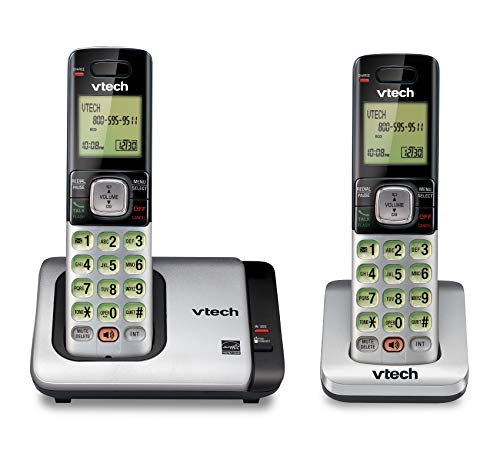
This two-handset VTech is built for multi-room landline use, with an intercom between handsets and conference calling; it differs from the Panasonic because its features do not include Bluetooth cell-phone pairing. The DECT 6.0 system includes caller ID and call waiting, plus storage for up to 50 caller ID entries. A quiet mode silences the ringer, and backlit displays and keypads help with dialing in low light. It can suit a home with landline service that needs two receivers, but it will not turn an existing mobile into a home-wide cordless system.
Bottom line: Pick this for two landline handsets and intercom, rather than using a mobile as the source.
How to choose a mobile phone setup for home
Choose a cell-linking cordless system when you already have a mobile plan and want calls available on multiple handsets; choose a SIM-based desk phone when you want a cellular device dedicated to one spot. Bluetooth relay systems depend on the paired phone being powered on, in range and connected to cellular service. A cellular desk phone needs a compatible SIM and working network coverage at its location. For a decision rule, choose multiple cordless receivers when calls need to be answered in three or more rooms; choose a desk phone when one central location covers the household. Traditional cordless phones use a separate landline connection and should not be confused with either cellular approach.
Cell-linking handsets versus cellular desk phones
Cell-linking systems use Bluetooth to connect a mobile phone to a cordless base, while cellular desk phones place calls over their own SIM and cellular network. Bluetooth systems are useful when the mobile phone can remain where its signal is strongest, with the handset acting as a room-to-room extension. SIM desk phones avoid the need to pair a second device but depend on the carrier bands and network coverage supported by the phone. Basic mobile phones are portable alternatives, not a substitute for a multi-handset relay system. The table separates the approaches by the source of the call and the home setup they support.
| Type | Call source | Best suited to |
|---|---|---|
| Bluetooth cell-link cordless | Paired mobile phone | Multiple rooms |
| Cellular desk phone | Phone’s SIM | One fixed calling spot |
| Basic mobile phone | Phone’s SIM | Portable calls |
| Traditional cordless | Landline service | Landline handset use |
Check cellular coverage and compatibility
Cellular reception at the intended phone location is the first fit check, because a SIM-based phone cannot improve a weak carrier signal by being shaped like a landline. Before choosing a cellular desk or feature phone, confirm that the carrier still supports its network technology and that the exact model is compatible with the carrier’s service. For a Bluetooth cell-link system, confirm the paired mobile’s Bluetooth connection remains reliable where the base will sit, and place the mobile where reception is strongest. Physical barriers and distance can weaken Bluetooth connections, so avoid assuming a phone in a distant room will relay calls consistently.
Plan handset placement and call access
Handset count matters when several people or rooms need independent access to incoming calls; a four-handset system can cover more locations than a single-handset phone, while a desk cellular unit stays in one place. Put cordless bases in an open central area rather than a cabinet or behind large appliances, since obstructions can reduce radio range. DECT cordless phones commonly operate in the 1.9 GHz band, separate from crowded 2.4 GHz Wi-Fi, though walls still affect range. Keep the paired mobile charged and within Bluetooth reach of its base, and verify that call notifications and ringing are enabled on both devices.
Frequently Asked Questions
Can a cordless phone use my cell phone plan?
Yes, a Bluetooth cell-link system can route calls through a paired mobile phone, so the mobile’s plan and cellular service handle the call. Keep the mobile powered, connected to the carrier network and within reliable Bluetooth range of the base.
Does a cellular desk phone need a SIM card?
A SIM-based cellular desk phone needs an active compatible SIM and adequate network coverage where it sits. Check carrier support for the specific phone before relying on it, since 4G compatibility alone does not establish service compatibility.
How many cordless handsets should a home have?
Plan on one handset for each regularly used calling area, with a central base and additional receivers where calls need answering. A multi-handset setup is more useful than a desk unit when three or more rooms need access.
Can a mobile phone ring through several home handsets?
Yes, a compatible Bluetooth cell-link base can distribute mobile calls to its cordless handsets. The number of cell phones and handsets supported varies by system, so match those counts to how many mobile lines and rooms you need.