
NES Game Controller USB: 4 Wired and Wireless Picks

For a USB controller advertised as compatible with Nintendo NES, choose VANJUNN NES USB Gamepad; for NES games through a supported emulator, ZAMPAM 2.4GHz Wireless USB Controller 2-Pack is the wireless option. KIWITATA SNES-Style USB Controller 2-Pack and Rii Classic Retro USB Controller 2-Pack are SNES-style USB pads for computer and Raspberry Pi setups, so choose them only if that layout and platform fit your games.
We earn a commission if you buy through links on this page. As an Amazon Associate I earn from qualifying purchases. Products are compared on manufacturer specifications, not hands-on testing.
- Best overall: VANJUNN NES USB Gamepad – Advertised as compatible with Nintendo NES, with configurable buttons and plug-and-play setup.
- Best for wireless emulator play: ZAMPAM 2.4GHz Wireless USB Controller 2-Pack – Uses a 2.4 GHz wireless connection with a range up to 10 meters.
- Best for a two-pad SNES-style setup: KIWITATA SNES-Style USB Controller 2-Pack – The two-pack supports Windows, Linux, Mac and Raspberry Pi.
| Product | Best for | Connection | Platforms or compatibility | Pack size | Shop |
|---|---|---|---|---|---|
| VANJUNN NES USB Gamepad | Nintendo NES use | USB | Nintendo NES | 1 controller | Check Price on Amazon |
| ZAMPAM 2.4GHz Wireless USB Controller 2-Pack | Wireless emulator play | 2.4 GHz wireless USB adapter | PC, Mac, Linux, Android; emulator use | 2 controllers | Check Price on Amazon |
| KIWITATA SNES-Style USB Controller 2-Pack | Two-player computer setup | Wired USB | Windows, Linux, Mac, Raspberry Pi | 2 controllers | Check Price on Amazon |
| Rii Classic Retro USB Controller 2-Pack | Longer wired reach | Wired USB | Windows, Mac, Raspberry Pi, Linux, Android | 2 controllers | Check Price on Amazon |
NES Game Controller USB Options
The key distinction is whether you need Nintendo NES compatibility or a USB pad for games running through a computer emulator.
VANJUNN NES USB Gamepad

Unlike the computer-focused pads below, this gamepad is advertised as compatible with Nintendo NES. Its buttons can be configured, and it is described as plug and play without extra drivers. The package contains one controller, which suits someone who needs a single pad rather than a two-pack. The key limitation is that the compatibility is narrow: buyers seeking a controller for PC emulators or other systems should verify that their setup accepts it before choosing it.
Bottom line: Choose this if Nintendo NES compatibility is your priority and one controller is enough.
ZAMPAM 2.4GHz Wireless USB Controller 2-Pack

Unlike the wired pads, this two-controller set connects wirelessly through a USB adapter and is intended for NES games played through supported emulators. The maker gives a wireless range of up to 10 meters and includes a turbo function with configurable rapid buttons. It suits players who want to sit away from a computer or compatible Android device. It is not compatible with NES Classic or Mini NES consoles, and the maker says a joystick mapper may be needed to configure keys, so allow for setup rather than assuming every emulator will recognize the controls automatically.
Bottom line: Choose this for wireless NES emulator play, not for NES Classic or Mini NES consoles.
KIWITATA SNES-Style USB Controller 2-Pack

This set is specifically an SNES-style computer controller, rather than a controller advertised for Nintendo NES hardware. It comes with two wired pads and supports Windows, Linux, Mac and Raspberry Pi with Retropie. The maker highlights a concave cross key with a frosted, anti-slip surface, which may appeal to players who prefer that directional-pad shape. Choose it for computer or Raspberry Pi emulator play when the SNES-style layout is what you want. Its use does not include the physical SNES console, so check the host platform and emulator mapping before selecting it for a particular game.
Bottom line: Choose this for two wired SNES-style pads on a supported computer or Raspberry Pi.
Rii Classic Retro USB Controller 2-Pack
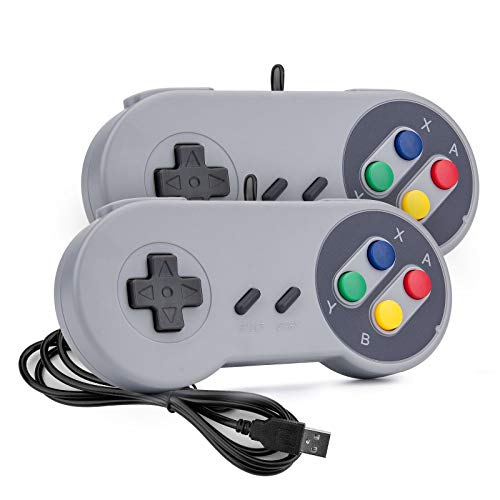
The Rii set stands apart among the wired choices by giving a cable length of about 5 feet, useful when the computer or Raspberry Pi is not close to the player. The maker says USB plug and play works when the program accepts USB controller input. That condition matters: the controller is intended for classic SNES games on computers, so NES play depends on emulator support and control mapping rather than physical NES-console compatibility.
Bottom line: Choose this when a roughly 5-foot cable and two computer-oriented pads suit your setup.
How to choose an NES USB controller
Start with the device you will connect: a console, computer, Raspberry Pi or Android device can require different compatibility. A USB plug describes the connection, not universal compatibility; emulator software must also accept controller input. Traditional NES controls use a directional pad plus A, B, Start and Select, while SNES-style pads may have additional face and shoulder buttons. If you need only the classic NES controls, verify that the emulator lets you map the buttons you need. For wireless play, keep the range in mind: up to 10 meters is the claim for ZAMPAM 2.4GHz Wireless USB Controller 2-Pack, but obstacles and the receiver position can affect usable distance. Choose wired when you prefer not to manage a wireless adapter or its range.
NES console versus emulator compatibility
A controller for NES games on an emulator is not automatically compatible with an NES console. Emulator play involves a USB host device and software that reads controller input; a physical console has its own controller connection. The distinction is especially important here: ZAMPAM 2.4GHz Wireless USB Controller 2-Pack explicitly excludes NES Classic and Mini NES consoles, while KIWITATA SNES-Style USB Controller 2-Pack and Rii Classic Retro USB Controller 2-Pack are described as computer-oriented SNES-style controllers. Before choosing a pad, match both ends of the setup: the controller must connect to the device, and the game or emulator must accept its input. For the fewest setup steps, prioritize a product that states the intended platform and check whether key mapping is needed for the emulator you plan to use.
Wired and wireless controller trade-offs
Wired USB controllers avoid wireless range limits and battery management, while wireless models give more freedom to sit away from the host device. The wired Rii Classic Retro USB Controller 2-Pack has a cable about 5 feet long, a useful measurable fit rule: if your seat is more than 5 feet from the host, do not assume that cable will reach comfortably. The wireless ZAMPAM 2.4GHz Wireless USB Controller 2-Pack uses 2.4 GHz and claims up to 10 meters, but you still need its USB adapter and a compatible host. A two-pack helps when two people need pads, but it does not guarantee that every game supports two-player input. Check the emulator’s player assignments and map each controller separately before starting a game.
Frequently Asked Questions
Will a USB controller work with an NES console?
A USB plug alone does not establish compatibility with an NES console. Confirm that the controller is specifically compatible with the console you own; ZAMPAM 2.4GHz Wireless USB Controller 2-Pack excludes NES Classic and Mini NES consoles.
Can I use these controllers for NES emulators?
NES emulator play requires a host device and software that accepts USB controller input. ZAMPAM 2.4GHz Wireless USB Controller 2-Pack is specifically described for NES games through supported emulators, while Rii Classic Retro USB Controller 2-Pack says plug and play depends on the program accepting controller input.
How far can the wireless controller reach?
The maker gives ZAMPAM 2.4GHz Wireless USB Controller 2-Pack a wireless range of up to 10 meters. Treat that as a maximum, and place the USB receiver where the controller has a clear connection to the host.
How long is the Rii controller cable?
The Rii controller cable is about 5 feet long. Measure the distance from your seat to the USB host and leave some slack rather than stretching the cable taut.
Do USB retro controllers need button mapping?
Some setups require mapping: the maker of ZAMPAM 2.4GHz Wireless USB Controller 2-Pack says joystick-mapper software may be needed, and Rii Classic Retro USB Controller 2-Pack works without extra drivers only when the program accepts USB controller input. Check the emulator’s controller settings before play.