
NVMe M.2 to SATA Adapters: 4 Options Compared

For adding SATA storage through a spare M.2 slot, RIITOP M.2 to SATA 6-Port Adapter is the direct match: it expands the slot to six SATA ports. Choose M.2 SATA to 2.5-Inch SATA Adapter only if your M.2 drive is SATA rather than NVMe; choose an enclosure such as SABRENT Tool-Free M.2 USB-C Enclosure or SSK M.2 NVMe/SATA USB-C Enclosure for external USB use instead.
We earn a commission if you buy through links on this page. As an Amazon Associate I earn from qualifying purchases. Products are compared on manufacturer specifications, not hands-on testing.
- Best overall: RIITOP M.2 to SATA 6-Port Adapter – Uses a spare M.2 NVMe slot to provide six SATA ports for storage drives.
- Best for M.2 SATA drives: M.2 SATA to 2.5-Inch SATA Adapter – Converts compatible SATA M.2 drives to a standard 2.5-inch SATA connection.
- Best for tool-free external use: SABRENT Tool-Free M.2 USB-C Enclosure – Accepts SATA and NVMe M.2 SSDs in three lengths and connects over USB-C.
| Product | Best for | Host or connection | Drive support | Port or data rate | Shop |
|---|---|---|---|---|---|
| RIITOP M.2 to SATA 6-Port Adapter | Adding SATA ports | M.2 NVMe slot | SATA drives | 6 ports; up to 6 Gbps | Check Price on Amazon |
| M.2 SATA to 2.5-Inch SATA Adapter | Reusing SATA M.2 | SATA connection | M.2 SATA, B+M key | SATA 6 Gbps | Check Price on Amazon |
| SABRENT Tool-Free M.2 USB-C Enclosure | External USB access | USB-C, 10 Gbps | NVMe and SATA M.2 | Up to 1,000 MB/s | Check Price on Amazon |
| SSK M.2 NVMe/SATA USB-C Enclosure | External SSD enclosure | USB-C, 10 Gbps | NVMe and SATA M.2 | Up to 10 Gbps | Check Price on Amazon |
NVMe M.2 to SATA Adapters and Related Options
Match the adapter to the drive protocol and the connection your computer or storage setup needs.
RIITOP M.2 to SATA 6-Port Adapter

RIITOP M.2 to SATA 6-Port Adapter is the direct fit for turning one spare M.2 NVMe slot into six standard SATA ports. The card uses an ASM1166 chipset and has an aluminum housing; it is aimed at systems with few open PCIe slots but an available M.2 slot. It can connect storage drives through the added SATA ports, unlike the external USB enclosures in this comparison. Check that the M.2 slot supports the card’s intended PCIe connection and that your case has room and power connections for the SATA drives. This is not a way to plug an M.2 SATA SSD into a SATA port.
Bottom line: Choose this when you need several SATA ports and have a compatible spare M.2 slot.
M.2 SATA to 2.5-Inch SATA Adapter
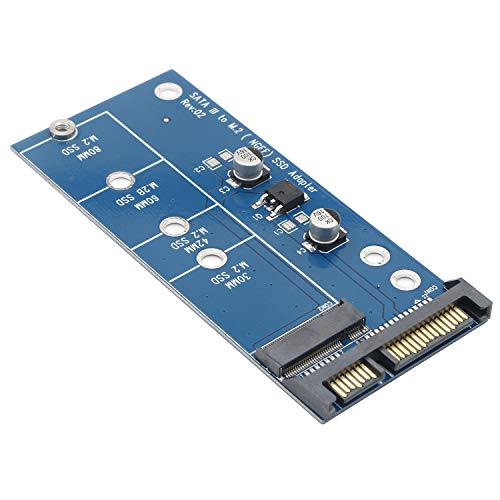
M.2 SATA to 2.5-Inch SATA Adapter handles the reverse direction from the main request: it converts a compatible M.2 SATA SSD to a standard 2.5-inch SATA connection. It supports 2230, 2242, 2260 and 2280 lengths, but explicitly excludes PCIe NVMe drives, so the drive’s protocol matters more than its M.2 shape. This can be useful for reusing an M.2 SATA drive through an existing SATA connection. A new drive may need partitioning and formatting before the system recognizes it; heat during operation is also noted as normal for this adapter.
Bottom line: Pick this only for an M.2 SATA SSD, not an NVMe drive.
SABRENT Tool-Free M.2 USB-C Enclosure
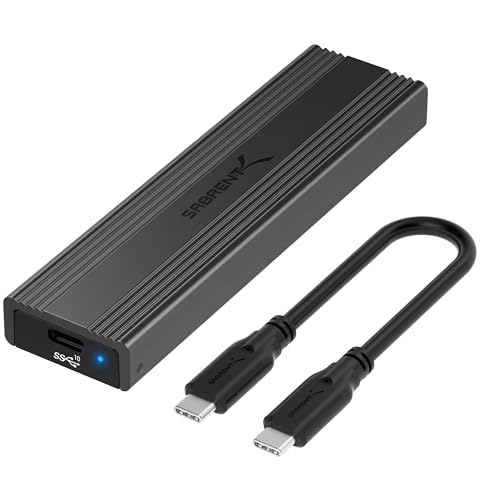
SABRENT Tool-Free M.2 USB-C Enclosure is an external enclosure, not an internal M.2-to-SATA port card. Its tool-free case accepts bare NVMe or SATA M.2 SSDs in 2242, 2260 and 2280 lengths, then connects to a computer over USB-C at up to 10 Gbps. The real-transfer ceiling is up to 1,000 MB/s, with actual connection speed depending on the USB host. The enclosure is bus powered and has an aluminum case with an ABS frame. It cannot take 2.5-inch SATA drives or SSDs with preinstalled heatsinks, so it is not suitable for expanding internal SATA ports.
Bottom line: Choose this for external USB access to a bare M.2 NVMe or SATA SSD.
SSK M.2 NVMe/SATA USB-C Enclosure

SSK M.2 NVMe/SATA USB-C Enclosure is another external enclosure rather than a card that adds internal SATA ports. It supports M.2 NVMe and SATA drives with M-key or B+M connectors in 2242, 2260 and 2280 sizes, and uses USB 3.2 Gen 2 at up to 10 Gbps. Its aluminum shell and RTL9210B chip distinguish it from the other enclosure option here. The maker also identifies UASP and TRIM support. It does not support M.2 PCIe AHCI SSDs, Wi-Fi or capture cards, mSATA drives, or SSDs outside the M.2 form factor.
Bottom line: Choose this for an external USB enclosure when the SSD matches its supported M.2 types.
How to choose an M.2 to SATA adapter
Start with the direction of conversion: a card that uses an M.2 slot to add SATA ports is different from a board that connects an M.2 SATA SSD to a SATA host. NVMe uses PCIe, while SATA M.2 drives use the SATA protocol; an M.2 connector alone does not identify which protocol a drive uses. Standard SATA III has a 6 Gbps link rate, while an adapter’s practical throughput depends on the host, drive and workload. If the goal is six internal drive connections, choose a port-expansion card; if the goal is an external portable SSD, choose a USB enclosure instead.
Check M.2 keying and protocol before connecting
Confirm both the drive protocol and the physical key before ordering: B+M-key drives commonly include SATA models, while M-key is common for NVMe, but key shape alone is not a guarantee of compatibility. M.2 lengths are commonly written as four digits, with the last two identifying length in millimeters; 2280 means 22 mm wide and 80 mm long. A card that requires an NVMe-capable M.2 slot will not necessarily work in a SATA-only M.2 socket. Match the adapter’s supported protocol, key and slot capability to the actual drive and motherboard.
Internal SATA expansion versus external enclosures
An internal M.2-to-SATA port card adds host connections for SATA storage; an external M.2 enclosure instead puts one M.2 SSD behind a USB bridge. SATA data rates top out at 6 Gbps per connection, while USB 10 Gbps enclosures share their usable throughput with the USB host and attached device. SATA drives also need suitable power in addition to a data connection, particularly 3.5-inch hard drives, which typically use a separate power supply from the computer. Use this comparison to choose by job rather than treating every M.2 adapter as interchangeable.
| Need | Choose | Key distinction |
|---|---|---|
| Add several internal SATA ports | M.2 NVMe-to-SATA card | Uses an M.2 slot to provide SATA connections |
| Connect an M.2 SATA SSD to SATA | M.2 SATA-to-SATA adapter | Does not convert an NVMe drive |
| Use an M.2 SSD externally | USB enclosure | Connects to USB, not internal SATA ports |
Common compatibility and installation mistakes
The most common mistake is buying by the phrase “M.2” without confirming NVMe versus SATA; the two protocols are not interchangeable. A second is assuming an adapter card provides all power for attached drives: SATA data cables carry data, while drives need power from an appropriate supply. For a port-expansion card, check available case space, M.2 slot capability, SATA cable routing and power connectors before installation. For an external enclosure, check supported SSD length and heatsink clearance; a bare-drive enclosure cannot accept an SSD whose heatsink makes it too large for the case.
Frequently Asked Questions
Can an M.2 NVMe SSD connect directly to SATA?
No, NVMe uses PCIe signaling and SATA drives use a different protocol. A simple SATA adapter cannot translate an NVMe SSD into a SATA drive; use a compatible NVMe host or an enclosure designed for NVMe.
Will an M.2 SATA adapter work with NVMe?
Not unless the adapter explicitly supports NVMe. M.2 describes a form factor, not a protocol, and an adapter built for SATA M.2 drives will not convert PCIe NVMe.
What does 2280 mean on an M.2 drive?
2280 indicates a drive that is 22 mm wide and 80 mm long. Check the adapter’s supported lengths as well as its protocol and key compatibility.
Does a SATA expansion card power the drives?
Plan a separate compatible power connection for each SATA drive, especially for 3.5-inch hard drives.
How fast is a SATA 6 Gbps connection?
SATA III has a 6 Gbps signaling rate, which is not the same as file-transfer throughput. The SSD, controller, workload and connection overhead affect real transfer speeds.