
Omni Breeze Premium Tower Fan Models Compared

The OmniBreeze Digital tower fan is the closest match for someone seeking the Omni Breeze Premium tower fan, with four modes and four speed options. Choose another fan if you want an airflow speed or oscillation angle, since those figures are available for the alternatives.
We earn a commission if you buy through links on this page. As an Amazon Associate I earn from qualifying purchases. Products are compared on manufacturer specifications, not hands-on testing.
- Best overall: OmniBreeze Digital Tower Fan, 40-Inch – Four modes include Auto, which adjusts fan speed according to room temperature.
- Best for temperature sensing: Levoit 36-Inch Tower Fan – Its built-in temperature sensor adjusts airflow, and it has five speeds and a 12-hour timer.
- Best for quiet operation: DREO 36-Inch Tower Fan, 4 Speeds – The maker gives a 28 dB noise figure and an 8-hour timer.
| Product | Best for | Height | Speed settings | Modes | Shop |
|---|---|---|---|---|---|
| OmniBreeze Digital Tower Fan, 40-Inch | OmniBreeze shoppers | 38.3 in | 4 | 4 | Check Price on Amazon |
| Levoit 36-Inch Tower Fan | Temperature sensing | 36.2 in | 5 | 4 | Check Price on Amazon |
| DREO 36-Inch Tower Fan, 4 Speeds | Quiet operation | 36.26 in | 4 | 3 | Check Price on Amazon |
| DREO 36-Inch Tower Fan, 8 Speeds | More speed choices | 36.22 in | 8 | 4 | Check Price on Amazon |
Omni Breeze Premium Tower Fans
These tower fans differ in their size, speed controls, and maker-provided airflow and noise figures.
OmniBreeze Digital Tower Fan, 40-Inch
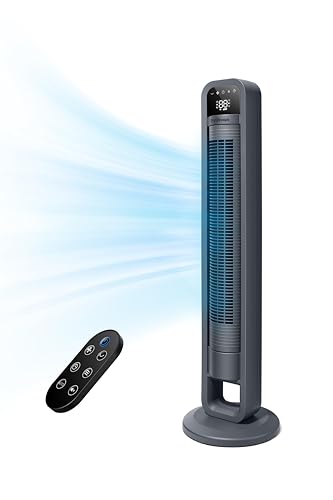
The OmniBreeze model is the only fan here identified as an OmniBreeze, and its controls pair four speeds with Normal, Natural, Sleep, and Auto modes. Auto adjusts fan speed according to room temperature; Sleep gradually slows the airflow, while the display-off and mute functions suit a dark, quiet bedroom. The fan is 38.3 inches tall, despite the 40-inch size label. Its key limitation is that no airflow speed or noise figure is provided, so buyers who want to compare those measurements directly may prefer a model with a figure.
Bottom line: Pick this if you want OmniBreeze branding and temperature-responsive Auto mode.
Levoit 36-Inch Tower Fan

The Levoit distinguishes itself with a built-in temperature sensor, five speeds, and a 12-hour timer. The maker says its airflow reaches 28 feet per second, and the four modes include Auto for adjusting airflow to room temperature. At 36.2 inches tall, it is shorter than the OmniBreeze and uses a white, 6.5-inch-wide profile. This is a useful alternative if temperature-responsive control and a longer timer matter more than matching the OmniBreeze name.
Bottom line: Choose this for a temperature sensor and 12-hour timer.
DREO 36-Inch Tower Fan, 4 Speeds

The DREO 36-inch model gives a precise noise figure of 28 dB and adds an 8-hour timer, unlike the OmniBreeze. The maker also gives airflow speed as 26 feet per second and reach up to 33 feet. It has four speeds, three modes, and 90-degree oscillation in a narrower 8.03-inch footprint. Those measurements help buyers comparing bedroom airflow, but this model has fewer modes than the OmniBreeze and Levoit. Pick it when the noise figure, oscillation, and timer are more useful than temperature-sensing Auto mode.
Bottom line: Pick this when 28 dB noise and an 8-hour timer suit your needs.
DREO 36-Inch Tower Fan, 8 Speeds

The second DREO offers eight speeds, the most among the fans here, while retaining four modes including Auto and Sleep. The maker says airflow reaches 28 feet per second and projects up to 34 feet; the fan has 90-degree oscillation. Its height is 36.22 inches, with an 11.81-inch width and depth, making it less narrow than the 36-inch DREO with four speeds. The maker describes it as quiet-optimized but provides no decibel figure, so buyers who need a numeric noise comparison should consider the other DREO.
Bottom line: Choose this for eight speed settings and an airflow reach.
How to choose a tower fan
Choose a tower fan by matching its control range and airflow direction to the room, not by height alone. Speed settings determine how finely you can tune the breeze, while modes such as Natural and Sleep change the pattern or behavior; Auto uses a temperature sensor when the model has one. Oscillation sweeps airflow across an angle, but a fan’s projection distance is not a guarantee that every seat receives the same breeze. For a bedroom, prioritize a low-speed noise figure if one is available and check whether the display can be dimmed or turned off. For a shared room, compare oscillation angle and the fan’s footprint against the space available around furniture.
What airflow and oscillation figures mean
Air speed in feet per second describes velocity near the fan, while a projection distance describes claimed reach; neither is the same as airflow volume in cubic feet per minute. A 90-degree oscillation angle sweeps a wider arc than a smaller angle, but the fan still needs an unobstructed path. Place a tower fan where its outlet faces the occupied area and avoid blocking it with curtains or furniture. Use a decibel value only as a comparison under similar conditions, since room acoustics and fan speed affect perceived sound. A practical rule: if the fan must reach across a room, favor a model with a projection distance and position it with a clear line of airflow.
| Need | Useful specification | Why it matters |
|---|---|---|
| Nighttime use | Noise figure and Sleep mode | Helps assess sound and gradual airflow changes |
| Air across a seating area | Oscillation angle and reach | Shows sweep and claimed projection |
| Automatic adjustment | Temperature sensor and Auto mode | Allows speed changes based on room temperature |
Tower fan placement and safe use
Set a tower fan on a stable, level floor with its intake and outlet clear; restricted airflow can reduce circulation and increase operating strain. Keep the cord out of walkways and away from areas where it can be pulled, and place the fan where children or pets cannot tip it over or put fingers near openings. Tower fans circulate room air but do not lower the room’s temperature like an air conditioner. For hot conditions, use a fan only as one part of a broader cooling plan, especially for people at higher risk from heat. Keep the fan away from wet floors and splashes because it is an electrical appliance.
Care for a tower fan
Dust the exterior grille regularly and unplug the fan before cleaning; never spray liquid into vents or controls. Tower fan intakes collect lint and pet hair, which can restrict airflow, so inspect the grille every few weeks in a dusty room and clean it when buildup appears. A soft brush or vacuum attachment can remove surface dust without forcing debris inward. Do not open a sealed motor housing unless the manufacturer provides a user-service procedure. For remote models, remove batteries if the remote will sit unused for a long period, and replace them if operation becomes intermittent.
Frequently Asked Questions
Do tower fans cool a room like an air conditioner?
No, a tower fan moves air but does not remove heat from a room. Use air conditioning or another cooling method when lowering room temperature is necessary.
What does 90-degree oscillation mean on a tower fan?
A 90-degree oscillation setting sweeps airflow through an approximately 90-degree arc. Furniture and walls can limit how much of that sweep reaches people.
How often should I clean a tower fan?
Inspect the intake grille every few weeks, especially in rooms with pets or dust. Unplug the fan and clear visible lint before it restricts airflow.
Is a 28 dB tower fan quiet for a bedroom?
A 28 dB figure is a maker-provided noise claim, but room acoustics and operating speed affect what you hear. Compare noise only at similar speeds and conditions.
Can I leave a tower fan running overnight?
Many fans include Sleep modes or timers, but overnight use depends on stable placement and an unobstructed intake and outlet. Keep the cord clear of walkways and the fan out of reach of children.