
Ottocast Mini 3.0 Ultra Cube Adapters Compared

For the named Ottocast Mini Cube 3.0, OTTOCAST Mini Slim Mini Cube 3.0 is the closest match because its name specifies Mini Cube 3.0 and dual USB-A/USB-C ports. Choose another model if you need a different port or dual-phone memory; these adapters require factory-wired CarPlay or Android Auto.
We earn a commission if you buy through links on this page. As an Amazon Associate I earn from qualifying purchases. Products are compared on manufacturer specifications, not hands-on testing.
- Best overall: OTTOCAST Mini Slim Mini Cube 3.0 – Names Mini Cube 3.0 and specifies USB-A/USB-C dual ports.
- Best for dual-band Wi-Fi: OTTOCAST Mini Cube 3.0 2026 Upgrade – Features mention a 2.4 GHz and 5 GHz chipset.
- Best for two phones: OTTOCAST Mini Slim 2026 Upgrade – Features say it can remember two phones.
| Product | Best for | USB port | Wireless connection | Phone memory | Shop |
|---|---|---|---|---|---|
| OTTOCAST Mini Slim Mini Cube 3.0 | Dual-port flexibility | USB-A and USB-C | 5 GHz Wi-Fi; Bluetooth 5.0 | — | Check Price on Amazon |
| OTTOCAST Mini Cube 3.0 2026 Upgrade | Dual-band connection | USB Type-A | 2.4 GHz and 5 GHz Wi-Fi | Remembers two phones | Check Price on Amazon |
| Ottocast Mini Cube 3.0 | USB-A simplicity | USB-A | 5 GHz Wi-Fi; Bluetooth 4.2 | — | Check Price on Amazon |
| OTTOCAST Mini Slim 2026 Upgrade | Two-phone memory | — | 2.4 GHz and 5 GHz Wi-Fi | Remembers two phones | Check Price on Amazon |
| OTTOCAST Mini Nova 2026 Upgrade | AI assistance | — | — | — | Check Price on Amazon |
Ottocast Mini 3.0 Ultra Cube adapters
Compare the Mini Cube 3.0 options with related Ottocast adapters by port and connection features.
OTTOCAST Mini Slim Mini Cube 3.0
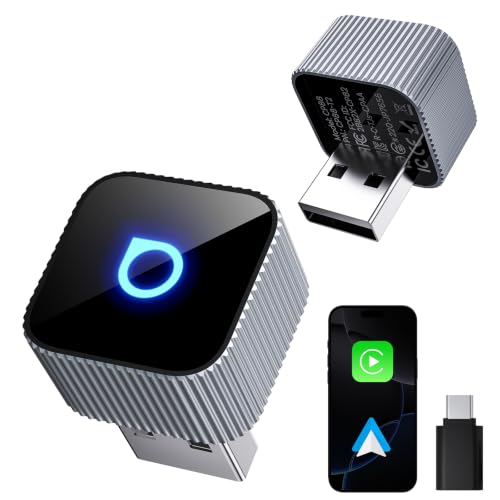
OTTOCAST Mini Slim Mini Cube 3.0 is the only Mini Cube 3.0 model here with USB-A and USB-C ports, so it suits drivers who need flexibility between those connection types. It supports wireless CarPlay and Android Auto in vehicles that already have factory-wired versions; the brand says initial pairing takes about one minute, followed by automatic reconnection in about 5 seconds. Bluetooth 5.0 is specified. This is not a fit for BMW or Tesla, or for a vehicle without factory-wired CarPlay or Android Auto, so confirm the vehicle system before choosing.
Bottom line: Choose this if you need either USB-A or USB-C.
OTTOCAST Mini Cube 3.0 2026 Upgrade

OTTOCAST Mini Cube 3.0 2026 Upgrade stands apart with a 2.4 GHz and 5 GHz dual-band chipset and the ability to remember two phones. The adapter is USB Type-A and is intended to convert factory-wired CarPlay or Android Auto to wireless use. That makes it a better match for a shared car where two drivers alternate, provided both phones and the car system are compatible. Its USB Type-A connection is a limitation if the vehicle only offers USB-C; check the available port before settling on this model.
Bottom line: Pick this for dual-band Wi-Fi and two remembered phones.
Ottocast Mini Cube 3.0
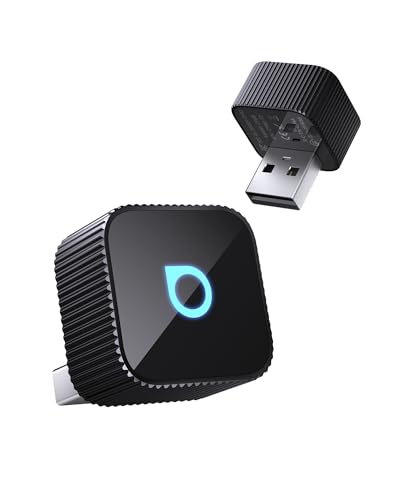
Ottocast Mini Cube 3.0 is a compact USB-A option with 5 GHz Wi-Fi and Bluetooth 4.2, but its product name does not identify it as a dual-port model. The brand says it supports 98% of wired CarPlay and Android Auto vehicles and reconnects automatically; BMW and Tesla are excluded. This suits a driver whose car has a USB-A port and factory-wired phone integration. Bluetooth 4.2 is an older version than the Bluetooth 5.0 specified for OTTOCAST Mini Slim Mini Cube 3.0, so choose another option if that distinction matters to your setup.
Bottom line: Choose this when USB-A is the needed port.
OTTOCAST Mini Slim 2026 Upgrade

OTTOCAST Mini Slim 2026 Upgrade is a related Mini Slim adapter rather than a clearly named Mini Cube 3.0 model. Its dual-band 2.4 GHz and 5 GHz Wi-Fi and two-phone memory suit households that alternate between drivers, and the brand says it auto-connects in 5 to 8 seconds. It is intended for cars with wired CarPlay or Android Auto and is described as compatible with cars after 2016.
Bottom line: Pick this if two-phone memory is the priority.
OTTOCAST Mini Nova 2026 Upgrade

OTTOCAST Mini Nova 2026 Upgrade is the Mini Nova, a related wireless CarPlay and Android Auto adapter rather than a Mini Cube 3.0 model. Its features include built-in AI assistance, and the brand says it reconnects in about 5 seconds after initial pairing. The dimensions are 1.28 by 0.35 by 0.82 inches.
Bottom line: Choose this if the Mini Nova AI feature is the draw.
How to choose a wireless CarPlay adapter
Start with the car’s existing system: these adapters convert factory-wired CarPlay or Android Auto, rather than adding either system to a car that lacks it. Then match the adapter’s connector to the car’s data-capable USB port; a charging-only port will not provide the wired phone interface an adapter needs. For setup, pair the phone through the car’s interface as directed by the adapter maker, then allow the device to reconnect on later starts. If two drivers share the car, prioritize a model that explicitly remembers two phones; otherwise, port compatibility is usually the first decision.
Check vehicle and USB compatibility first
Wireless adapters require a factory-wired CarPlay or Android Auto connection; a Bluetooth-only stereo is not enough. USB-A and USB-C describe connector shapes, not interchangeable vehicle compatibility, so check the car’s actual data port and whether it supports phone projection. A model that advertises broad compatibility still cannot replace a missing factory system. For cars with multiple ports, test the one used for wired CarPlay or Android Auto rather than choosing based only on a port used for charging.
What dual-band Wi-Fi and Bluetooth mean
Dual-band Wi-Fi refers to support for 2.4 GHz and 5 GHz bands, while 5 GHz-only models have a narrower stated band selection. The adapter and phone use wireless links to maintain the CarPlay or Android Auto session; Bluetooth versions can differ between models, as they do here. A higher Bluetooth version alone does not establish a better connection in every vehicle, since phone and head-unit behavior also affect pairing. For a shared car, the explicit two-phone memory claim is a more concrete differentiator than a generic promise of fast reconnection.
Setup and safe driving habits
Initial pairing and later reconnection are separate steps: the first setup may take longer than subsequent starts, and one model notes that vehicle and phone can affect reconnect timing. Complete pairing while parked, and do not handle the phone or adapter while driving. CarPlay and Android Auto are designed for supported phone functions such as navigation, calls and audio; use voice control where available and keep visual interaction brief. Streaming video is not appropriate for the driver, and OTTOCAST Mini Slim 2026 Upgrade explicitly says streaming apps such as YouTube and Netflix are unavailable.
Frequently Asked Questions
Will these adapters add CarPlay to any car?
No. They require factory-wired CarPlay or Android Auto already working through a data-capable USB port. A Bluetooth-only stereo or a car with no factory phone projection will not meet that requirement.
Does a USB-C adapter work in a USB-A port?
A USB-C connector does not physically fit a USB-A port without a suitable adapter, and the vehicle port must also support wired CarPlay or Android Auto data. Match the plug to the port used by the factory system.
How long does initial adapter pairing take?
Initial pairing differs from automatic reconnecting: OTTOCAST Mini Slim Mini Cube 3.0 says its first pairing takes about one minute, while subsequent auto-connect is about 5 seconds. Pair while parked and expect timing to vary by phone and vehicle.
Can two phones share one wireless adapter?
Some models say they remember two phones, including OTTOCAST Mini Cube 3.0 2026 Upgrade and OTTOCAST Mini Slim 2026 Upgrade. The features do not establish that both connect simultaneously, so expect to use one phone connection at a time.
Can I watch videos through these adapters?
No; OTTOCAST Mini Slim 2026 Upgrade specifically says streaming apps such as YouTube and Netflix are unavailable. Keep video viewing out of the driver’s workflow, and complete setup only when parked.