
PCIe to PCI Adapter: 3 Legacy Card Options

StarTech PEX1PCI1 PCIe-to-PCI Adapter is the clearest fit for most buyers because it includes a low-profile bracket solution and supports up to 250 MBps of available bandwidth, according to StarTech. Choose another option if you need two PCI slots or an external USB 3.0 cable connection.
A PCIe-to-PCI adapter bridges two different expansion-card interfaces; confirm your card’s voltage, physical fit and system compatibility before ordering.
We earn a commission if you buy through links on this page. As an Amazon Associate I earn from qualifying purchases. Products are compared on manufacturer specifications, not hands-on testing.
- Best overall: StarTech PEX1PCI1 PCIe-to-PCI Adapter – Includes a half-height bracket adaptation and supports up to 250 MBps of available bandwidth, according to StarTech.
- Best for two cards: ELFJMZP PCIe x1 Dual-PCI Adapter – Provides two PCI slots on a PCIe x1 adapter board.
- Best for cable connection: PCIe-to-PCI Adapter with USB 3.0 Cable – Uses a USB 3.0 cable to connect legacy PCI cards.
| Product | Best for | PCIe host | PCI slots | Connection / power | Shop |
|---|---|---|---|---|---|
| StarTech PEX1PCI1 PCIe-to-PCI Adapter | Low-profile PCI cards | PCIe x1 | 1 | LP4 power connector included | Check Price on Amazon |
| ELFJMZP PCIe x1 Dual-PCI Adapter | Two PCI cards | PCIe x1 | 2 | — | Check Price on Amazon |
| PCIe-to-PCI Adapter with USB 3.0 Cable | Cable-connected setups | — | 1 | USB 3.0 cable | Check Price on Amazon |
| Trotwei LTD18 PCIe-to-PCI Adapter | Legacy 5V cards | PCIe x1/x4/x8/x16 | 1 | — | Check Price on Amazon |
PCIe to PCI adapters
Match the host slot and adapter layout to your card, then verify voltage and physical clearance before choosing.
StarTech PEX1PCI1 PCIe-to-PCI Adapter
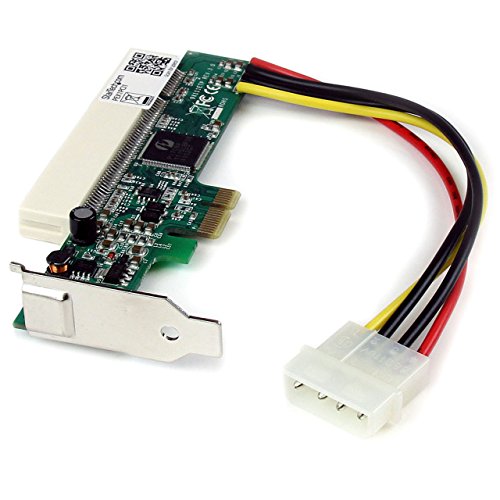
StarTech PEX1PCI1 PCIe-to-PCI Adapter stands out for its low-profile bracket approach: its bracket adapts and secures the existing half-height bracket on a PCI card. StarTech says the card complies with PCI Express Base Specification 1.0a and provides up to 250 MBps of available bandwidth. It includes an LP4 power connector for universal-voltage PCI cards supporting 3.3V or 5V, and requires no driver or software installation. This is a practical match when a compact case or legacy card bracket is the main constraint. It has one PCI slot, so a buyer needing multiple legacy cards should consider a dual-slot board instead.
Bottom line: Pick this when low-profile card fit and a bandwidth figure matter most.
ELFJMZP PCIe x1 Dual-PCI Adapter
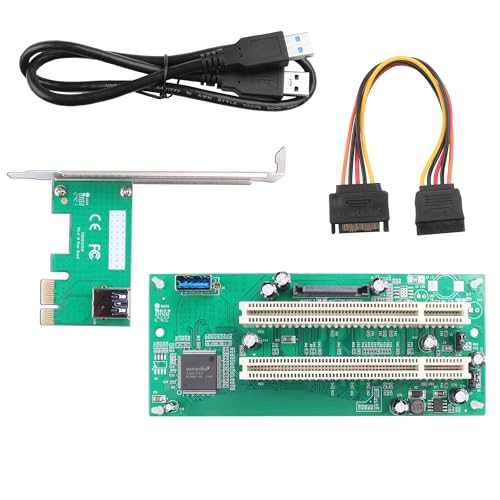
ELFJMZP PCIe x1 Dual-PCI Adapter is the only option here with two PCI slots, making its layout useful when a system needs to retain more than one legacy expansion card. The board has a fixing post intended to keep its solder joints from contacting a surface beneath it, and the maker says the adapter is plug and play without driver installation. Its compatibility text names several legacy Windows versions, Windows NT-series systems, Vista and Linux. That operating-system range does not establish compatibility with every specific PCI card or current system, so buyers with a specialized card should verify that combination before purchase.
Bottom line: Choose this when two PCI cards must connect through one PCIe x1 host slot.
PCIe-to-PCI Adapter with USB 3.0 Cable

PCIe-to-PCI Adapter with USB 3.0 Cable differs from the internal-board options by including a USB 3.0 cable in its PCI expansion-converter design. Its intended uses include legacy sound cards, video-capture cards and other PCI devices; the maker says no additional drivers or software are required. That form can suit a setup where the cable connection is useful, rather than a buyer seeking only a compact internal adapter.
Bottom line: Consider this when the USB 3.0 cable connection fits your setup.
Trotwei LTD18 PCIe-to-PCI Adapter

Trotwei LTD18 PCIe-to-PCI Adapter explicitly targets 32-bit, 5V legacy PCI cards and says it can use PCIe x1, x4, x8 or x16 slots. Trotwei also identifies a 120 × 65 mm mini PCB, 2 oz copper and over-current protection; those are maker claims, not a guarantee that every PCI card will work. This option suits a buyer whose card matches the 5V format and whose desktop has a compatible PCIe slot. Its card-voltage scope is narrower than the StarTech model’s description of universal-voltage cards, so a 3.3V or dual-voltage card owner should confirm fit before selecting it.
Bottom line: Pick this for a 32-bit 5V PCI card and a compatible PCIe slot.
How to choose a PCIe to PCI adapter
Start with the legacy card’s electrical and physical requirements, not just the motherboard slot shape. PCI and PCI Express use different signaling, so a bridge adapter must translate between them; a slot that physically accepts the adapter does not guarantee that a particular card will operate. Conventional 32-bit, 33 MHz PCI has a theoretical peak of about 133 MB/s, while usable throughput is lower and depends on the bridge and card. Check the card’s voltage marking or documentation, bracket height, and any auxiliary power connector. If a card requires 5V PCI and an adapter only supports 3.3V cards, do not assume compatibility. For the choices here, identify whether you need one PCI slot, two, or a cable-connected setup before narrowing by host slot.
PCIe slot fit and legacy PCI voltage
A PCIe x1 card can generally fit in a longer x4, x8 or x16 slot when the slot is open-ended or the card is designed for that fit, but motherboard layout and case clearance still matter. The Trotwei adapter names x1/x4/x8/x16 compatibility, while other products specify different connection details; match the actual board and adapter rather than assuming every combination works. Legacy PCI cards may use 3.3V, 5V, or both, and keyed connectors can help distinguish voltage compatibility. Compare the card’s notch and voltage requirements with the adapter’s supported voltage before installation. Also measure available case space: a low-profile bracket may help with height, but it does not solve clearance conflicts with nearby components.
PCIe to PCI adapter layouts compared
Choose the layout by the number of cards and the connection your case permits. A single-slot bridge is enough for one legacy PCI card; a dual-slot board is relevant only when two PCI cards are needed. Cable-connected adapters may move the card away from the motherboard, but cable design alone does not establish device compatibility or power delivery. The table summarizes the meaningful distinctions in these options.
| Need | Adapter layout | Check before choosing |
|---|---|---|
| One low-profile card | Single PCI slot with adapted bracket | Bracket and voltage fit |
| Two legacy cards | Dual-PCI slots | Card clearance and power |
| Separate cable connection | PCI adapter with USB 3.0 cable | Host slot and power path |
| 32-bit 5V card | Adapter explicitly supporting 5V | Card keying and system fit |
Installation and compatibility checks
Power down and unplug a desktop before installing or removing an expansion card; handling powered internal components risks damage and electrical injury. Secure the adapter and card so the board cannot sag or touch the case, and connect auxiliary power only when the adapter requires it. A no-driver claim refers to the bridge adapter, not necessarily the older PCI device: operating systems may still need a device driver for a sound, capture or controller card. Before installation, check whether the card’s manufacturer supports your operating system and whether the motherboard firmware exposes the slot correctly. For a system-critical controller, confirm function with the specific card model and host platform before committing the machine to that hardware.
Frequently Asked Questions
Can a PCIe x1 adapter fit in a PCIe x16 slot?
Often, a PCIe x1 card can fit in an x16 slot because the x16 connector is longer. A closed-ended slot or physical obstruction can prevent installation, and the adapter’s own compatibility still matters.
Will a PCIe to PCI adapter work with every old PCI card?
No, compatibility depends on the card’s voltage, physical format, operating system driver and bridge support. Check the card’s keying and power needs; conventional 32-bit, 33 MHz PCI has a theoretical peak of about 133 MB/s, but that does not promise the same usable speed through a bridge.
Does a PCIe to PCI adapter need a device driver?
The adapter may not need a separate driver, but the PCI card can still require its own operating-system driver. Verify support for the exact card model and operating system before installing it.
What does 3.3V or 5V PCI compatibility mean?
It refers to the voltage supported by the legacy PCI card and adapter, not the PCIe slot’s connector shape. Compare the card’s notch or documentation with the adapter’s voltage support, since a mismatch can prevent operation or cause damage.
Can I use two PCI cards with one adapter?
Only an adapter with two PCI slots is intended for two cards; a one-slot bridge cannot connect both simultaneously. Check that both cards fit around one another and that the system can supply any required auxiliary power.