
Pet Cameras With Phone Apps: 3 Models Compared

For the clearest video and app alerts for pet, person, and crying detection, choose Anona 4K Indoor Camera, 2-Pack, which combines 4K video with 360-degree pan and 110-degree tilt. Choose Tapo C210 2K Pan-Tilt Camera instead if you want microSD recording up to 512GB, or Tapo C100 1080p Indoor Camera if 1080p is sufficient.
Indoor pet cameras send live video and notifications to a phone app over Wi-Fi; confirm your home network band is compatible before choosing.
We earn a commission if you buy through links on this page. As an Amazon Associate I earn from qualifying purchases. Products are compared on manufacturer specifications, not hands-on testing.
- Best overall: Anona 4K Indoor Camera, 2-Pack – Pairs 4K video and 8× zoom with app alerts for pet, person, and crying detection.
- Best for local storage: Tapo C210 2K Pan-Tilt Camera – Supports microSD cards up to 512GB without requiring a cloud-storage subscription.
- Best for simple monitoring: Tapo C100 1080p Indoor Camera – Offers 1080p video, two-way audio, and app-based pet monitoring.
| Product | Best for | Video resolution | Pan and tilt | Storage | Shop |
|---|---|---|---|---|---|
| Anona 4K Indoor Camera, 2-Pack | Sharper video | 4K UHD | 360° pan; 110° tilt | — | Check Price on Amazon |
| Tapo C210 2K Pan-Tilt Camera | Local recording | 2K | 360° pan; 114° tilt | microSD up to 512GB | Check Price on Amazon |
| Tapo C100 1080p Indoor Camera | Basic monitoring | 1080p | — | microSD and cloud | Check Price on Amazon |
Pet Cameras With Phone Apps
Compare resolution, room coverage, and recording options to find a camera suited to your pet-monitoring setup.
Anona 4K Indoor Camera, 2-Pack
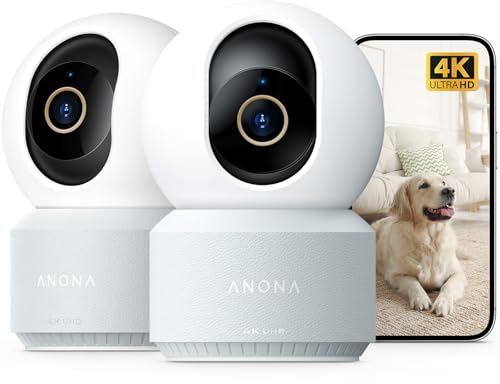
For higher-resolution video and a two-camera setup, this Anona pair offers 4K UHD capture and 8× zoom. The maker says its app can send alerts for detected pets, people, and baby crying, and describes auto-tracking and two-way audio among its features. Dual-band Wi-Fi 6 supports 2.4GHz and 5GHz networks, a useful distinction if your router offers both bands. The 360-degree pan and 110-degree tilt help cover a room from a fixed position. This is the clearest fit for buyers prioritizing image detail, but the features do not establish a storage option, so choose another model if local recording is essential.
Bottom line: Choose this pair if 4K video, zoom, and two-camera coverage matter most.
Tapo C210 2K Pan-Tilt Camera

For buyers who want a defined local-recording option, the Tapo C210 supports microSD cards up to 512GB alongside optional cloud storage. It records in 2K and provides 360-degree horizontal and 114-degree vertical pan/tilt coverage, giving it a slightly wider stated tilt range than the other models here. The maker says it can send motion, person, and baby-crying notifications; it also includes two-way audio and a siren. The 2.4GHz Wi-Fi requirement is a constraint for homes that rely only on 5GHz Wi-Fi, so check router settings before choosing it.
Bottom line: Pick this camera if you want 2K video and a microSD recording option.
Tapo C100 1080p Indoor Camera

For straightforward monitoring rather than pan-and-tilt coverage, the Tapo C100 is a wired 1080p camera with two-way audio and a built-in siren. The maker says its app can send motion and person alerts, with baby-crying detection also supported, and describes night vision up to 30 feet. Cloud and SD-card storage are supported, though the features do not give an SD-card capacity. Its lower resolution and lack of a pan/tilt range make it a less suitable choice for seeing fine detail or sweeping across a room; it better suits a fixed view where 1080p is enough.
Bottom line: Choose it for a fixed-view setup with 1080p video and two-way audio.
How to choose a pet camera with a phone app
Start with what you need to see: resolution, room coverage, alerts, and recording method answer different needs. Higher resolution can reveal more image detail, but it does not guarantee useful alerts or footage if the camera is poorly positioned. Pan-and-tilt models can move their view remotely; a fixed camera needs a clear line of sight to the area you want to monitor. For storage, distinguish local microSD recording from cloud storage, which may require a service plan. A practical rule: if you want a camera to cover more than one side of a room, prioritize a model with pan/tilt movement; for a single crate or doorway, a fixed view may be enough. Check the Wi-Fi band before buying, since some indoor cameras require 2.4GHz.
Wi-Fi, placement, and app setup
Place an indoor camera where it can see the pet’s usual resting or play area without furniture blocking the lens. A raised, stable position often gives a broader view, but avoid aiming directly at bright windows, which can make indoor footage harder to interpret. Wi-Fi band compatibility matters: the C210 requires 2.4GHz, while the Anona camera supports 2.4GHz and 5GHz. A dual-band router does not necessarily mean every device can join either band, so check which network name and band the camera setup requires. Keep the camera away from water bowls, heaters, and chewable cords; wired models should be positioned so pets cannot pull or bite the cable.
Local recording and cloud storage compared
Local storage keeps recordings on a card in the camera, while cloud storage places recordings on a service account. The C210 supports microSD cards up to 512GB, and the C100 supports SD-card and cloud storage; the Anona specifications do not establish a recording-storage choice. Choose local recording when you want an option that does not rely on a cloud plan, and check the supported card capacity before buying any model. For cloud recording, confirm whether a plan is needed and how long clips remain available, because live viewing and stored clips are different functions. A camera’s notification feature alone does not mean it saves a video of every alert.
Privacy and safe use around pets
Use privacy settings when an indoor camera does not need to record, and place the lens away from areas where household members expect privacy. The Anona camera includes a privacy mode, while the other products’ features do not establish that setting. App-connected cameras also depend on account access: use a unique password and enable two-step verification if the app offers it. For pet safety, keep the camera, power adapter, and cable out of reach; cords can be chewed or pulled, and a camera can fall if mounted where an animal can knock it down. Two-way audio can let you speak through a camera, but it is not a substitute for checking a distressed or injured pet in person.
Frequently Asked Questions
Can a pet camera work on 5GHz Wi-Fi?
Some models support 5GHz, but others require 2.4GHz. The C210 requires 2.4GHz, while the Anona model supports both 2.4GHz and 5GHz; verify that your router broadcasts a compatible band.
Does a pet camera need a microSD card?
A microSD card is needed only if you want to use a camera’s supported local recording feature. The C210 accepts cards up to 512GB, while the C100 also supports SD-card storage; live app viewing is a separate function.
Where should I place an indoor pet camera?
Place the camera on a stable surface with an unobstructed view of the pet’s usual area. Keep it away from water, heat, and chewable cords, and avoid pointing it directly toward a bright window.
Are two-way audio and alerts the same feature?
No; two-way audio lets you speak through the camera, while alerts are app notifications triggered by events the camera detects. Check that the specific alert types you want, such as motion or pet detection, are supported.
Can I use a pet camera to monitor my pet at night?
Night monitoring depends on a camera’s night-vision capability and placement. The C100 specifies night vision up to 30 feet; keep the camera’s view clear and avoid assuming every model has the same range.