
Pink Gaming PC and Monitor: 4 Picks Compared

For a pink gaming PC and monitor setup, pair the HELLOLAND tower HELLOLAND Pink RGB Gaming Desktop with the Raywego 34-inch display Raywego 34-Inch Curved UWQHD Monitor if you want a 3440 × 1440 ultrawide at 165Hz. The tower and monitors are separate products, so choose a different display if you prefer a smaller screen or higher refresh rate.
We earn a commission if you buy through links on this page. As an Amazon Associate I earn from qualifying purchases. Products are compared on manufacturer specifications, not hands-on testing.
- Best overall: Raywego 34-Inch Curved UWQHD Monitor – Its 34-inch UWQHD panel combines 3440 × 1440 resolution with a 165Hz refresh rate.
- Best for a pink gaming tower: HELLOLAND Pink RGB Gaming Desktop – It pairs a Ryzen 7 5700X and RTX 5060 with 32GB RAM and a 1TB SSD.
- Best for compact high refresh: SKitphrati 24-Inch FHD IPS Monitor – Its 24-inch Full HD panel has a 200Hz refresh rate.
| Product | Best for | Screen size | Resolution | Refresh rate | Shop |
|---|---|---|---|---|---|
| HELLOLAND Pink RGB Gaming Desktop | Gaming desktop | — | — | — | Check Price on Amazon |
| Raywego 34-Inch Curved UWQHD Monitor | Ultrawide gaming | 34 inches | 3440 × 1440 | 165Hz | Check Price on Amazon |
| CUNPU 27-Inch 1440p IPS Monitor | Adjustable stand | 27 inches | 2560 × 1440 | 180Hz | Check Price on Amazon |
| SKitphrati 24-Inch FHD IPS Monitor | Compact high refresh | 24 inches | 1920 × 1080 | 200Hz | Check Price on Amazon |
Pink Gaming PC and Monitor Picks
Choose the desktop for the computer hardware, then select a separate monitor to match your space and preferred gameplay.
HELLOLAND Pink RGB Gaming Desktop

The only desktop in this group, the HELLOLAND combines a Ryzen 7 5700X processor with a GeForce RTX 5060 8GB graphics card, 32GB DDR4 memory, and a 1TB PCIe SSD. It also includes a 240mm liquid cooler, RGB lighting, and Windows 11. The maker claims high frame rates in supported games, but actual results vary by title, settings, and display. This choice suits someone seeking a complete pink tower rather than an all-in-one PC-and-monitor bundle; you will need to choose a monitor separately.
Bottom line: Choose this if you need a pink gaming tower and want to select a separate display.
Raywego 34-Inch Curved UWQHD Monitor
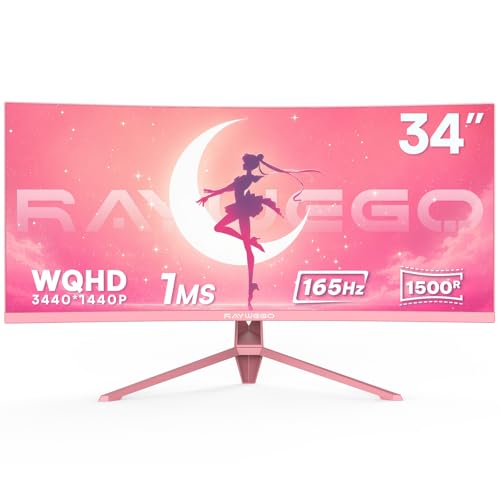
The 34-inch curved ultrawide is the largest gaming-focused display here, with a 21:9 aspect ratio and 3440 × 1440 resolution. Its 1500R curve, 165Hz refresh rate, 1ms MPRT response time, and FreeSync suit immersive gaming and multitasking. Picture-in-picture and picture-by-picture modes can show two sources, and the monitor has HDMI 2.0, DisplayPort 1.4, and a 100 × 100 VESA mount pattern. Its width calls for more desk space than the smaller options, so measure your available surface before choosing it.
Bottom line: Pick this for a wide gaming view and enough desk space for a 34-inch display.
CUNPU 27-Inch 1440p IPS Monitor

The 27-inch CUNPU stands out with a height-, swivel-, tilt-, and pivot-adjustable stand, giving more positioning options than the other gaming monitors. Its 1440p fast IPS panel runs at up to 180Hz with a claimed 1ms GTG response time, and the maker identifies Adaptive Sync support. It also has built-in speakers and 90% DCI-P3 coverage. This is a strong match for a desk where monitor positioning matters, though the 27-inch screen is not as wide as the 34-inch ultrawide.
Bottom line: Choose this if an adjustable stand and a 1440p panel are priorities.
SKitphrati 24-Inch FHD IPS Monitor

The SKitphrati is the smallest gaming display here and has the highest refresh rate, at 200Hz. Its 24-inch Full HD fast IPS panel also lists a 1ms GTG response time, Adaptive Sync, and built-in speakers. HDMI and DisplayPort provide connection choices. The smaller 1080p format can be a practical fit for a compact desk or a player focused on fast-paced games, but it offers less screen area and resolution than the 27-inch 1440p and 34-inch UWQHD options.
Bottom line: Pick this for a compact setup where refresh rate matters more than screen resolution.
How to choose a pink gaming PC and monitor
Choose the desktop and monitor as separate components unless a product explicitly includes both; these picks are standalone devices. A practical match is a monitor whose resolution and refresh target fit the games and computer you intend to run. The desktop’s maker claims 1080p competitive frame rates and 1440p play at medium-high settings, but results depend on each game and settings. For fast esports-style play, prioritize refresh rate; for more workspace and detail, favor a higher resolution or ultrawide format. Check that the monitor’s inputs match the computer’s video outputs before purchase. Measure the desk as well: the 34-inch model is 31.7 inches wide, compared with 21.3 inches for the 24-inch screen.
Monitor sizes and resolutions compared
Screen size and pixel resolution determine how much fits on screen and how much desk space it takes. Full HD means 1920 × 1080, while 1440p here is 2560 × 1440; the 34-inch UWQHD model uses 3440 × 1440 across a wider 21:9 panel. The same resolution spread over a larger display gives a less dense image, while ultrawide panels need more horizontal desk space. Use the chart to narrow the form factor before comparing stand features or refresh rates.
| Display format | Resolution | Best fit |
|---|---|---|
| 24-inch Full HD | 1920 × 1080 | Compact desk and high refresh |
| 27-inch Full HD | 1920 × 1080 | Everyday tasks and casual games |
| 27-inch 1440p | 2560 × 1440 | Higher detail at a standard width |
| 34-inch UWQHD | 3440 × 1440 | Wide workspace and immersive play |
Refresh rate and response time for gaming
Refresh rate is the number of times a display updates each second: 100Hz refreshes 100 times per second, while 200Hz refreshes 200 times. Higher refresh can make motion look smoother, but the computer must generate enough frames to take advantage of it. Response time is a separate measure of pixel transitions, and MPRT and GTG methods are not directly interchangeable. Adaptive Sync can coordinate a display’s refresh with compatible graphics output to reduce tearing. For a compact competitive setup, prioritize refresh rate; for a higher-detail experience, balance refresh against resolution and the game’s performance.
Desk fit, connections, and setup safety
Measure the usable desk width and depth before selecting a large screen; the 34-inch monitor is 31.7 inches wide, while the 27-inch CUNPU is 24.11 inches wide. The 34-inch model supports a 100 × 100 VESA mount, which identifies its mounting-hole spacing, not the weight capacity of an arm. Confirm that any mount is rated for the display’s weight and size. Check available HDMI or DisplayPort connections across the PC and monitor, and use a cable and port combination capable of the resolution and refresh you want. Keep ventilation openings on a desktop tower unobstructed so heat can escape.
Frequently Asked Questions
Does the pink gaming PC include a monitor?
No, the HELLOLAND product is a desktop tower, and the monitors are separate products. Choose a screen separately and verify its inputs match the graphics card’s available outputs.
What resolution is best for a 27-inch gaming monitor?
Both 1080p and 1440p are available in 27-inch pink monitors here. Choose 1440p when image detail matters more, or Full HD when you prefer the lower pixel workload and everyday use is the priority.
Is a 200Hz monitor better than a 165Hz monitor?
A 200Hz screen can refresh 35 more times per second than a 165Hz screen, but the PC must produce enough frames for that difference to matter. The 24-inch 200Hz option is Full HD, while the 34-inch 165Hz option is UWQHD.
How much desk space does a 34-inch ultrawide need?
The 34-inch Raywego measures 31.7 inches wide, so reserve at least that much clear desk width plus room for cables and peripherals. Measure desk depth too, since viewing distance and stand placement affect comfort.
Can I mount a pink gaming monitor on an arm?
The 34-inch Raywego has a 100 × 100 VESA pattern, which is the spacing between its mounting holes in millimeters. Match the arm’s VESA plate and weight rating to the monitor before mounting it.