
PlayStation 4 Pro Cooler Fan: 3 Options Compared

For most players who want added cooling without opening the console, Linkhood Five-Fan USB Cooler for PS4 Pro is the fit: it attaches externally, uses the console’s USB port, and offers normal and turbo speeds. Choose an internal replacement such as YHZONE Internal Fan for PS4 Pro CUH-7XXX or Siakoocty Internal Fan for PS4 Pro CUH-7XXX only if you are replacing a fan inside a compatible PS4 Pro.
A cooler fan is either an add-on that moves air around the console or a replacement part installed inside it; those are different jobs, not interchangeable accessories.
We earn a commission if you buy through links on this page. As an Amazon Associate I earn from qualifying purchases. Products are compared on manufacturer specifications, not hands-on testing.
- Best overall: Linkhood Five-Fan USB Cooler for PS4 Pro – External five-fan cooler with normal and turbo modes, plus continuous and temperature-sensor operation.
- Best for CUH-7XXX repair: YHZONE Internal Fan for PS4 Pro CUH-7XXX – Internal replacement explicitly lists CUH-7XXX compatibility and includes thermal compound and a screwdriver.
- Best for 3-pin replacement: Siakoocty Internal Fan for PS4 Pro CUH-7XXX – Internal replacement specifies a 3-pin power connection and lists CUH-7000 and CUH-7500 models.
| Product | Best for | Fan type | Compatibility | Power or connection | Shop |
|---|---|---|---|---|---|
| Linkhood Five-Fan USB Cooler for PS4 Pro | External cooling | External, 5 fans | PS4 Pro; not PS4 or Slim | USB, DC 5V | Check Price on Amazon |
| YHZONE Internal Fan for PS4 Pro CUH-7XXX | CUH-7XXX repair | Internal replacement | PS4 Pro CUH-7XXX | Fan connector; screwdriver included | Check Price on Amazon |
| Siakoocty Internal Fan for PS4 Pro CUH-7XXX | 3-pin fan swap | Internal replacement | PS4 Pro CUH-7000/7500 | 3-pin connection | Check Price on Amazon |
PlayStation 4 Pro Cooler Fans
Start by deciding whether you need an external accessory or a replacement fan for a specific console model.
Linkhood Five-Fan USB Cooler for PS4 Pro
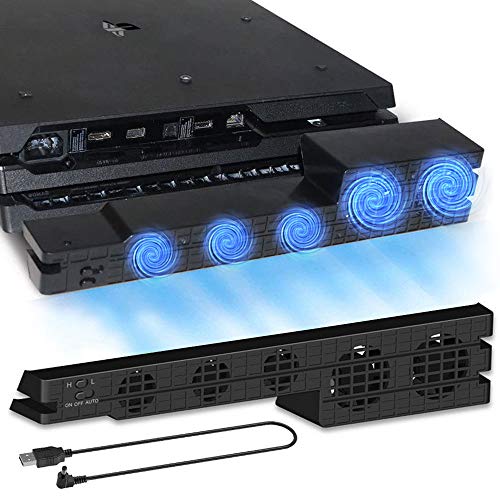
Unlike the internal parts below, this is an external cooler that connects to the console’s USB port. It has five fans, normal and turbo speed settings, and a choice between continuous operation and an auto mode that uses a temperature sensor. Its dimensions are 8.46 by 2.28 by 1.81 inches. The maker says the cooler runs from the console’s 5V USB power, so it does not need a separate power supply. Choose it if you want an add-on rather than a repair part; it is not designed for the PS4 or PS4 Slim.
Bottom line: Pick this if you want an external USB cooler and do not plan to open the console.
YHZONE Internal Fan for PS4 Pro CUH-7XXX

This is an internal replacement, not an accessory cooler, and its CUH-7XXX compatibility is the key distinction. The package includes one fan, thermal compound, and a screwdriver. Its compatibility examples include CUH-7000, CUH-7115B, and CUH-7215B; the product specifically excludes CUH-10XX, CUH-11XX, and PS4 Slim CUH-2XXX consoles. Match the full model code on your console before choosing a repair part, since a similar-looking PS4 model can use a different fan. This option suits a compatible-console repair, but not anyone seeking a fan that attaches externally or installs without disassembly.
Bottom line: Pick this for an internal fan replacement after confirming your console is CUH-7XXX.
Siakoocty Internal Fan for PS4 Pro CUH-7XXX
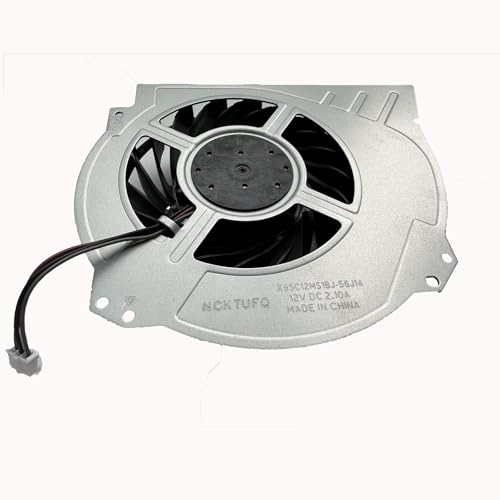
The specific 3-pin power connection sets this internal replacement apart from the external USB cooler. Compatibility includes PS4 Pro CUH-7XXX, CUH-7000, and CUH-7500, with part numbers G95C12MS1CJ-56J14 and G95C12MS1AJ-56J14. The package includes one fan and the maker states a 365-day warranty. Use the part-number and model-code match to narrow the choice before beginning a repair. This option is for replacing an internal fan; buyers looking for a plug-in cooling accessory should choose an external unit instead.
Bottom line: Pick this when your compatible PS4 Pro needs a 3-pin internal fan replacement.
How to Choose a PS4 Pro Cooler Fan
Choose an external cooler for added airflow without opening the console, and an internal replacement only when repairing the fan inside a matching PS4 Pro. The external unit here uses USB power and has selectable speeds; the replacements are model-specific parts that require installation. Read the full CUH model code from the console before selecting an internal fan, because PS4, PS4 Slim, and PS4 Pro parts are not automatically interchangeable. A practical rule: if you do not intend to disassemble the console, choose an external accessory rather than an internal fan.
PS4 Pro Fan Compatibility and Model Codes
Match an internal replacement to the console’s complete CUH code and, where available, the existing fan’s part number. The internal choices here name CUH-7XXX-family compatibility, while one explicitly rules out CUH-10XX and CUH-11XX PS4 models and CUH-2XXX Slim models. Product names may include several overlapping model codes, so compare the console label rather than relying on the phrase “PS4 fan.” Use this table to identify the kind of fit you need, then confirm the exact model before ordering an internal part.
| Need | Choose | Fit check |
|---|---|---|
| Added airflow without repair | External USB cooler | PS4 Pro, not PS4 or Slim |
| Replace internal fan | Internal replacement | CUH-7XXX code and connector/part number |
Installing an Internal PS4 Pro Fan Safely
An internal fan replacement requires opening the console, while an external cooler does not. Disconnect the console from power before opening it, keep screws organized by location, and avoid pulling on fan wires or nearby connectors. Small console connectors and ribbon cables can be damaged by force, so use a suitable precision tool and stop if a connector resists. Thermal compound is intended for the processor-to-heatsink contact, not as a general lubricant or adhesive. If you are not comfortable handling small connectors or applying thermal compound, have a repair professional do the installation. Confirm the fan connector and model compatibility before reassembly rather than forcing a part that does not align.
Frequently Asked Questions
How do I find my PS4 Pro model number?
Check the console’s label for its CUH code, which identifies the model family. Compare the complete code with the internal fan’s compatibility list; a broad “PS4” label is not enough to confirm a fit.
Can I use a PS4 Slim cooling fan in a PS4 Pro?
Do not assume the fans are interchangeable: the internal replacement described here excludes PS4 Slim CUH-2XXX models. Match the CUH code and fan part number before buying a replacement.
Does an external PS4 Pro cooler need its own power?
The Linkhood external cooler draws DC 5V through the console’s USB port, so it does not require a separate power supply. Keep the console’s ventilation openings unobstructed when positioning any add-on cooler.
Should I replace a PS4 Pro fan or add an external cooler?
Replace the internal fan when the repair is specifically a failed or damaged fan and the part matches the console; choose an external cooler when you want an add-on without opening the system. Internal replacement requires disassembly, while an external unit connects by USB.