
Reading Pens for Adults: 5 Models Compared

The Scanmarker Pal suits many adults because it reads scanned text aloud and highlights words on its screen. Choose a different model if you need a scanner that connects to a computer or phone, a larger touchscreen, or a different mix of translation languages.
We earn a commission if you buy through links on this page. As an Amazon Associate I earn from qualifying purchases. Products are compared on manufacturer specifications, not hands-on testing.
- Best overall: Scanmarker Pal – Reads text aloud with highlighted words on screen and supports translation in over 100 languages.
- Best for connected workflows: Scanmarker Air – Sends scanned text to a web app and works with computers and mobile devices.
- Best for a large screen: 4.3-Inch Translation Reading Pen – Has a 4.3-inch touchscreen and supports 142 online and 10 offline translation languages.
| Product | Best for | Operation | Translation languages | Screen | Shop |
|---|---|---|---|---|---|
| Scanmarker Pal | Reading and translation | Pen reader; reads aloud | Over 100; 5 offline | On-screen highlighting | Check Price on Amazon |
| Scanmarker Pro | Standalone reading | Standalone; reads aloud | Over 100; 5 offline | On-screen highlighting | Check Price on Amazon |
| Scanmarker Air | Connected workflows | Requires connected device | Over 140 | — | Check Price on Amazon |
| VORMOR AI Translator Reading Pen | Fast line scanning | Pen reader; reads aloud | 75 scan online; 150 voice | — | Check Price on Amazon |
| 4.3-Inch Translation Reading Pen | Large touchscreen | Pen reader; reads aloud | 142 online; 10 offline | 4.3-inch touchscreen | Check Price on Amazon |
Reading Pens for Adults
Compare how each pen reads scanned text, handles translation and fits into your reading setup.
Scanmarker Pal

The Scanmarker Pal combines spoken reading with on-screen word highlighting, while its translation support covers over 100 languages. The maker says offline translation works in English, Spanish, French, German and Italian. That combination suits adults who want to listen to printed text and use a single device for language learning or travel. The feature set centers on reading and translation rather than saving text into a computer workflow, so choose another option if sending scans to a connected device is essential. The size is Pal, and its weight is 0.0125.
Bottom line: Choose this if spoken reading and highlighted text matter more than connected scanning.
Scanmarker Pro

The Scanmarker Pro is explicitly a standalone pen, unlike a scanner that needs a computer or mobile device to operate. It reads scanned text aloud and highlights words on its screen, making it a fit for adults who want reading support without routing scans to another device. The maker says it translates over 100 languages online and supports offline translation in English, Spanish, French, German and Italian. Its black color distinguishes the version; choose a connected scanner instead if moving scanned text into another application is your priority.
Bottom line: Choose this for reading aloud without a computer or phone connection.
Scanmarker Air
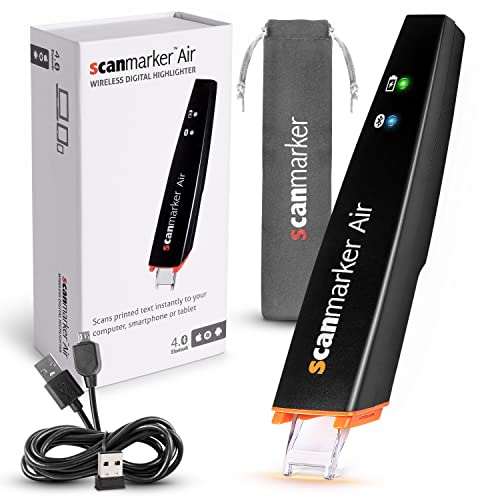
The Scanmarker Air requires a computer or mobile device to operate, making it the connected-workflow choice rather than a standalone reader. Scanned printed text appears on the screen through its web app, and the maker says its OCR supports over 140 languages and can integrate with applications such as Microsoft Word. This setup suits adults who want to work with scanned text in a digital workflow. It is a poor fit if you need the pen to read independently without a connected device. The scanner measures 5 inches long, 0.9 inches wide and 0.7 inches high.
Bottom line: Choose this when sending scans into a connected app matters more than standalone reading.
VORMOR AI Translator Reading Pen

The VORMOR AI pen emphasizes fast line scanning: the maker says it scans 3,000 characters per minute and can scan and translate a line within one second. The maker also claims 98% accuracy, online scan translation in 75 languages and real-time voice translation in 150. It reads the original text and translation aloud, and supports offline use. This suits adults who want spoken output alongside translation. The accuracy and speed claims are manufacturer performance claims, not a guarantee for every font or page; choose a model with a known screen size if larger on-device text is important.
Bottom line: Choose this for claimed fast line scanning and spoken translation.
4.3-Inch Translation Reading Pen

The 4.3-inch touchscreen sets this reading pen apart for adults who want a larger on-device display. It scans printed text and reads it aloud; the maker says it supports 142 online and 10 offline translation languages. Enlarged fonts and left- and right-handed scanning are also included in the feature set. This may suit someone who prefers a larger touch interface while reading or translating. Its wider body measures 1.3 inches across, so adults seeking a narrower pen-shaped scanner may prefer a more compact option. The length is 6.27 inches.
Bottom line: Choose this if a 4.3-inch display and enlarged fonts are priorities.
How to Choose a Reading Pen for Adults
Start by deciding whether you need spoken reading, digital text capture, or both. A reading pen scans printed characters with optical character recognition (OCR); text-to-speech then converts recognized text into spoken output. OCR depends on the print being legible and the scanner moving across the text cleanly, so compare the operating mode with the way you read. If you want to scan without carrying or connecting a phone or computer, choose a model explicitly described as standalone. If you want scanned words in a document or web app, a connected model may fit better. Translation language counts matter only if they include the languages you use; check online and offline coverage separately, since they can differ.
Standalone and Connected Reading Pens
A standalone pen can perform its reading function without a computer or phone, while a connected scanner relies on another device or application. That difference affects where you can use it and whether scanned text can flow into a digital workflow. For adults who read away from a desk, independent operation can reduce setup steps; for document work, app integration may matter more. The table groups the main choice by use rather than treating one operating style as universally better.
| Need | Choose | Tradeoff |
|---|---|---|
| Read aloud away from a connected device | Standalone reader | Digital handoff may be limited |
| Move scanned text into an app | Connected scanner | Requires a compatible connected device |
| Read and translate offline | Check offline language support | Offline languages may be fewer than online |
With no access to a compatible phone or computer during reading, choose a standalone model rather than a connected-only scanner.
Scanning Printed Text Clearly
OCR works best when the scanner can distinguish dark characters from a light, uncluttered background. Keep the pen aligned with one printed line and move steadily; tilted movement, curved pages, small type or low contrast can make character recognition harder. A ruler or finger below the line can help maintain a straight path without covering the text. Reading pens are designed for printed text, not handwriting, and dense tables or multi-column pages can be difficult because the scanner may capture the wrong line. For regular use with books or forms, check the scan direction and supported text layout before relying on a pen for long passages.
Translation and Offline Use
Translation counts do not tell the whole story: a device may offer more languages online than offline, and voice translation can use a different language set from scanned-text translation. Confirm the exact source and target languages you need, plus whether the feature works without internet access. Offline support is useful when traveling or reading where a network is unavailable, but it may cover only a smaller group of languages. A printed-text translator also does not guarantee that every sentence or specialized term will translate cleanly; verify important passages against a trusted bilingual source. Use the spoken original-text function when the goal is reading assistance rather than translation.
Frequently Asked Questions
Can a reading pen read a whole page at once?
Most pen scanners capture a line as you guide the sensor over printed text, rather than scanning an entire page in one pass. For full pages, a flatbed or camera-based scanner is a more suitable type of device.
Do reading pens work without internet access?
Some support offline features, but the available language set can be smaller than the online set. Check that your required language is included for the specific offline function before relying on it away from a network.
Can a reading pen scan handwriting?
These products are described for scanning printed text, not handwriting. Handwritten characters vary in shape and spacing, so use a tool specifically designed for handwriting recognition if that is your main task.
Will a reading pen work with every book font?
OCR needs clear contrast and distinct printed characters, so unusually small, decorative or faint type may be harder to recognize. Test a short line in the same print style before scanning a long passage.
What does a standalone reading pen mean?
A standalone reading pen performs its reading function without needing a connected computer or phone. A connected scanner depends on another device or app, which can be useful when you need to move the scanned text into digital documents.