
Realtek RTL8821CE 802.11ac Adapters Compared by Fit

The Realtek RTL8821CE PCIe WLAN card is the closest match for a system that needs an RTL8821CE Wi-Fi adapter, and its M.2 format is the key fit check. Choose the 2230 replacement if that is the required card size; the remaining options are wired Ethernet adapters or a different wireless module.
RTL8821CE cards are Wi-Fi modules, not Ethernet cards. Before ordering, confirm the computer accepts the module’s physical format and connection.
We earn a commission if you buy through links on this page. As an Amazon Associate I earn from qualifying purchases. Products are compared on manufacturer specifications, not hands-on testing.
- Best overall: Realtek RTL8821CE M.2 WLAN Card – It names the RTL8821CE chip and has an M.2 card format.
- Best for 2230 fit: RTL8821CE 2230 WiFi Card – It explicitly identifies an RTL8821CE 2230 replacement.
- Best for wired gigabit: StarTech RTL8111H Gigabit PCIe NIC – It adds a Realtek RTL8111H Gigabit Ethernet interface.
| Product | Best for | Wireless or wired | Card format | Network capability | Shop |
|---|---|---|---|---|---|
| Realtek RTL8821CE M.2 WLAN Card | RTL8821CE M.2 fit | Wireless WLAN | M.2 | 802.11ac | Check Price on Amazon |
| RTL8821CE 2230 WiFi Card | 2230 replacement | Wireless Wi-Fi | 2230 | 802.11ac | Check Price on Amazon |
| StarTech RTL8111H Gigabit PCIe NIC | Wired gigabit Ethernet | Wired Ethernet | PCIe x1–x16 | 10/100/1000 Mbps | Check Price on Amazon |
| Realtek RTL8125B 2.5G PCIe Card | Faster wired Ethernet | Wired Ethernet | PCIe | 2.5/1/0.1 Gbps | Check Price on Amazon |
| Deal4GO Intel 3165NGW Wi-Fi Module | Different Wi-Fi chipset | Wireless Wi-Fi | M.2 NGFF | 433 Mbps at 5 GHz | Check Price on Amazon |
Realtek RTL8821CE 802.11ac adapters
Match the module format and network type to the computer before choosing among these related adapters.
Realtek RTL8821CE M.2 WLAN Card

This is the direct match for a search for an RTL8821CE adapter: the card name identifies the chipset, and its M.2 format distinguishes it from the 2230 replacement and wired PCIe cards. Its name also includes Bluetooth 4.2. It suits a system that uses this specific M.2 WLAN module and needs wireless networking. The critical limitation is physical compatibility: M.2 modules come in different keying and interface configurations, so the M.2 label alone does not establish that a particular computer can use this card.
Bottom line: Choose this when your computer is confirmed to take an RTL8821CE M.2 WLAN module.
RTL8821CE 2230 WiFi Card

The 2230 size designation sets this RTL8821CE replacement apart from the M.2 card identified only by format. Its name pairs the 2230 form factor with 802.11ac, making it a candidate when the original module is marked 2230. A 2230 card still has to match the computer’s slot, antenna connections, and firmware support; size by itself is not a full compatibility check.
Bottom line: Pick this when the existing RTL8821CE module is a compatible 2230 card.
StarTech RTL8111H Gigabit PCIe NIC

This StarTech card is a wired Ethernet alternative, not an RTL8821CE Wi-Fi adapter: it uses the Realtek RTL8111H and adds one Gigabit Ethernet interface. It supports auto-negotiation at 10, 100, or 1,000 Mbps and 9K jumbo frames, plus Wake-on-LAN. Its PCIe compatibility spans x1, x2, x4, x8, and x16 slots, and a low-profile form factor suits some compact cases. The trade-off is fundamental: it requires a wired Ethernet connection and cannot replace a wireless WLAN module.
Bottom line: Choose this only if you want a wired Gigabit Ethernet connection rather than Wi-Fi.
Realtek RTL8125B 2.5G PCIe Card
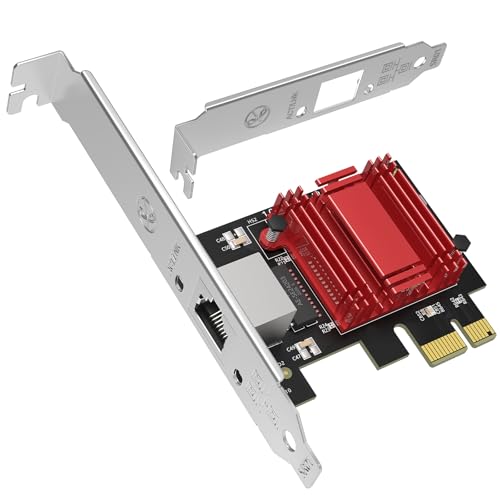
This card differs from the RTL8821CE options by providing wired 2.5G Base-T Ethernet through a Realtek RTL8125B controller. It also supports 1 Gbps and 100 Mbps links, so it can connect to equipment operating at those rates; reaching 2.5 Gbps requires compatible network equipment and cabling. Standard and low-profile brackets are included, and the operating-system support covers Windows 7 through 11 and Linux. This is not a Wi-Fi module, so it is the wrong type if the goal is wireless connectivity.
Bottom line: Pick this for a wired 2.5G network, not an RTL8821CE wireless replacement.
Deal4GO Intel 3165NGW Wi-Fi Module

This Deal4GO module is a different wireless option built around Intel 3165NGW, rather than Realtek RTL8821CE. Its 802.11ac support includes a maximum rate of 433 Mbps at 5 GHz and 300 Mbps at 2.4 GHz, with Bluetooth 4.0. The laptop compatibility excludes IBM/ThinkPad, Lenovo, and HP, and its supported systems are Windows 7, 8, 8.1, and 10 in 32- or 64-bit versions. Because it uses another chipset and has explicit device restrictions, it is not a drop-in RTL8821CE replacement.
Bottom line: Choose it only if you need the Intel module and your laptop is among its compatible systems.
How to choose an RTL8821CE adapter
Choose by chipset, card dimensions, and host interface together; the RTL8821CE name alone does not guarantee a physical fit. Laptop WLAN cards commonly use compact M.2 2230 modules, while desktop PCIe network cards use a different board and slot. The product names here distinguish an M.2 module from a specifically 2230 replacement and from wired PCIe cards. A useful decision rule is to match every marking on the removed module, including dimensions and slot key, before selecting a replacement. Wireless modules also need compatible antenna leads, and some computers restrict which cards firmware will accept. Verify the computer model’s supported WLAN parts if its original card is not available to compare.
Wi-Fi modules versus PCIe Ethernet cards
Wi-Fi cards connect wirelessly to a router, while Ethernet NICs connect to a network through a cable; one type cannot substitute for the other. A 1 Gbps Ethernet link is adequate for many wired networks, while 2.5 Gbps is useful only when the switch or router port and the rest of the network also support that rate. Wireless 802.11ac uses the 5 GHz band and may also support 2.4 GHz, but the exact bands and maximum rates depend on the module. This distinction matters more than the shared word “Realtek”: RTL8821CE, RTL8111H, and RTL8125B identify different controllers. Choose a WLAN module for wireless access and an Ethernet card for a cable-based connection.
Check card size, slot, and antennas
A 2230 M.2 card is approximately 22 mm wide and 30 mm long, but matching that size does not prove electrical or firmware compatibility. M.2 cards may use different keying, and WLAN modules typically connect to one or more small antenna leads inside the computer. Compare the original module’s labels and connector positions with the replacement, then check the computer manufacturer’s compatibility guidance when the markings differ. For desktop PCIe Ethernet cards, check both the slot and case bracket: x1 cards can typically fit longer PCIe slots, while a low-profile bracket is needed for a low-profile case. Never force a card or antenna connector into place; mismatched connectors can be damaged.
What network speeds mean for your setup
Ethernet link rates are negotiated between the card and the connected switch or router, so a 2.5 Gbps adapter does not make a 1 Gbps port run faster. For wired connections, Cat 5e is commonly used for Gigabit Ethernet, while 2.5GBase-T is designed to work over Cat 5e cabling at the standard channel distance of up to 100 meters. Actual throughput also depends on the network device, cable condition, and other traffic. Wi-Fi’s advertised data rates are link rates, not guaranteed file-transfer speeds; walls, distance, interference, and router capability affect real performance. Match the adapter to the fastest network equipment you actually have, rather than treating a single adapter figure as expected internet speed.
Frequently Asked Questions
Can an RTL8821CE card replace any M.2 Wi-Fi card?
No; the M.2 form factor does not guarantee matching keying, interface, antennas, or firmware support. For a 2230 module, confirm the exact slot and computer compatibility before replacing the card.
What does 2230 mean on a Wi-Fi card?
2230 describes a module about 22 mm wide and 30 mm long. That dimension is only one fit check; the slot key and computer support must also match.
Will a 2.5G Ethernet card work at gigabit speed?
Yes, the RTL8125B card supports 1 Gbps and 100 Mbps in addition to 2.5 Gbps. The connected router or switch determines which link rate is negotiated.
Does 802.11ac mean a Wi-Fi card supports 2.4 GHz?
No; 802.11ac is associated with 5 GHz Wi-Fi, and dual-band support depends on the specific card. Check the module’s bands and the router’s supported bands before choosing.
Can a PCIe Ethernet card add Wi-Fi to a desktop?
No; the Ethernet cards here provide wired network ports, not wireless radio. A Wi-Fi solution requires a WLAN module or adapter with compatible antennas and host connections.