
Realtek RTL8821CE 802.11ac PCIe Adapters Compared

For a Realtek RTL8821CE 802.11ac adapter, Realtek RTL8821CE M.2 2230 Wi-Fi 5 is the clearest fit if you need a Wi-Fi 5 M.2 2230 card with Bluetooth 5.0 and dual-band wireless. Choose Realtek RTL8821CE 915620-001 if you need the RTL8821CE card and its 915620-001 identifier, but confirm the M.2 fit and Bluetooth version for your device.
The other options are wired PCIe Ethernet cards, not substitutes for a wireless adapter; consider them only if you want a cable-based network connection.
We earn a commission if you buy through links on this page. As an Amazon Associate I earn from qualifying purchases. Products are compared on manufacturer specifications, not hands-on testing.
- Best overall: Realtek RTL8821CE M.2 2230 Wi-Fi 5 – Combines RTL8821CE Wi-Fi 5, M.2 2230 size, dual-band wireless up to 433 Mbps and Bluetooth 5.0.
- Best for 915620-001: Realtek RTL8821CE 915620-001 – Names the RTL8821CE and 915620-001 identifier, with M.2 listed as its size.
| Product | Best for | Connection | Wireless or wired speed | Shop |
|---|---|---|---|---|
| Realtek RTL8821CE M.2 2230 Wi-Fi 5 | Dual-band Wi-Fi | M.2 2230 | Up to 433 Mbps Wi-Fi | Check Price on Amazon |
| Realtek RTL8821CE 915620-001 | Identified card | M.2 | — | Check Price on Amazon |
| StarTech RTL8111H Gigabit PCIe Ethernet | Gigabit Ethernet | PCIe Ethernet | 10/100/1000 Mbps | Check Price on Amazon |
| NICGIGA RTL8126 5GbE PCIe Card | 5GbE Ethernet | PCIe Ethernet | Up to 5 Gbps | Check Price on Amazon |
| TP-Link TG-3468 Gigabit Ethernet | Low-profile Ethernet | PCIe Ethernet | 10/100/1000 Mbps | Check Price on Amazon |
Realtek RTL8821CE 802.11ac PCIe adapters
The RTL8821CE cards are wireless options; the other PCIe cards below provide wired Ethernet instead.
Realtek RTL8821CE M.2 2230 Wi-Fi 5
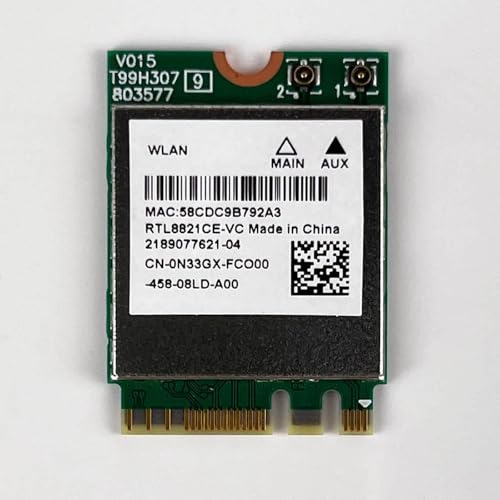
For buyers who need a clearly identified M.2 2230 Wi-Fi card, this RTL8821CE option specifies Wi-Fi 5 and Bluetooth 5.0. It supports both 2.4 GHz and 5 GHz bands, and the maker says its maximum Wi-Fi speed is 433 Mbps. That single-stream ceiling is useful for checking expectations: actual wireless throughput depends on the router, signal conditions and network traffic. This card suits a laptop or desktop that accepts the specified M.2 size and supports its wireless connections. Confirm that your device has the right M.2 slot and antenna connections before ordering.
Bottom line: Choose this if your device supports an M.2 2230 wireless card and you want Bluetooth 5.0.
Realtek RTL8821CE 915620-001

The 915620-001 identifier distinguishes this RTL8821CE PCI-Express wireless card from the M.2 2230 option, while its size is given as M.2. The card is explicitly identified as an 802.11ac WLAN adapter with Bluetooth 4.2, which makes it a match for buyers seeking that wireless standard and Bluetooth generation. Its fit is less fully defined than a card with a 2230 size, so verify the slot and card dimensions against your computer before choosing it. This option suits someone matching a replacement by part identifier, rather than selecting by a documented speed figure.
Bottom line: Pick this when 915620-001 is the identifier you need to match.
StarTech RTL8111H Gigabit PCIe Ethernet

Unlike the RTL8821CE cards, this StarTech adapter adds a wired Gigabit Ethernet port rather than Wi-Fi. It uses a Realtek RTL8111H controller and supports auto-negotiation across 10, 100 and 1,000 Mbps connections, plus Wake-on-LAN and 9K jumbo frames. The maker says drivers auto-install in most major operating systems, including Windows, Windows Server and Linux. It suits a desktop or server with a PCIe slot and a need for a cable connection. It is not a wireless replacement, so choose it only if wired networking meets your goal.
Bottom line: Choose this for a wired Gigabit Ethernet connection, not wireless networking.
NICGIGA RTL8126 5GbE PCIe Card

This NICGIGA card is a wired 5GbE adapter, a different connection type from the RTL8821CE Wi-Fi cards. Its Realtek RTL8126 controller provides an RJ45 port and the maker says it supports speeds up to 5 Gbps, with backward auto-negotiation to 2.5 Gbps, 1 Gbps and 100 Mbps. Wake-on-LAN is also supported. It is intended for a compatible PCIe slot and the maker lists Windows 10/11, Windows Server and Linux support. A 5GbE link requires compatible equipment at the other end; this card does not add wireless connectivity.
Bottom line: Pick this if your goal is a wired connection up to 5 Gbps.
TP-Link TG-3468 Gigabit Ethernet
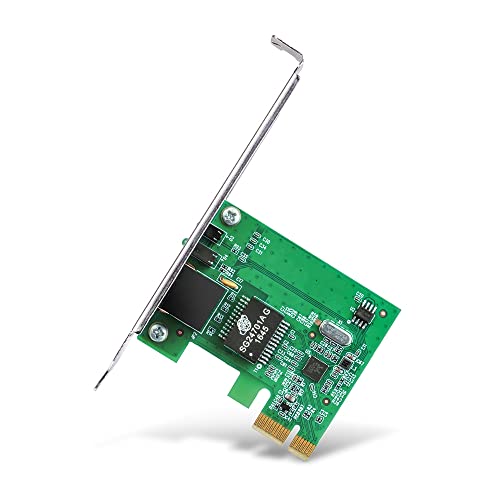
The TG-3468 is a wired Gigabit Ethernet card, not an 802.11ac wireless adapter. It supports 10/100/1000 Mbps networking and includes both low-profile and standard-profile brackets, making it the option here with an explicit choice for different desktop case heights. Wake-on-LAN and auto-negotiation are supported, and the maker lists compatibility with Windows versions from XP through 11. Choose it when you have an available PCIe slot and want a wired RJ45 connection. Its wired-only design makes it unsuitable if you need Wi-Fi or Bluetooth from the adapter.
Bottom line: Choose this for desktop Ethernet when a low-profile bracket may be useful.
How to choose an RTL8821CE Wi-Fi adapter
Choose by device fit first, then check the wireless and Bluetooth specifications you need. M.2 cards commonly use the 2230 form factor, meaning 22 mm wide by 30 mm long; M.2 describes a connector family, not a guarantee that every card fits every slot. Wireless cards also need compatible antenna leads and a device that supports Wi-Fi modules in that slot. A 1×1 Wi-Fi 5 connection has a theoretical maximum link rate of 433 Mbps under suitable conditions, not a promised internet speed. Router capabilities, distance, interference and the internet plan can all limit throughput. If your computer has no compatible wireless M.2 slot, a card with the right chipset may still not install.
Wi-Fi versus PCIe Ethernet cards
Choose Wi-Fi for a wireless connection and Ethernet for a cable connection to a router, switch or other network device. PCIe describes the expansion slot used by a desktop card; it does not mean the card provides Wi-Fi. The RTL8821CE products here are WLAN cards, while the RTL8111H, RTL8126 and TG-3468 options add wired Ethernet ports. Wired Ethernet link speeds such as 1 Gbps or 5 Gbps are negotiated with the connected network equipment, and the slower endpoint can limit the link. Use this distinction before comparing throughput figures.
This table separates the connection types and their roles.
| Need | Adapter type | Check before choosing |
|---|---|---|
| Wireless network and Bluetooth | RTL8821CE Wi-Fi card | Device slot, size and antenna fit |
| Cabled network up to 1 Gbps | Gigabit PCIe Ethernet | PCIe slot and network port |
| Cabled network up to 5 Gbps | 5GbE PCIe Ethernet | PCIe slot and 5GbE-capable network equipment |
M.2 size and slot compatibility
Match the exact M.2 size and keying supported by the computer before buying a wireless card. M.2 2230 measures 22 by 30 mm, but the computer’s manual or existing card can help establish whether that size and wireless module type are supported. Desktop PCIe Ethernet cards use expansion slots instead; a PCIe x1 card can generally fit longer PCIe slots, but physical clearance and bracket height still matter. For a compact desktop, look for a low-profile bracket when the case requires one. Never force a card or antenna connector into place: a wrong slot or connector can damage hardware.
Wireless speed, bands and Bluetooth
Wi-Fi 5 is the common name for 802.11ac, which operates in the 5 GHz band; a dual-band card can also use 2.4 GHz. The two bands trade coverage and congestion characteristics: 2.4 GHz usually reaches farther through obstacles, while 5 GHz often has more room for fast local links at shorter range. A 433 Mbps maximum is a link-rate ceiling, not a guarantee of real download speed. Bluetooth version matters when matching accessories or a replacement card, but the computer must also support the card’s Bluetooth interface. Check whether the needed antenna leads and internal connection are present before installation.
Frequently Asked Questions
Is RTL8821CE a Wi-Fi 5 adapter?
Yes, RTL8821CE cards support 802.11ac, commonly called Wi-Fi 5. A dual-band version can connect on 2.4 GHz or 5 GHz, while achievable speed depends on the router and signal conditions.
What does M.2 2230 mean on a Wi-Fi card?
M.2 2230 means the card is 22 mm wide and 30 mm long. Confirm that the device supports a wireless card of that size and has suitable antenna connections; the dimensions alone do not guarantee compatibility.
Does 433 Mbps mean my internet will run that fast?
No, 433 Mbps is a maximum wireless link rate, not a guaranteed internet speed. Router capability, distance, interference, network traffic and the internet connection can all reduce actual throughput.
Do I need Bluetooth 5.0 instead of Bluetooth 4.2?
Choose the version that matches your device needs and replacement requirements; Bluetooth 5.0 and 4.2 identify different Bluetooth generations. Confirm the version on the card and that the computer supports its Bluetooth connection.