
Round Corner Paper Cutter: 4 Models Compared by Fit

The QIQQIKIN paper corner rounder is the closest match for most crafters because it offers three corner radii—4 mm, 7 mm and 10 mm—in one tool. Choose another model if you need a cutter with a capacity for 20 lb bond paper or 3.9 mil laminate, or if your material must stay within a narrower thickness limit.
We earn a commission if you buy through links on this page. As an Amazon Associate I earn from qualifying purchases. Products are compared on manufacturer specifications, not hands-on testing.
- Best overall: QIQQIKIN 3-in-1 Corner Rounder – Three radius choices cover small, medium and large corner treatments.
- Best for thin laminate: Sunstar Kadomaru Pro – Its capacity includes laminate film up to 3.9 mils thick.
- Best for thin stock: Blue 3-in-1 Paper Corner Rounder – Its material thickness range is 0.1–0.4 mm.
| Product | Best for | Corner radii | Material capacity | Size | Shop |
|---|---|---|---|---|---|
| QIQQIKIN 3-in-1 Corner Rounder | Three radius choices | 4, 7, 10 mm | Under 2 mm; 70–230 g paper | 4.8 × 4.6 × 1.5 in | Check Price on Amazon |
| Sunstar Kadomaru Pro | Bond paper and laminate | — | 3 sheets of 20 lb bond; laminate to 3.9 mil | 7.3 × 4.1 × 2.1 in | Check Price on Amazon |
| TONOS 3-Size Corner Rounder | Journals and scrapbooks | 4, 7, 10 mm | — | 2.8 × 2.4 × 1.4 in | Check Price on Amazon |
| Blue 3-in-1 Paper Corner Rounder | Thin paper stock | 4, 7, 10 mm | 0.1–0.4 mm | — | Check Price on Amazon |
Round corner paper cutters
Match the corner radius and the cutter’s material limits to the paper or laminate you plan to trim.
QIQQIKIN 3-in-1 Corner Rounder
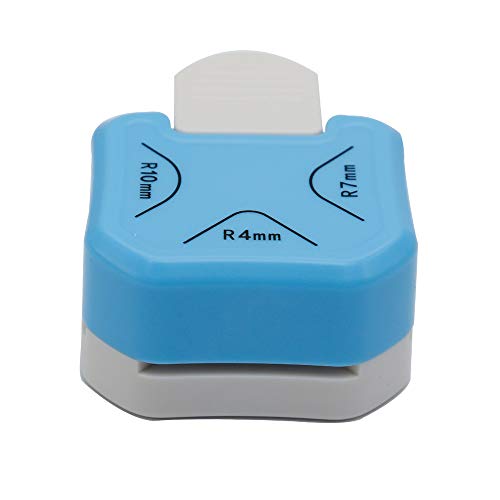
Three corner radii set this punch apart: 4 mm, 7 mm and 10 mm let you choose a tighter or broader curve without changing tools. Its zinc-alloy and ZBS construction includes a stainless-steel blade, and the maker says it handles paper, EVA foam, foil and craft paper below 2 mm, with a suggested paper weight of 70–230 g. Place the corner against the guides and press the handle. This is a flexible option for varied craft materials; buyers working with thicker stock should choose a cutter with a suitable capacity.
Bottom line: Choose this if you want three corner sizes and work within its thickness and paper-weight guidance.
Sunstar Kadomaru Pro

A sheet and laminate capacity distinguishes this cutter: the maker says it can trim up to three sheets of 20 lb bond paper or laminated film up to 3.9 mils thick. Insert the material at the back of the body and press the handle. Its compact size suits a desk or craft kit, and the dimensions convert to about 7.3 × 4.1 × 2.1 inches. The specifications do not identify its corner radius, so choose another option if a particular curve size is essential.
Bottom line: Pick this when its paper or laminate capacity fits your project and the radius is not your deciding factor.
TONOS 3-Size Corner Rounder

Its compact body and three radius choices make this punch distinct: 4 mm, 7 mm or 10 mm can give a journal page, photo or tag a different corner profile. The maker describes it for paper crafting, scrapbooking, card making and laminate projects. The operating guidance says to turn the tool upside down to see the positioning, which can help with alignment on small pieces. Because the material limit is not clear in the available product facts, it is a weaker fit for anyone selecting by paper weight or maximum thickness.
Bottom line: Choose this for compact crafting and three curve sizes when your material is already known to be compatible.
Blue 3-in-1 Paper Corner Rounder

A narrow material range is the key distinction for this three-radius punch: it is intended for stock 0.1–0.4 mm thick, roughly one to four sheets of ordinary A4 printing paper according to the maker. The tool offers 4 mm, 7 mm and 10 mm corner options for paper, photos and thin rigid plastic. The maker cautions against soft or uneven material and says laminate should lie flat with neat edges. That makes this a targeted choice for thin, flat pieces rather than foam or other flexible stock.
Bottom line: Pick this for flat, thin paper or similar material within the thickness range.
How to choose a round corner paper cutter
Choose first by corner radius, then by material thickness: a radius is the distance from the corner’s square point to the curve, and larger radii remove more of the corner. A 4 mm curve keeps more of a small card’s corner, while 10 mm creates a visibly broader curve. For a tool used across multiple project sizes, a three-radius punch avoids needing separate fixed-radius tools. Also compare thickness limits carefully: paper weight in grams per square meter is not the same measurement as thickness in millimeters, and coating or laminate can change how a sheet feeds.
For mixed craft materials, favor a product whose capacity covers the thickest planned item. For thin, flat paper, a narrow thickness range can give a clearer fit rule. Avoid forcing material into a punch: misalignment or excess thickness can cause poor cuts or jam the mechanism.
Paper thickness, weight and laminate fit
Paper weight and paper thickness answer different questions: gsm measures mass per area, while millimeters measure thickness. Standard office copy paper is commonly around 75–90 gsm and roughly 0.09–0.11 mm thick, but coatings, fibers and moisture affect thickness, so weight alone cannot confirm that a punch will accept a sheet. Several sheets stack their thickness; check the actual stack rather than assuming a weight limit translates directly.
Laminate film is often rated in mils, where 1 mil equals 0.001 inch or 0.0254 mm. Keep laminated stock flat and aligned before punching; a curled edge can feed unevenly. The table gives a quick way to compare the capacity and curve options.
| Need | Compare |
|---|---|
| Choose curve size | 4, 7 and 10 mm options |
| Trim a defined paper stack | Capacity stated in sheets and paper weight |
| Use laminate | Film thickness limit in mils |
| Control stock thickness | Material range in millimeters |
Aligning corners for clean cuts
Accurate alignment matters more than speed: insert the corner until both edges sit against the guides, then make one firm press. Keep the paper square to the guide; an angled approach can produce an off-center curve, especially on narrow tags and small cards. Make a test cut on a scrap from the same material when the finish matters, since laminated or coated surfaces can behave differently from plain paper.
For pieces with a printed border, allow enough margin for the radius to remove the corner without clipping the design. As a practical rule, leave at least the radius distance between the corner and any critical printed element. Clear scraps from the punch only as the manufacturer permits, and keep fingers away from the cutting area.
Frequently Asked Questions
What does a 4 mm corner radius mean?
A 4 mm radius describes a tighter curve than a 7 mm or 10 mm radius. The larger the radius, the more material the punch removes from the original square corner.
Can a corner rounder punch cut laminated paper?
Some punches specify a laminate limit, such as 3.9 mils, while others are intended for flat, thin laminate without a film thickness. Keep laminate flat and confirm the tool’s maximum before cutting thicker pouches.
How many sheets can a paper corner punch cut at once?
Capacity depends on the punch and stock; one model here specifies up to three sheets of 20 lb bond paper. For other tools, use the thickness range rather than assuming the same sheet count.
Should I choose paper by gsm or thickness?
Use thickness when comparing a punch’s millimeter limit, because gsm measures paper mass rather than its physical thickness. Two papers with the same gsm can differ in bulk because of fibers, coating and finish.
How do I avoid crooked rounded corners?
Seat both edges of the paper against the punch guides before pressing the handle. On small pieces or printed borders, test on scrap and leave margin at least as wide as the chosen corner radius.