
Samsung Galaxy A32 Wireless Charging Options Compared

The Samsung Galaxy A32 needs a USB-C wireless charging receiver to charge from a Qi pad, and the 7.5W receiver is the closest fit for adding that capability. Choose the wired charger instead if you want a conventional USB-C connection rather than a receiver attached to the phone.
A wireless charging receiver is a thin adapter that plugs into the phone’s charging port and pairs with a compatible Qi charging pad.
We earn a commission if you buy through links on this page. As an Amazon Associate I earn from qualifying purchases. Products are compared on manufacturer specifications, not hands-on testing.
- Best overall: External Type-C Receiver with Folding Stand – Its 7.5W receiver and folding stand combine wireless charging with a phone prop.
- Best for a separate pad: U01 Receiver and Wireless Charger Pad – The receiver-and-pad setup supports Qi charging at up to 7.5W, with a QC 3.0 wall charger required separately.
- Best for wired charging: 18W USB-C Quick Charge Wall Charger – The included USB-C cable and 18W adapter offer a direct wired alternative.
| Product | Best for | Charging method | Maximum output | Included equipment | Shop |
|---|---|---|---|---|---|
| External Type-C Receiver with Folding Stand | Stand-style charging | Qi receiver | 7.5W | Receiver with folding stand | Check Price on Amazon |
| U01 Receiver and Wireless Charger Pad | Separate charging pad | Qi receiver and pad | 7.5W max | Pad and receiver; QC 3.0 adapter not included | Check Price on Amazon |
| 18W USB-C Quick Charge Wall Charger | Direct wired charging | USB-C wired | 18W max | Adapter and 5-foot cable | Check Price on Amazon |
Samsung Galaxy A32 wireless charging options
The A32 options differ in whether they add Qi charging through a receiver or use a standard wired charger.
External Type-C Receiver with Folding Stand

The folding stand distinguishes this receiver from a receiver-and-pad kit: it props up the phone while the adapter provides wireless charging. Its output is over 7.5W, though the maker cautions that it is slower than wired charging. The adapter is listed for Galaxy A32 4G and 5G models, as well as several other A-series phones. At 103 × 75 × 142 mm, the stand takes more space than a receiver alone, so it suits a desk setup better than a minimal travel kit. Make sure the receiver stays connected to the USB-C port during use.
Bottom line: Choose this if you want a receiver that also props up the phone.
U01 Receiver and Wireless Charger Pad

The U01 pairs an external Qi receiver with a separate charging pad, while the folding stand option combines charging and propping the phone. The maker gives a 7.5W maximum output and says charging takes longer than plugging into a wall charger. A QC 3.0 wall charger is required but not included, and the receiver is intended for use with a simple case. The maker also notes that some heat during charging is normal; stop charging if the phone or adapter becomes unusually hot, and keep the setup away from fabric or other heat-trapping surfaces.
Bottom line: Pick this if you already have a QC 3.0 adapter and prefer a separate pad.
18W USB-C Quick Charge Wall Charger
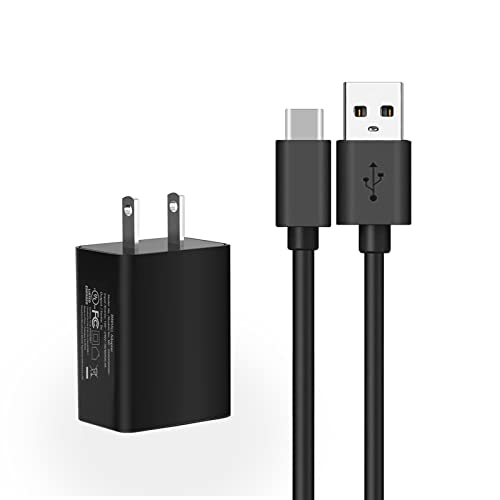
The 18W wall adapter is a wired alternative, not a way to add wireless charging to the Galaxy A32. It includes a 5-foot USB-C cable and lists 5V/3A, 9V/2A, and 12V/1.5A output options, making it the straightforward choice for buyers who want to connect directly to the phone. The maker identifies it as compatible with the A32 and says it uses Quick Charge 3.0. The limitation is fundamental: a cable must remain plugged into the phone, so this option does not provide the convenience of setting the device on a Qi pad.
Bottom line: Choose this if a direct USB-C cable connection matters more than wireless charging.
How Galaxy A32 wireless charging works
The Galaxy A32 requires an external receiver to use a Qi charging pad because the phone does not have built-in wireless charging. A receiver plugs into the USB-C port and sits against the back of the phone, where a Qi pad can transfer power through the receiver. The phone’s USB-C port is then occupied, so wired charging and most USB-C accessories cannot be used at the same time. The receiver and pad must align for charging to begin; center the phone over the pad’s coil rather than assuming any position on the pad will work. A receiver’s maximum output is not the same as the phone’s wired charging speed, and wireless charging generally takes longer.
Choosing a receiver, pad, or wired charger
Choose a receiver-and-pad setup for Qi charging, a receiver with a stand if you also want an upright desk position, or a wired adapter for direct charging. Qi is the wireless charging standard used by these receiver setups; the receiver bridges the standard to a phone that lacks native wireless charging. The two wireless products list up to 7.5W output, while the wired alternative lists up to 18W. These maximum figures do not mean every charging session will reach that output, since the power source and alignment matter. The included equipment also changes the setup: one wireless option specifies a pad and receiver but requires a separate QC 3.0 adapter. Confirm you have the needed adapter before choosing that kit.
| Need | Choose | Trade-off |
|---|---|---|
| Wireless charging with a phone stand | Receiver with folding stand | More desk space |
| Separate Qi pad and receiver | U01 receiver-and-pad kit | Requires QC 3.0 adapter |
| Direct power connection | USB-C wired charger | Does not add wireless charging |
Fit, cases, and charging safety
Check receiver placement and case fit before relying on a wireless setup, because the adapter must connect to the USB-C port and lie flat against the phone. The U01 maker limits its receiver to a simple case, so bulky or magnetic cases may prevent a reliable connection; remove the case if charging is inconsistent. Wireless charging can produce heat, and a pad or receiver should sit on a hard, uncovered surface rather than bedding or upholstery. If the phone becomes unusually hot, disconnect it and let it cool before trying again. Keep the USB-C connector clean and dry, and avoid forcing the receiver plug, which can damage the port.
Frequently Asked Questions
Does the Galaxy A32 charge wirelessly without an adapter?
No, the Galaxy A32 needs an external USB-C receiver to charge from a Qi pad. Without a receiver, use a wired USB-C charger.
Will a Galaxy A32 case work with a charging receiver?
A thin, simple case is the safer fit; the U01 receiver is specified for simple cases. Remove thick or magnetic cases if charging does not start reliably.
How fast is wireless charging on the Galaxy A32?
The two receiver options specify up to 7.5W, and one maker says its receiver charges more slowly than a wall charger. Actual charging rate depends on alignment and the power source.
Can I use the USB-C port while the receiver is attached?
No, the receiver occupies the Galaxy A32’s USB-C port while it is plugged in. Remove the receiver before connecting a cable or USB-C accessory.
Is warmth during wireless charging normal?
Some warmth is normal during wireless charging, but unusual heat is a reason to stop and disconnect the setup. Charge on a hard, uncovered surface to avoid trapping heat.