
Shinecon VR 3D Glasses: Models Compared by Fit

For most phone-based VR viewers, VR SHINECON Smartphone VR Glasses is the closest match to Shinecon VR 3D glasses because its features focus on 360-degree video, head rotation, and an adjustable strap. Choose another option if you need a phone-size range or a remote; phone-based VR viewers hold your smartphone and depend on it for content.
We earn a commission if you buy through links on this page. As an Amazon Associate I earn from qualifying purchases. Products are compared on manufacturer specifications, not hands-on testing.
- Best overall: VR SHINECON Smartphone VR Glasses – Its features include 360-degree video, 3D rotation, games, and an adjustable head strap.
- Best for wider phone fit: VR SHINECON Headset with Remote – Its phone range reaches 6.8 inches and its name includes a remote control.
- Best for larger phones: 3D VR Glasses for 4.5–7-Inch Phones – Its range covers phones from 4.5 to 7 inches.
| Product | Best for | Phone fit | Remote | Adjustment | Shop |
|---|---|---|---|---|---|
| VR SHINECON Smartphone VR Glasses | 360-degree viewing | — | — | Adjustable head strap | Check Price on Amazon |
| VR SHINECON Headset with Remote | Larger phone range | 4.7–6.8 in. | Yes | — | Check Price on Amazon |
| Phone VR Headset with Remote | Remote control | 4.7–6 in. | Yes | — | Check Price on Amazon |
| Adjustable 3D VR Glasses | Broad phone fit | 4.7–7.2 in. | — | Pupil and object distance | Check Price on Amazon |
| 3D VR Glasses for 4.5–7-Inch Phones | Myopia support claim | 4.5–7 in. | — | Pupil distance | Check Price on Amazon |
Shinecon VR 3D Glasses and Phone-Based Alternatives
Compare the phone-size ranges and features first, then confirm the headset fits your device.
VR SHINECON Smartphone VR Glasses

VR SHINECON Smartphone VR Glasses emphasizes 360-degree video and head rotation rather than a phone-size range. The maker says it supports VR games and apps, and the adjustable head strap accommodates different head sizes. It is a direct fit for shoppers seeking Shinecon-branded smartphone goggles for games and video. The missing phone-size range matters if your handset is unusually large or small, so confirm physical compatibility before buying. Phone-based VR also requires a compatible smartphone app; the headset itself is not a standalone VR system.
Bottom line: Pick it for Shinecon branding, 360-degree video support, and an adjustable strap.
VR SHINECON Headset with Remote
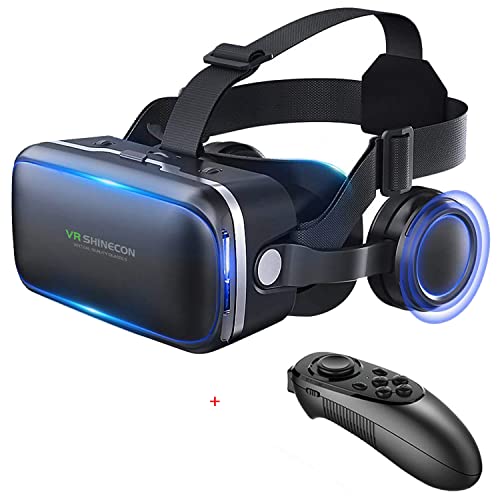
VR SHINECON Headset with Remote gives a defined phone range of 4.7 to 6.8 inches, which reaches larger than the 4.7-to-6-inch range of some alternatives here. Its name includes a remote control, and the maker says it is intended for TV, movies, and video games. It suits buyers who want a fit range and a remote in a Shinecon-branded viewer. Check your phone’s screen size and app compatibility.
Bottom line: Choose it when your phone is within 4.7–6.8 inches and you want a remote.
Phone VR Headset with Remote

Phone VR Headset with Remote is a phone-based VR viewer with a remote, not a Shinecon-branded headset. Its phone range is 4.7 to 6 inches, making it a possible alternative for buyers whose handset fits that window and who want remote control. The maker says the headset relies on the buyer’s smartphone and downloaded VR applications; it has no built-in system or preinstalled content. That reliance is the key limitation: a compatible app and phone are essential, and the maker cautions that some third-party apps may not work with every device.
Bottom line: Pick it if your phone fits 4.7–6 inches and remote control matters.
Adjustable 3D VR Glasses

Adjustable 3D VR Glasses is a non-Shinecon alternative with the broadest phone range in this group: 4.7 to 7.2 inches. Its maker describes adjustment for pupil distance and object distance, which lets a user position the optics relative to their eyes and phone screen. It may suit someone whose phone is too large for the narrower ranges above. Phone dimensions and case thickness can affect whether a handset fits.
Bottom line: Choose it for a phone between 6.8 and 7.2 inches.
3D VR Glasses for 4.5–7-Inch Phones

3D VR Glasses for 4.5–7-Inch Phones is a non-Shinecon option with a phone range of 4.5 to 7 inches and adjustable pupil distance. Its maker says the design supports use by people with myopia, but that claim is not a substitute for vision care or a guarantee of comfort. The broader fit window than a 4.7-to-6-inch viewer can be useful when selecting by handset size. Check that your phone fits with its case removed if needed.
Bottom line: Pick it if your phone is 4.5–7 inches and pupil-distance adjustment is useful.
How Phone-Based VR Glasses Work
Phone-based VR glasses use your smartphone screen and apps rather than running VR software inside the headset. A compatible app typically divides the display into two side-by-side images, one for each eye, and the headset lenses focus those images into a stereoscopic view. Head rotation depends on the phone’s motion sensors and app support; it does not provide room-scale movement or hand tracking. Look for apps that explicitly support a split-screen headset mode, since ordinary video apps may show a single image instead. A remote can control some apps, but it cannot make an incompatible app work. Never use a phone headset while walking, driving, or near stairs; the headset blocks awareness of your surroundings.
How to Choose a Phone Fit
Choose by the phone’s screen size and the headset’s range, then check the handset’s full dimensions and case thickness. A screen-size number alone does not guarantee that a phone will fit the headset tray: aspect ratio, bezel size, and a bulky case affect the opening needed. Remove a thick case if it prevents the phone from sitting centered. Centering matters because the left and right images need to line up with the lenses. The ranges differ across these models, so a handset just outside a boundary is not a safe fit assumption. If your phone is over 6 inches, favor a headset whose upper limit reaches its screen size rather than guessing from the headset’s external dimensions.
Remote Controls and Head Tracking
A remote and head tracking solve different problems: the phone’s sensors register head direction, while a remote can provide button input when an app supports it. Many phone-VR experiences use three degrees of freedom, meaning rotation in place rather than tracked forward, backward, or sideways movement. That differs from room-scale systems with external or inside-out position tracking. A headset described as supporting 3D rotation should not be assumed to track body position or include motion controllers. Before choosing a remote-equipped model, check whether the VR app accepts Bluetooth or other controller input; compatibility varies by app and phone operating system. For basic 360-degree video, a remote is optional, but it can simplify menu selection.
Comfort, Optics, and Safe Viewing
Fit and lens alignment affect comfort as much as the phone’s screen size. Adjust the headset so each eye sees its own half of the split image clearly, and stop if the view stays blurry, causes eyestrain, or feels uncomfortable. Phone-VR lenses magnify a screen held close to the eyes; they do not correct vision or guarantee that a user can wear the headset comfortably. Take regular breaks rather than wearing a viewer continuously, and keep children supervised because the headset restricts awareness of the room. Do not treat blue-light or fatigue language as proof of eye protection. A remote does not change these viewing precautions, and no phone VR viewer should be worn while moving through a physical space.
Frequently Asked Questions
Does a phone VR headset work without an app?
No, phone-based VR needs compatible content on the smartphone. Many viewers use apps that display separate left- and right-eye images, so ordinary video playback may not create a VR view.
What phone size fits a VR glasses headset?
The compatible range depends on the specific headset; ranges among these options run from 4.5 inches at the low end to 7.2 inches at the high end. Check both the phone’s screen size and whether its body and case fit the holder.
Do phone VR glasses track movement around a room?
Most phone-based viewers rely on the phone’s sensors for rotational head movement, commonly called three degrees of freedom.
Can I use a Bluetooth remote with every VR app?
No, app support determines whether a remote can control menus or playback. Confirm the app accepts the remote’s input method, because a headset remote cannot add controls to an app that does not support them.
Can I wear my glasses inside phone VR goggles?
Fit depends on the headset opening and your glasses frame, so there is no universal fit guarantee. Remove anything that presses painfully against your face, and stop viewing if the image remains blurry or uncomfortable.
Is it safe to walk while wearing phone VR glasses?
No, a phone headset blocks much of your view of the surroundings. Use it seated or stationary, away from stairs, traffic, and other hazards, and supervise children during use.