
Single-DIN Screen Stereo: 3 Models Compared

PLZ 10.1-Inch Single-DIN Stereo suits drivers who want a large 10.1-inch screen with wired and wireless Apple CarPlay and Android Auto. Choose Single-DIN Stereo LSLYA-6640 or Single-DIN Stereo with 6.9-Inch Screen instead if you prefer a smaller or unspecified display, or need front-camera support; a single-DIN receiver uses a compact dash opening, while its screen can extend beyond that opening.
We earn a commission if you buy through links on this page. As an Amazon Associate I earn from qualifying purchases. Products are compared on manufacturer specifications, not hands-on testing.
- Best overall: PLZ 10.1-Inch Single-DIN Stereo – The 10.1-inch display and wired or wireless CarPlay and Android Auto are a clear fit for a large-screen setup.
- Best for front-camera input: Single-DIN Stereo LSLYA-6640 – It supports front and backup cameras, plus wired and wireless CarPlay and Android Auto.
- Best for a smaller screen: Single-DIN Stereo with 6.9-Inch Screen – The 6.9-inch touchscreen is smaller than the 10.1-inch option and includes wireless phone connectivity.
| Product | Best for | Display | Phone connection | Camera support | Shop |
|---|---|---|---|---|---|
| PLZ 10.1-Inch Single-DIN Stereo | Large-screen setup | 10.1-inch IPS touchscreen | Wired and wireless CarPlay, Android Auto | Backup camera | Check Price on Amazon |
| Single-DIN Stereo LSLYA-6640 | Front-camera input | Touchscreen; size not given | Wired and wireless CarPlay, Android Auto | Front and backup cameras | Check Price on Amazon |
| Single-DIN Stereo with 6.9-Inch Screen | Smaller screen | 6.9-inch touchscreen | Wireless CarPlay, Android Auto | Backup camera | Check Price on Amazon |
Single-DIN Screen Stereos
Compare display size, phone connectivity and camera support before choosing a receiver for your dash.
PLZ 10.1-Inch Single-DIN Stereo
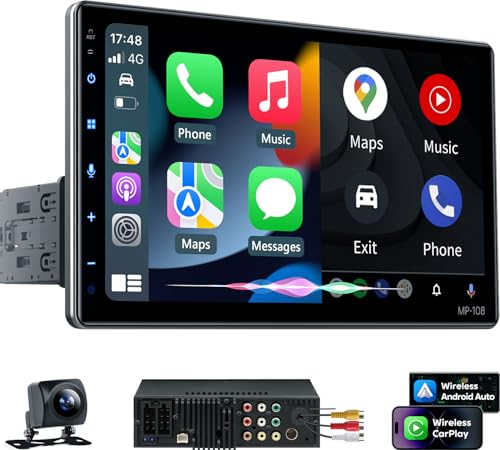
The 10.1-inch IPS touchscreen makes this the large-display option among these single-DIN receivers. PLZ says it supports wired and wireless Apple CarPlay and Android Auto, with voice control through Siri or Google Assistant; the product name also identifies Bluetooth 5.3, a backup camera and two subwoofer outputs. Its screen adjusts to multiple angles, and the receiver is described as compatible with most single- and double-DIN dash openings.
The large screen suits drivers prioritizing an expansive interface. Check the dash opening, vent and control clearance, and screen movement before choosing it; a single-DIN opening alone does not guarantee room for a 10.1-inch display.
Bottom line: Choose this if you want the largest display and can confirm dash clearance.
Single-DIN Stereo LSLYA-6640
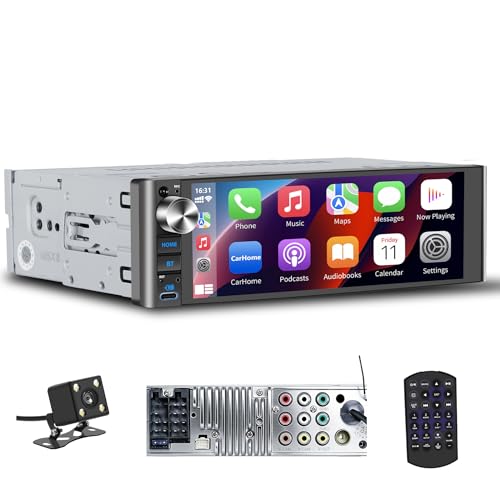
Front-camera support separates this receiver from the other two exact-fit options. It supports wired and wireless Apple CarPlay and Android Auto, Bluetooth 5.3, USB and Type-C, plus two subwoofer outputs and a DSP with a 10-band EQ. The product name gives a 240-watt peak figure, while its size code is LSLYA-6640.
This model suits drivers who want both front and backup camera connections and audio adjustment options. The screen size is not included among the product facts, so it is a weaker choice if display dimensions are the deciding factor; confirm the screen and dash fit before ordering.
Bottom line: Pick this for front-camera support and a 10-band EQ.
Single-DIN Stereo with 6.9-Inch Screen

The 6.9-inch touchscreen gives this receiver a smaller stated display than PLZ 10.1-Inch Single-DIN Stereo. Its product name identifies wireless Apple CarPlay and Android Auto, Bluetooth, a 1080p backup camera, MirrorLink, USB Type-C and steering-wheel control support. The product facts also specify 12-volt automotive DC compatibility and caution that the screen can block vents or buttons in some vehicles.
Choose it if a 6.9-inch display better suits your dash layout. The dimensions include a 7-inch height, so verify the actual mounting and screen-clearance requirements against your vehicle rather than assuming the front panel stays within the single-DIN opening.
Bottom line: Choose this when a 6.9-inch touchscreen and backup camera fit your setup.
How to Choose a Single-DIN Screen Stereo
Start with the chassis opening, then check whether the screen can clear nearby trim, vents and controls. A standard single-DIN radio opening is about 7 inches wide by 2 inches high; a floating display may extend well beyond that face, so screen dimensions and adjustment range matter as much as the receiver body.
Next, match phone connection and camera needs. Wireless CarPlay or Android Auto avoids plugging in for everyday connection, while wired support can be useful as an alternate connection method. If you need a front camera as well as a rear camera, select a model that explicitly supports both.
Single-DIN Screen Size and Dash Fit
Measure the dash opening and the space in front of it before selecting a screen. A single-DIN opening is roughly 7 by 2 inches, but an oversized screen can obstruct HVAC vents, hazard switches or access to controls even when the receiver fits the radio slot. A 6.9-inch panel is smaller than a 10.1-inch panel, but diagonal size alone does not establish fit; screen shape, mount position and angle affect clearance.
Use this practical rule: if the screen overlaps a vent or switch at any adjustment angle, choose a smaller display or a different mounting arrangement. Check that the screen can tilt without contacting the dash and that the driver’s view of the road remains clear. Vehicle-specific dash kits and wiring adapters may also be needed.
Wired and Wireless Phone Connections
Wireless CarPlay and Android Auto connect a compatible phone without a USB cable, while wired versions use a cable and can provide a predictable connection. The three exact-fit receivers identify wired, wireless or both modes in their product facts; do not assume a model supports both just because it has Bluetooth. Bluetooth typically handles hands-free calls and audio, while CarPlay and Android Auto provide the phone interface and navigation apps.
For daily commutes, prioritize the connection mode you will actually use and confirm that your phone supports it. Voice assistants can reduce the need to interact with the touchscreen, but drivers should set destinations and playlists before moving and use voice commands or a passenger while underway.
Camera Inputs and Installation Checks
Camera support differs in a useful way: one receiver names front and backup camera connections, while the others name a backup camera. A front camera can help with visibility immediately ahead of the vehicle; a backup camera is used when reversing. Confirm that the camera type, video connector and trigger wiring match your vehicle and existing camera before installation.
Most aftermarket receivers use a vehicle-specific wiring harness and dash kit rather than a universal plug-in fit. Disconnect the battery before wiring, use the correct adapter for steering-wheel controls if retaining them, and never route cables where they can interfere with pedals or airbags. One supplied model explicitly limits use to 12-volt automotive DC, so verify the vehicle’s electrical system first.
Frequently Asked Questions
Will a single-DIN screen stereo fit every single-DIN dash?
No; the receiver may fit the slot while its screen hits nearby trim, vents or controls. A standard single-DIN opening is about 7 inches wide by 2 inches high, so measure the surrounding dash and screen travel too.
How large a screen can a single-DIN receiver use?
There is no fixed screen-size limit set by the DIN opening because many units use a floating screen. In these choices, the named sizes are 6.9 inches and 10.1 inches; check the display’s width and height and how far it projects.
Is wireless CarPlay different from Bluetooth audio?
Yes; wireless CarPlay provides the phone’s compatible in-dash interface, while Bluetooth generally supports calls and audio streaming. Confirm the receiver and phone both support the connection method you intend to use.
Can I keep my factory steering-wheel controls?
Often, but retaining them usually requires a vehicle-specific steering-wheel control interface and compatible wiring. Check the vehicle and adapter fit before installation, even when the stereo identifies steering-wheel control support.
Do I need a separate camera for a backup input?
A camera input requires a compatible camera and proper video and trigger wiring. Check whether your vehicle already has a factory camera and whether its connector and signal work with the receiver before connecting it.