
SNES Controller for PC: 3 Models Compared by Fit

For a wired SNES-style controller for PC, KIWITATA Classic SNES USB Controller is the clearest match because it is specifically made for computer retro games and supports Windows, Linux, Mac, and Raspberry Pi. Choose a wireless option instead if you want to avoid a cable, or a controller with joysticks and shoulder buttons for games beyond SNES-era layouts.
We earn a commission if you buy through links on this page. As an Amazon Associate I earn from qualifying purchases. Products are compared on manufacturer specifications, not hands-on testing.
- Best overall: KIWITATA Classic SNES USB Controller – Wired USB controller specifically described for PC retro games, with support for Windows, Mac, Linux, and Raspberry Pi.
- Best for wireless play: ZAMPAM 2.4GHz Wireless SNES Controllers – 2.4GHz wireless connection is rated for a range of up to 32 feet.
| Product | Best for | Connection | Cable length or range | PC compatibility | Shop |
|---|---|---|---|---|---|
| KIWITATA Classic SNES USB Controller | Wired PC emulation | Wired USB | — | Windows, Mac, Linux, Raspberry Pi | Check Price on Amazon |
| ZAMPAM 2.4GHz Wireless SNES Controllers | Wireless PC play | 2.4GHz wireless USB receiver | Up to 32 ft | Windows, Mac, Linux, Raspberry Pi | Check Price on Amazon |
| Rii Classic Retro USB Wired Controller | Longer wired reach | Wired USB | About 5 ft | Windows, Mac, Linux, Raspberry Pi, Android | Check Price on Amazon |
SNES Controllers for PC
Compare these gamepads by connection style, supported devices, and the controls or cable length that suit your setup.
KIWITATA Classic SNES USB Controller

For a straightforward wired SNES-style PC pad, this two-controller set is explicitly designed for retro games on a computer or laptop. The maker lists support for Windows versions through Windows 11, Mac OS X, Linux, and Raspberry Pi with RetroPie. Its frosted, concave directional pad and contoured shape are intended for grip during play. The key limitation is the wired connection, which does not provide the freedom of a wireless setup; it also is not compatible with an original Super Nintendo console. Choose it for computer emulation rather than original-console play.
Bottom line: Pick this wired set for PC retro gaming across several operating systems.
ZAMPAM 2.4GHz Wireless SNES Controllers
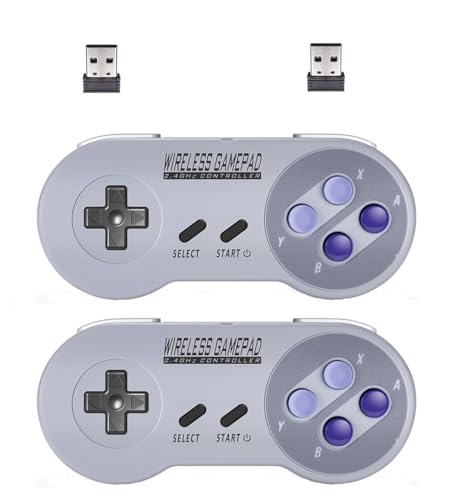
Wireless play is the main distinction here: these two gamepads use a 2.4GHz USB receiver rather than a cable running to the computer. The maker gives a range of up to 32 feet and says setup requires no driver or software, provided the emulator or program accepts standard USB game controllers. Compatibility includes Windows, Mac, Linux, Raspberry Pi, RetroPie, and Recalbox. The receiver occupies a USB port, and wireless operation depends on staying within range. This is the better fit when couch distance matters more than a direct wired connection.
Bottom line: Choose this set if you want a wireless PC gamepad and have room for its USB receiver.
Rii Classic Retro USB Wired Controller
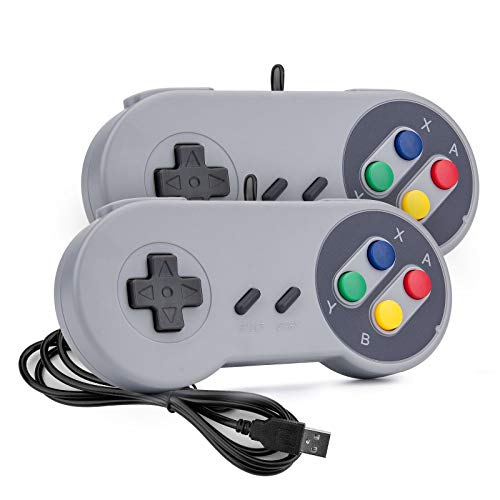
The Rii set stands out for its approximately 5-foot cable, giving a defined wired reach for a desk or nearby seating. The maker lists Windows, Mac OS X, Raspberry Pi devices, Linux, and Android compatibility, and says no driver or patch is needed when the application accepts USB controller input. A separate emulator is needed to play emulator games, so the pad alone is not a game library or emulator. Its cable may still be too short for distant couch play; measure the route from the USB port to your seat before choosing a wired model.
Bottom line: Pick this pair when a roughly 5-foot wired connection suits your seating distance.
How to choose an SNES controller for PC
Choose a wired pad for the simplest direct USB connection, or wireless when your seat is farther from the computer. Basic SNES-style pads suit games mapped to a directional pad and face buttons. Games that need analog movement benefit from clickable joysticks, and rumble or turbo matters only when the game and software support those inputs. Measure the seat-to-computer distance: for a wired setup beyond 5 feet, select a cable long enough to reach without tension or plan for an extension that supports controller data.
| Need | Connection or feature to prioritize | Why |
|---|---|---|
| Direct setup near computer | Wired USB | No wireless receiver or battery charging |
| Play farther from computer | 2.4GHz receiver or Bluetooth | Avoids a cable across the room |
| Analog game controls | Clickable joysticks | Provides movement beyond a directional pad |
Wired and wireless SNES-style pads compared
USB gamepads typically communicate as standard human interface devices, but older games and emulators can require manual input mapping before buttons behave as expected. Range claims are not a guarantee through walls or interference, so keep a wireless receiver in a clear position near the play area. If reliable low-latency input matters for a rhythm or fighting game, a wired pad removes the wireless link from the equation.
PC and emulator compatibility checks
Windows, macOS, and Linux do not guarantee that every emulator will recognize every button automatically. Many emulators provide a controller configuration screen where you assign the directional pad and each button; check that the game or emulator supports USB game controllers before connecting a pad. RetroPie and similar Raspberry Pi distributions also use emulation software, rather than making the controller itself a console. Keep in mind that SNES-style USB pads are not generally substitutes for controllers connected to the original Super Nintendo console. For a Switch-family product, check the exact console generation because compatibility can differ between Switch models.
Setup and safe cable placement
Connect the controller before opening the emulator, then use its input settings to map directions, face buttons, and any shoulder buttons. A typical wired gamepad cable is around 5 feet; measure your route and leave slack so the connector is not pulled when you move. Keep cables away from walkways, chair wheels, and pets to reduce trip and snag hazards. A wireless controller still needs its receiver or pairing connection to remain within workable range; placing a USB receiver behind a metal desktop can obstruct the signal. If controls do not respond, confirm the emulator recognizes the controller and check its assigned input profile before assuming the pad is incompatible.
Frequently Asked Questions
Do SNES USB controllers work with PC emulators?
Many do when the emulator accepts standard USB game-controller input. You may still need to assign the directional pad and buttons in the emulator’s input settings.
How far can a wireless SNES controller reach?
The 2.4GHz option here is rated for up to 32 feet. Walls, furniture, and wireless interference can reduce practical range, so keep the receiver near the play area.
Will a PC SNES controller work on an original console?
A USB PC controller is not automatically compatible with an original Super Nintendo console, which uses a different connector and system. For a PC-focused model, do not assume console support.
Do I need to install an emulator for SNES games?
A USB controller does not itself run games; an emulator is separate software that interprets game input. Confirm the emulator supports USB gamepads and map the controls before play.