
Sony STARVIS 2 Dash Cam: 5 Models Compared

For most drivers seeking balanced front-and-rear footage, VIOFO A229 Plus is the strongest starting point because both cameras use STARVIS 2 sensors and record 1440p. Choose Roadwitness Dual STARVIS 2 Mirror Dash Cam instead if you want 4K recording from both cameras; drivers who only need a traditional windshield-mounted camera should compare the layouts and mounting fit before choosing.
STARVIS 2 is Sony’s image-sensor technology; resolution, lens, and exposure still affect the footage a dash cam captures.
We earn a commission if you buy through links on this page. As an Amazon Associate I earn from qualifying purchases. Products are compared on manufacturer specifications, not hands-on testing.
- Best overall: VIOFO A229 Plus – Dual STARVIS 2 sensors and 1440p recording at both ends provide balanced coverage.
- Best for 4K front and rear: Roadwitness Dual STARVIS 2 Mirror Dash Cam – Two IMX678 sensors record 4K at both the front and rear.
- Best for 4K front footage: REDTIGER F7NP – Records 4K front and 1080p rear with STARVIS 2.
| Product | Best for | Front / rear resolution | STARVIS 2 sensors | Camera layout | Shop |
|---|---|---|---|---|---|
| VIOFO A229 Plus | balanced dual coverage | 1440p / 1440p | 2 | Front and rear | Check Price on Amazon |
| Roadwitness Dual STARVIS 2 Mirror Dash Cam | dual 4K recording | 4K / 4K | 2 | 12-inch mirror display | Check Price on Amazon |
| ROVE R2-4K Dual | upscaled front 4K | 2.5K upscaled to 4K / 1080p | 1 specified | Front and rear | Check Price on Amazon |
| REDTIGER F7N Touch | touchscreen controls | 4K / 1080p | 1 specified | Front and rear | Check Price on Amazon |
| REDTIGER F7NP | parking mode setup | 4K / 1080p | 1 specified | Front and rear | Check Price on Amazon |
Sony STARVIS 2 dash cams
Compare resolution and camera design first, since STARVIS 2 alone does not determine what each camera records.
VIOFO A229 Plus

Dual 1440p recording is the distinguishing feature of the A229 Plus: its front and rear cameras each use a Sony STARVIS 2 IMX675 sensor. VIOFO says the sensors offer 2.5 times the dynamic range and light sensitivity of STARVIS, and the system includes HDR recording on both channels. That makes this a fit for drivers who want the same resolution and sensor generation at each end rather than a higher-resolution front camera paired with a lower-resolution rear one. The tradeoff is that it records at 1440p, not 4K.
Bottom line: Choose this if matched front-and-rear 1440p resolution matters more than 4K.
Roadwitness Dual STARVIS 2 Mirror Dash Cam

Two 4K channels set this mirror-style system apart: Roadwitness specifies a Sony STARVIS 2 IMX678 sensor for both the front and rear cameras, with simultaneous 3840 × 2160 recording at 30 fps. Its 12-inch smart rear-view camera format is a substantial design difference from conventional compact dash cams, so consider whether that mirror display suits your vehicle and preferred view. It also includes GPS and a 64GB card. The main limitation is the mirror form factor; drivers seeking a small windshield unit may prefer a conventional camera design.
Bottom line: Pick this for dual 4K capture if a mirror-style display fits your setup.
ROVE R2-4K Dual

The ROVE combines a STARVIS 2 front sensor with 2.5K capture that is upscaled to 4K, while its rear camera records 1080p. The distinction matters if you are comparing it with native 4K options: the front file is not captured natively at 4K. ROVE specifies a Sony IMX675 5MP front sensor, F1.5 front and F1.8 rear apertures, HDR, GPS, and a 128GB card. Its 24-hour parking mode is another reason to consider it, though the rear resolution is lower than the front.
Bottom line: Choose this if you want front STARVIS 2 with an included rear camera and card.
REDTIGER F7N Touch
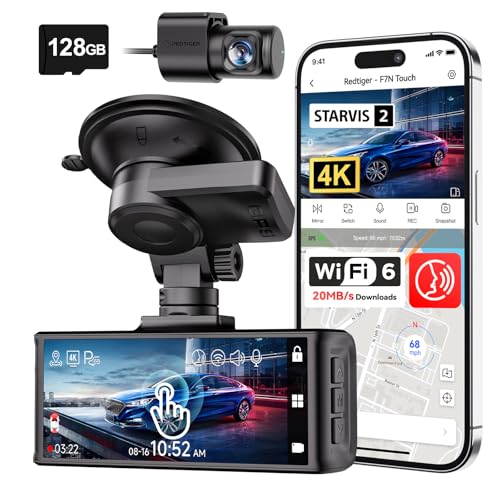
Touchscreen and voice controls distinguish the F7N Touch among these front-and-rear systems. REDTIGER specifies front 4K and rear 1080p video, STARVIS 2, GPS, loop recording, and a 128GB card; the front and rear fields of view are 170 and 140 degrees, respectively. HDR and WDR are included for the camera system. This model suits drivers who want screen-based control as well as voice commands. Its rear camera records at 1080p, so it does not match the 4K rear footage of the mirror-style model.
Bottom line: Pick this for touchscreen and voice controls with front 4K recording.
REDTIGER F7NP

The F7NP pairs front 4K with rear 1080p and names 24-hour parking mode among its features, setting it apart for drivers considering parked-vehicle recording. REDTIGER specifies a STARVIS 2 sensor, F1.5 aperture, 170-degree front and 140-degree rear views, plus WDR and HDR. A card is included, and the product name identifies a hardwire kit connection for parking mode, so installation planning matters. The feature set is less suited to buyers seeking equal front-and-rear resolution; the rear channel is Full HD rather than 4K.
Bottom line: Choose this if 24-hour parking mode is a priority and hardwiring is suitable.
How to choose a STARVIS 2 dash cam
Start with the resolution and camera count, not the STARVIS 2 label alone. These models range from 1440p front and rear to 4K on both channels, and STARVIS 2 appears in products with different sensors and camera formats. For balanced coverage, look for matching front-and-rear resolutions; for finer stated resolution at the front, accept that some systems pair it with a 1080p rear camera. A larger aperture can admit more light, but exposure, HDR processing, lens quality, and windshield reflections also shape night footage. If a parking mode is essential, confirm whether the installation requires a hardwire kit; do not assume a parking feature means the camera can run indefinitely without vehicle power planning.
Front-and-rear resolution differences
Resolution describes the recorded image dimensions, while upscaling enlarges a lower-resolution capture rather than adding native image detail. A 4K/1080p system therefore gives the front and rear cameras different pixel dimensions, and a 2.5K capture upscaled to 4K is distinct from native 4K capture. Choose the highest resolution where you most need detail, but remember that a dash cam’s view is constrained by windshield placement and field of view. Wide-angle lenses capture more of the scene but spread the image across a broader area. Keep the camera close to the windshield centerline and outside the driver’s primary sightline; check local rules for permitted windshield placement.
STARVIS 2 sensor and low-light footage
STARVIS 2 identifies a sensor technology, not a guarantee that every camera records equally well at night. Sony’s STARVIS 2 sensors are designed for imaging in low light, but a dash cam’s aperture, shutter behavior, HDR processing, and compression also affect whether moving plates remain legible. HDR can balance bright headlights against darker surroundings, though strong reflections from a dirty windshield can still obscure detail. Clean the glass near the lens and avoid placing the camera behind a tinted or dotted windshield area. For night driving, prioritize the resolution and sensor specified for the camera aimed at the direction you need to document.
Parking mode and installation planning
Parking mode can record events when a vehicle is parked, but installation and power management determine whether the camera can remain active. Hardwiring to the vehicle fuse box is a common way to enable parked recording; a low-voltage cutoff helps reduce the risk of draining the starter battery. Some systems use motion or impact detection, while others can record continuously, so verify the mode and power requirements for the specific setup. Route cables away from airbags and moving controls, and avoid obstructing the driver’s view. If you cannot identify a safe cable route or fuse connection, have a qualified installer handle the wiring.
| Need | Compare first | Tradeoff |
|---|---|---|
| Same resolution front and rear | 1440p / 1440p | Not 4K |
| 4K at both cameras | 4K / 4K mirror system | Mirror-style form factor |
| Higher front resolution | 4K or upscaled 4K front | 1080p rear on these models |
Frequently Asked Questions
Does STARVIS 2 mean a dash cam records in 4K?
No. STARVIS 2 identifies an image sensor technology, while resolution is a separate specification. These examples include 1440p, 4K, and 2.5K footage that is upscaled to 4K.
Is upscaled 4K the same as native 4K?
No. Upscaling enlarges an image captured at a lower resolution, while native 4K capture records at 4K dimensions. Compare the camera’s capture resolution rather than the playback label.
Will a dash cam capture license plates at night?
A dash cam may capture plates, but legibility depends on distance, motion, exposure, headlights, and camera resolution. HDR and a larger aperture can help manage difficult lighting, but no sensor label guarantees a readable plate.
Does parking mode need hardwiring to the car?
Many parking modes rely on a hardwire connection for power while the ignition is off. A low-voltage cutoff is useful to reduce battery-drain risk; confirm the camera’s power setup and use a safe fuse connection.
Where should a front dash cam be mounted?
Mount the front camera near the windshield centerline without blocking the driver’s primary view. Keep the lens clear of tinted areas and route power cables away from airbags.