
Super USB Cassette Capture Alternatives Compared

The Super USB Cassette Capture product is not among these options; DigitNow USB Cassette Capture is the closest match because it transfers cassette audio to MP3 through a USB-connected computer. Choose another option if you want to record directly to a USB drive or SD card without a computer.
A cassette capture device converts the tape’s analog playback into digital audio, either through computer software or by saving files to removable storage.
We earn a commission if you buy through links on this page. As an Amazon Associate I earn from qualifying purchases. Products are compared on manufacturer specifications, not hands-on testing.
- Best overall: DigitNow USB Cassette Capture – Connects to a computer by USB and converts cassette audio to MP3 using software.
- Best for computer-free recording: DIGITNOW BR607 USB Cassette Player – Records MP3 files to a FAT32 USB drive without requiring a PC.
- Best for SD-card recording: K7 Cassette Player with 8GB SD Card – Converts tapes to MP3 on the included 8GB SD card without another device or app.
| Product | Best for | Recording path | Storage format | Playback option | Shop |
|---|---|---|---|---|---|
| DigitNow USB Cassette Capture | Computer transfer | USB to computer | MP3; computer storage | 3.5mm headphone jack | Check Price on Amazon |
| DIGITNOW USB 2.0 Audio Capture Card | Existing cassette deck | USB audio interface | MP3 or WAV; computer storage | 3.5mm and RCA inputs | Check Price on Amazon |
| DIGITNOW BR607 USB Cassette Player | USB-drive recording | Direct to USB drive | MP3; FAT32 USB drive | Headphones included | Check Price on Amazon |
| K7 Cassette Player with 8GB SD Card | SD-card recording | Direct to SD card | MP3; included 8GB SD card | Built-in speaker | Check Price on Amazon |
| Reshow Cassette Tape Player | Simple tape playback | USB to computer | MP3; computer storage | 3.5mm headphone jack | Check Price on Amazon |
USB cassette capture alternatives
These options differ in whether they transfer audio through a computer or save it directly to removable storage.
DigitNow USB Cassette Capture
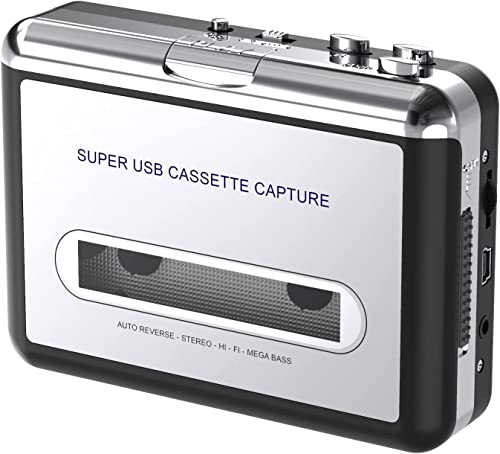
For computer-based cassette capture, this portable player connects by USB and uses Audacity software to convert tape audio to MP3. It also has a 3.5mm headphone output, and the package includes earphones and a USB cable. The maker lists compatibility with Windows XP, Vista, Windows 7, and Mac versions older than 10.5, so check your computer’s operating system before choosing it if you use a newer system. The computer-based workflow suits people who want to manage the resulting files on a laptop or desktop rather than save them directly to a drive.
Bottom line: Pick this if you want USB-connected computer capture and MP3 conversion.
DIGITNOW USB 2.0 Audio Capture Card

Unlike cassette player converters, this is a USB audio capture card that takes input from a separate audio source. It has 3.5mm and left/right audio inputs, connects to a computer over USB, and can record audio as MP3 or WAV using its included Audacity software. The maker lists support for Windows XP through Windows 10 and Mac OS 10.11 and later. It is a fit for someone who already has a cassette deck with a compatible output; it does not itself play tapes, so it is not a standalone cassette solution.
Bottom line: Choose it if you already have a cassette deck and want a computer audio interface.
DIGITNOW BR607 USB Cassette Player
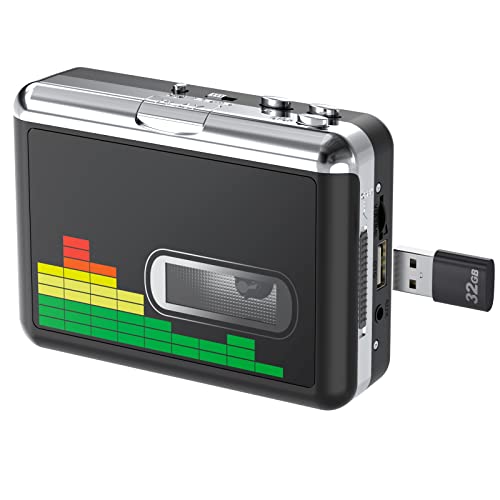
For recording without a computer, this portable cassette player saves MP3 files directly to a USB flash drive. The drive must use FAT32, and the maker says the player supports drives up to 128 GB; it can run from a USB port or two AA batteries. A volume control and playback function make it useful for both conversion and listening. Its direct-to-drive workflow differs from computer capture, so it suits buyers who prefer removable storage; it requires a compatible USB drive, which is not identified among the included items.
Bottom line: Pick this if you want to capture tapes directly to a compatible USB drive.
K7 Cassette Player with 8GB SD Card

For an SD-card workflow, this player converts cassette tapes to MP3 files on the included 8GB SD card, without a computer or separate app. It also works as an SD-card music player and has a built-in speaker and microphone; an SD card reader and earphones are included. The speaker and microphone make it more than a transfer-only device, but its storage path is SD rather than USB-to-computer capture. Choose it when onboard playback and a self-contained recording setup matter more than editing or managing transfers on a computer.
Bottom line: Choose it if you want SD-card conversion with a built-in speaker.
Reshow Cassette Tape Player

For a straightforward portable cassette player that can also convert tapes, this model sends cassette audio to MP3 through a USB cable and works with laptops and personal computers. It has a 3.5mm jack for standard headphones, and its compact body measures 5 by 1.2 by 1.5 inches. It suits buyers who also want ordinary headphone-based tape playback.
Bottom line: Pick this if you want portable cassette playback alongside USB conversion.
How to choose a USB cassette capture method
Choose a computer-connected converter if you want to manage audio files on a computer, or a standalone recorder if you want files saved to removable storage. Computer capture typically needs a playback device, a USB audio connection, and recording software; confirm that the software supports your operating system. Standalone models instead write to a USB drive or SD card, so the storage format and capacity matter. A cassette transfer runs in real time: a 60-minute side takes about 60 minutes to play and record. If you have a working cassette deck already, an audio capture interface can be an alternative to buying a cassette player, provided its input matches the deck’s output.
How computer cassette transfers work
Computer cassette transfers use the player’s audio output and recording software to make a digital file while the tape plays. Stereo cassette audio has two channels, so use a stereo connection when you want to retain left and right sound; a mono input can collapse them. Set the recording level so peaks do not clip, then listen to a short test before capturing a full side. MP3 files use lossy compression, while WAV files preserve uncompressed audio and take more storage. The capture card in this group offers MP3 or WAV recording, while the cassette player converters describe MP3 output. For tapes with long pauses, check the finished file boundaries before organizing an album.
USB cassette players versus capture cards
A USB cassette player combines tape playback with a computer connection, while an audio capture card records a signal from a separate deck or other audio source. The difference matters most when deciding what equipment you already own: a capture card needs an external player, but a cassette player can read tapes by itself. Standalone USB-drive and SD-card models avoid a computer during recording, though file transfer and editing may still require one later. Use the table to match the recording path to your setup.
| Setup | What it needs | Best fit |
|---|---|---|
| USB cassette player | Cassette tape and computer | Computer-managed MP3 transfer |
| USB audio capture card | Separate deck and computer | Existing audio equipment |
| Standalone recorder | Compatible USB drive or SD card | Capture without a computer |
What to check before capturing tapes
Check the connection and storage requirements before recording a full tape. A 3.5mm headphone output is not the same as paired left/right RCA outputs, so match the cable and input to the equipment you plan to use. For direct-to-USB recording, this group’s BR607 specifies a FAT32 drive up to 128 GB; do not assume a different file system will work. Keep a clean, labeled copy of the original recording before trimming or renaming files. On older tapes, playback may be uneven or noisy, and a digital transfer captures those source conditions rather than restoring the recording.
Frequently Asked Questions
How long does it take to convert a cassette tape?
A 60-minute tape side takes about 60 minutes to capture when recorded in real time. A 90-minute tape takes about 90 minutes for both sides combined, excluding setup and file checks.
Can I capture cassette audio without a computer?
Yes, a standalone cassette recorder can write files directly to removable storage. The options here include an SD-card model and a USB-drive model, each with its own storage requirement.
What is the difference between MP3 and WAV capture?
MP3 uses lossy compression and generally creates smaller files, while WAV stores uncompressed audio and uses more space. Choose WAV when preserving an uncompressed capture matters more than file size.
Can an audio capture card play cassette tapes?
No, an audio capture card records an incoming signal but does not contain a cassette mechanism. You need a separate cassette deck with an output that matches the card’s input.
Do USB cassette players record both tape sides automatically?
Do not assume they do; auto-reverse playback is a separate feature from automatic digital recording. Check for both functions if you need unattended two-sided transfers.