
Xbox One X Vertical Stands Compared by Features

eXtremeRate Xbox One X Stand suits most Xbox One X owners because its stand locks into the console’s slots and clicks into place. Choose a simpler base if you only need upright support, or a fan stand if you want extra USB ports and cooling.
A vertical stand supports the console upright; it does not replace clear space around the console’s vents.
We earn a commission if you buy through links on this page. As an Amazon Associate I earn from qualifying purchases. Products are compared on manufacturer specifications, not hands-on testing.
- Best overall: eXtremeRate Xbox One X Stand – Its stand locks into the console’s slots and clicks into place.
- Best for a simple base: KlsyChry Xbox One X Stand – Non-slip grips help keep this compact stand from sliding.
- Best for fan controls: Mcbazel Xbox One X Cooling Stand – Three fans offer high, low, and off modes, plus three USB 2.0 ports.
- Best for device charging: FASTSNAIL Xbox One X Cooling Stand – Its three USB 2.0 ports support controllers and other USB devices, but not external hard drives.
| Product | Best for | Stand type | Cooling fans | USB ports | Shop |
|---|---|---|---|---|---|
| eXtremeRate Xbox One X Stand | Locking support | Locking base | — | — | Check Price on Amazon |
| KlsyChry Xbox One X Stand | Simple support | Non-slip base | — | — | Check Price on Amazon |
| Mcbazel Xbox One X Cooling Stand | Fan controls | Cooling stand | 3 | 3 USB 2.0 | Check Price on Amazon |
| FASTSNAIL Xbox One X Cooling Stand | USB accessories | Cooling stand | 3 | 3 USB 2.0 | Check Price on Amazon |
Xbox One X vertical stands
Compare console fit first, then decide whether a basic base or added cooling and USB ports better suit your setup.
eXtremeRate Xbox One X Stand
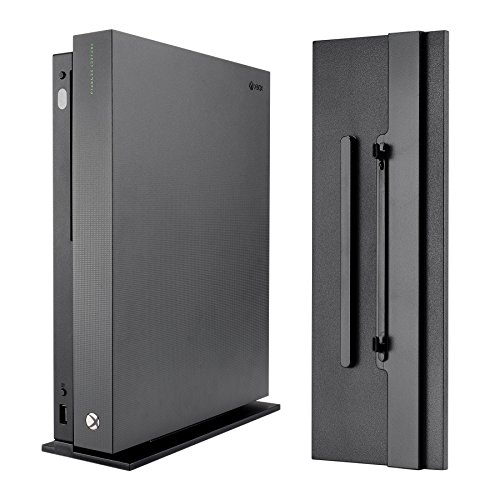
The locking base sets this stand apart from simple supports: it slides into the Xbox One X’s bottom slots until it clicks. The stand is made for Xbox One X and is not compatible with Xbox One S or the standard Xbox One. Its 1.18-inch height and 3.94-inch width make it a compact addition to a setup. Choose it if you want a stand that attaches to the console rather than simply holding it upright. It has no listed cooling fans or USB ports, so buyers seeking those extras should consider a powered stand instead.
Bottom line: Choose this if a console-attaching base matters more than added ports or fans.
KlsyChry Xbox One X Stand

The compact, minimal design distinguishes this stand from fan-and-hub models. It fits Xbox One X only, and non-slip grips on the base are intended to reduce vibration and sliding. Setup is simple: place the console on the stand. This suits an owner who wants upright support without extra controls or accessories. The trade-off is that it does not add cooling fans or USB ports, so it is not a fit for buyers seeking those functions. Keep the console’s ventilation openings clear regardless of which stand you choose.
Bottom line: Pick this for straightforward upright support without extra electronics.
Mcbazel Xbox One X Cooling Stand

Selectable fan modes set this cooling stand apart: its three fans have high, low, and off settings. The Xbox One X-only stand also has three USB 2.0 ports, a light bar, a lock, and a non-slip pad. The maker says the fans help prevent overheating during long gameplay; added fans do not remove the need to keep the console’s own vents unobstructed. Choose this model if adjustable fan operation and extra USB connections matter. The USB hubs do not support external hard drives, so storage devices need a different connection.
Bottom line: Choose this if you want selectable fan modes and three USB 2.0 ports.
FASTSNAIL Xbox One X Cooling Stand
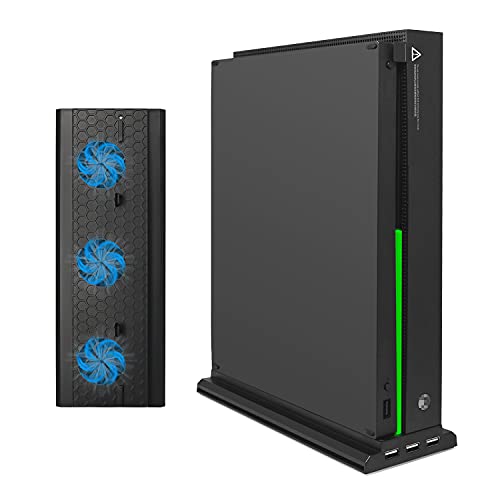
This stand combines upright support, three cooling fans, and three USB 2.0 ports for accessories. The maker says the fans help keep the console cool during long gameplay. Its ports can connect or charge controllers, keyboards, phones, tablets, and other USB devices; external hard drives are explicitly excluded. Choose it if you want to connect several accessories at the stand.
Bottom line: Pick this for fan cooling and USB connections for accessories other than external drives.
How to choose an Xbox One X vertical stand
Choose by attachment and extras: a basic base supports the console, while powered stands add fans and USB ports. Xbox One X is designed to operate horizontally or vertically when positioned correctly; a vertical stand must support the console securely. Check that the stand is made for Xbox One X, since Xbox One S and the original Xbox One have different fit requirements. For a plain setup, prioritize a stable base; for accessories, compare USB port count and supported devices. A fan’s presence alone does not establish a cooling benefit, and extra fans cannot compensate for blocked console vents. Avoid stands that obstruct the console’s air intake or exhaust.
| Need | Stand feature to prioritize |
|---|---|
| Upright placement | Stable base made for Xbox One X |
| Console attachment | Base that engages the console slots |
| Fan adjustment | Selectable fan modes |
| Accessory connections | USB ports and supported device types |
Xbox One X stand fit and placement
Match the stand to the exact console model before setting it upright. Xbox One X is not interchangeable with Xbox One S or the original Xbox One for stand fit; an upright base shaped for another console can fail to support it securely. Place the console on a hard, level surface, not carpet or a soft cushion, and keep vents uncovered. Leave several inches of open space around the console rather than pressing it against a wall or shelf; cramped placement can restrict airflow. Route cables so they do not pull the console or catch on the stand. If a stand attaches into slots, confirm that it seats fully before connecting cables or moving the setup.
Cooling fans and USB ports on vertical stands
Cooling stands add features, but their fans and ports serve separate purposes. A fan stand may offer more than one operating mode, so use a lower setting when noise matters and turn the fans off when they are not wanted. The Xbox One X still needs its own intake and exhaust openings clear; an accessory fan is not a substitute for room around the console. USB 2.0 ports can support compatible accessories, but they are not automatically suitable for every device. In particular, verify external-drive support before connecting storage: some stands expressly exclude external hard drives. A stand powered through USB may also occupy a console port, so account for the connections your setup already uses.
Common Xbox One X stand setup mistakes
The most common mistake is choosing a stand by appearance without checking console compatibility. Xbox One X stands are not necessarily compatible with Xbox One S or the original Xbox One, and the wrong base can leave the console unstable. Another mistake is treating a stand fan as permission to enclose the console; maintain open airflow and avoid heat sources. Do not place the console on a soft surface that can cover vents, and do not force an attaching base if its slots do not line up. For stands with USB hubs, connect controllers and supported accessories only; check external-drive compatibility before using a hub for storage.
Frequently Asked Questions
Can an Xbox One X stand also fit Xbox One S?
Do not assume an Xbox One X stand fits Xbox One S. Stand shapes and attachment points can differ by console model, so use a base identified for the exact console.
How much space should surround an Xbox One X?
Leave several inches of open space around the console and keep every vent unobstructed. A closed shelf or wall immediately beside an intake or exhaust can restrict airflow.
Does a cooling stand prevent Xbox One X overheating?
A stand fan cannot guarantee that a console will avoid overheating. Keep the console on a hard surface with clear vents and open space; added fans are supplementary.
Can I connect an external hard drive to a stand USB hub?
Only if that stand supports external hard drives. Some cooling stands specifically exclude them, so connect storage to a supported console port instead.
Is vertical placement safe for Xbox One X?
Vertical placement is suitable when the console is held securely by a compatible stand on a level, hard surface. Keep cables from pulling the console and leave its vents open.