
Surface Pro Model 1983 Parts Compared by Type and Fit

The Surface Pro model 1983 parts here include a screen assembly, batteries and a keyboard flex cable, so the right choice depends on which component needs replacement. A complete Surface Pro 1983 tablet is not among these options; choose another source if you need the computer itself rather than a repair part.
We earn a commission if you buy through links on this page. As an Amazon Associate I earn from qualifying purchases. Products are compared on manufacturer specifications, not hands-on testing.
- Best overall: Surface Pro 8 1983 Screen Assembly – The screen assembly is specified for Surface Pro 8 models 1983 and 1982.
- Best for battery replacement: CENIFENX DYNC01 Surface Pro 8 Battery – Includes a repair toolkit and specifies 4414mAh, 50.2Wh and 11.38V.
- Best for cycle-life guidance: JOTACT DYNC01 Surface Pro 8 Battery – Specifies up to 500 recharge cycles and compatible battery codes.
| Product | Best for | Component | Compatible models | Key specification | Shop |
|---|---|---|---|---|---|
| Surface Pro 8 1983 Screen Assembly | Screen replacement | Screen assembly | 1983, 1982 | 120Hz | Check Price on Amazon |
| CENIFENX DYNC01 Surface Pro 8 Battery | Battery with toolkit | Battery | 1983, 1982 | 4414mAh; 50.2Wh; 11.38V | Check Price on Amazon |
| JOTACT DYNC01 Surface Pro 8 Battery | Battery cycle estimate | Battery | 1983, 1982 | 4414mAh; 50.2Wh; 11.38V | Check Price on Amazon |
| Surface Pro 8 Keyboard Flex Cable | Keyboard cable repair | Keyboard flex cable | 1982, 1983 | 1 cable | Check Price on Amazon |
Surface Pro Model 1983 Replacement Parts
Match the part to the failed component, then confirm the exact model and part code before starting a repair.
Surface Pro 8 1983 Screen Assembly
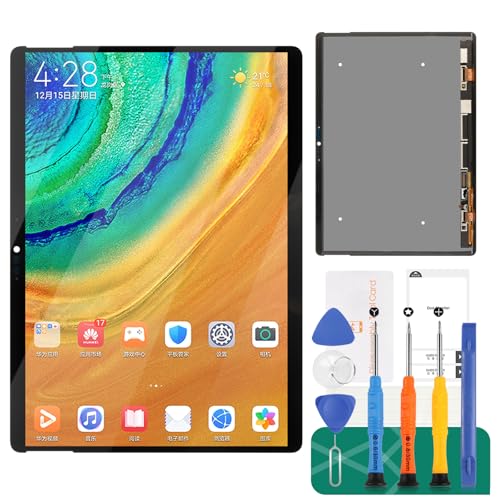
This option is the only screen assembly in this group, intended for Surface Pro 8 model 1983 and 1982. It is a 13-inch black LCD and digitizer assembly with a claimed 120Hz refresh rate, aimed at replacing a damaged display or touch layer. Choose it when the screen itself is the failed component, not for a battery or keyboard issue. The product maker says it is QC tested and describes checks for pixel and line defects. Screen replacement is a delicate repair; buyers without device-repair experience may prefer professional service.
Bottom line: Choose this when the display or touch assembly needs replacement.
CENIFENX DYNC01 Surface Pro 8 Battery

This battery is the only option in the group that explicitly includes a repair toolkit. Its specifications are 4414mAh, 50.2Wh and 11.38V, and it is identified by the DYNC01 and 96BTA016H codes for Surface Pro 8 models 1983 and 1982. The maker says the battery has a microchip for overcharge, over-discharge, short-circuit and overheating protection, and identifies it as UL, CE, FCC and RoHS certified. Pick it when those identifiers match the battery being replaced. Opening a tablet can damage the display or battery; do not puncture, bend or force a lithium-ion cell.
Bottom line: Choose this if you want a replacement battery with a toolkit included.
JOTACT DYNC01 Surface Pro 8 Battery

This battery distinguishes itself with a service-life estimate of up to 500 recharge cycles. It is a 4414mAh, 50.2Wh, 11.38V Li-ion replacement for Surface Pro 8 models 1983 and 1982, and lists DYNC01, 96BTA015H and 96BTA016H as compatible original battery codes. Check the code on the installed battery before choosing this replacement, especially if comparing it with the other 96BTA016H option. The cycle figure is the maker’s estimate, not a guarantee of runtime or lifespan; battery aging and charging conditions affect actual service life.
Bottom line: Choose this when its compatible battery code matches and the cycle estimate matters.
Surface Pro 8 Keyboard Flex Cable

This is the only keyboard-related part in the group: a single replacement flex cable, rather than a complete keyboard or a battery. It is identified as compatible with Surface Pro 8 models 1982 and 1983, with cable code 0801-DD43BQS. Choose it only when the cable is the part being replaced and the code and device model match. Installation requires maintenance skills, according to the maker, so it is a poor fit for someone expecting a plug-in external keyboard or a beginner repair. Verify the cable code against the removed part before proceeding.
Bottom line: Choose this for a compatible keyboard flex-cable repair.
How to Choose a Surface Pro 1983 Replacement Part
Choose by failed component first: a display fault points to a screen assembly, a worn battery to a battery, and a keyboard connection problem to a flex cable. Surface Pro 8 model 1983 and 1982 are the compatibility identifiers shared by these repair parts, but that alone does not confirm the replacement part code. Battery replacements should also match voltage and connector layout; the two batteries here specify 11.38V and identify DYNC01/96BTA codes. For a cable repair, match the code printed on the old cable where possible. If the part code or physical connector differs, stop and verify fit before opening the device.
Screen Assembly Fit and Repair Considerations
The screen assembly is listed as a 13-inch LCD and digitizer for Surface Pro 8 models 1983 and 1982. A digitizer is the touch-sensing layer, so a full assembly is different from a glass-only repair or an LCD-only panel. Before selecting a screen part, match the model and compare the connector and assembly layout with the original; model family alone may not settle every revision question. Tablet displays are bonded assemblies and opening one can crack glass or damage internal components. If you lack the right tools or repair experience, professional service is a safer path than prying at the display.
Surface Pro 8 Battery Replacement Safety
Both replacement battery choices specify 11.38V and 50.2Wh (4414mAh), but one includes a toolkit and the other gives an estimate of up to 500 recharge cycles. Those distinctions help narrow the choice only after the old battery code and connector match. Lithium-ion batteries can catch fire if punctured, crushed or shorted, so power down and unplug the device before service, and never use a sharp tool against the cell. A swollen battery should not be pressed back into place or handled as a routine replacement. Arrange safe professional handling if the battery is swollen or damaged.
Keyboard Flex Cable Versus Complete Keyboard
A keyboard flex cable is a small internal connection part, not an external keyboard and not a full keyboard assembly. The cable option here is identified by code 0801-DD43BQS and intended for Surface Pro 8 models 1982 and 1983. Confirm both the device model and the cable markings before buying; matching only the phrase “Surface Pro” is not enough for a repair part. Internal cable work involves opening the tablet and handling delicate connectors, which can be torn by pulling at an angle. If you cannot reach and release the connector without force, stop rather than risking damage to the socket.
Frequently Asked Questions
Is Surface Pro model 1983 the same as Surface Pro 8?
The replacement parts here identify model 1983 as compatible with Surface Pro 8, often alongside model 1982. Confirm the model printed on your device before selecting a part.
How do I know which Surface Pro 8 battery code I need?
Compare the code on the installed battery with DYNC01, 96BTA015H or 96BTA016H before ordering a compatible replacement. Also match the 11.38V specification and connector.
Can I replace only the Surface Pro 8 screen glass?
The screen option here is a complete LCD and digitizer assembly, not a glass-only component. Confirm whether your repair requires the full assembly before opening the tablet.
What does a 500-cycle battery rating mean?
The maker estimates up to 500 recharge cycles over the battery’s life. Actual service life depends on charging and use, so the estimate does not promise a particular runtime.