
Tablets With Wireless Charging: Docked Options Compared

For a tablet that charges without plugging a cable into the tablet, Jeazans 10.1-inch Tablet with Speaker Dock is the clearest match because its included dock charges through magnetic contacts. The products here do not establish standard Qi wireless-pad support, so choose a different model if Qi compatibility is essential.
A charging dock is a stand that supplies power through contacts when the tablet is seated; that differs from Qi charging, which transfers power across a compatible pad.
We earn a commission if you buy through links on this page. As an Amazon Associate I earn from qualifying purchases. Products are compared on manufacturer specifications, not hands-on testing.
- Best overall: Jeazans 10.1-inch Tablet with Speaker Dock – Its magnetic-contact dock is explicitly described as charging the tablet.
- Best for a docked hub: Jeazans 10.1-inch Tablet with Charging Dock – The included dock is identified as charging the tablet while docked.
| Product | Best for | Screen size | Storage | Charging method | Shop |
|---|---|---|---|---|---|
| Jeazans 10.1-inch Tablet with Speaker Dock | Desk dock setup | 10.1 in | 64GB; up to 1TB expansion | Magnetic-contact dock | Check Price on Amazon |
| Jeazans 10.1-inch Tablet with Charging Dock | Docked daily use | 10.1 in | 64GB; up to 1TB expansion | Charging dock | Check Price on Amazon |
| Samsung Galaxy Tab A11+ 8GB/256GB | More storage | — | 256GB | Fast wired charging | Check Price on Amazon |
| Jeazans 10.1-inch Android 16 Tablet Kit | Accessory bundle | 10.1 in | 64GB; up to 1TB expansion | — | Check Price on Amazon |
| Samsung Galaxy Tab A11+ 128GB Wi-Fi | Wi-Fi only tablet | 11 in | 128GB | USB-C wired charging | Check Price on Amazon |
Tablets With Wireless Charging
These models differ in whether a charging dock is included or described, and whether wireless-pad charging is supported.
Jeazans 10.1-inch Tablet with Speaker Dock
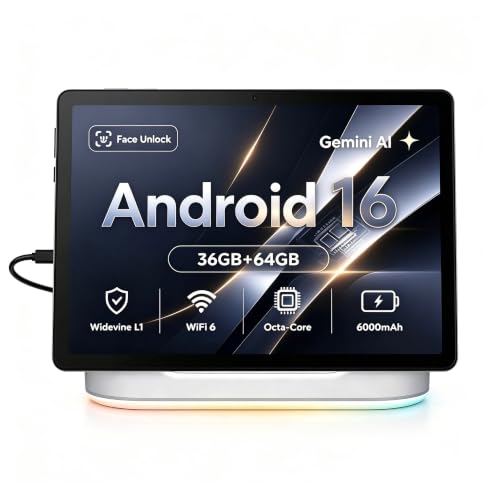
Jeazans 10.1-inch Tablet with Speaker Dock is the direct fit for shoppers seeking a tablet that can charge while seated in a dock: the Jeazans dock uses magnetic contacts and also serves as a speaker. The 10.1-inch tablet has 64GB of internal storage and accepts TF-card expansion up to 1TB. Its dock adds music-synced ambient lights, white-noise modes, and clock and photo-frame functions, making the package suited to a stationary bedside or desk setup. The charging method is specific to the included dock, however, so it is not a confirmed choice for charging on a standard Qi pad.
Bottom line: Pick this if you want the included magnetic-contact dock as part of the setup.
Jeazans 10.1-inch Tablet with Charging Dock

It also has an 8-core processor and storage expansion up to 1TB with a separate TF card. This setup fits someone who wants a dedicated place to seat and charge a tablet. The available wording does not establish Qi-pad compatibility or specify the charging connector, so do not choose it on the assumption that any wireless charger will work.
Bottom line: Choose this for a tablet-and-dock arrangement rather than Qi-pad charging.
Samsung Galaxy Tab A11+ 8GB/256GB

Samsung Galaxy Tab A11+ 8GB/256GB is a conventional tablet alternative, not a dock-charging match: its features mention fast charging but do not describe a charging dock. Its 256GB storage exceeds the 64GB internal capacity of the Jeazans docked models, while storage is also expandable. The large storage allocation suits users keeping more apps or files on the tablet. The tradeoff for this search is that fast charging does not mean wireless charging, and the features do not identify Qi support; choose this only if a dock is not a requirement.
Bottom line: Pick this if storage matters more than having a charging dock.
Jeazans 10.1-inch Android 16 Tablet Kit

Jeazans 10.1-inch Android 16 Tablet Kit differs from the docked Jeazans models by bundling a keyboard, wireless mouse, stylus, and case rather than naming a charging dock. It has 64GB internal storage with TF-card expansion up to 1TB, making the bundle relevant to typing and basic productivity setups. Because this search is specifically about charging, the key limitation is that the features do not establish either dock charging or Qi-pad charging.
Bottom line: Choose this for its input accessories, not for wireless tablet charging.
Samsung Galaxy Tab A11+ 128GB Wi-Fi

Samsung Galaxy Tab A11+ 128GB Wi-Fi is an 11-inch Wi-Fi-only tablet with 128GB of storage and a USB Type-C 2.0 port, rather than a model described with an included charging dock. Its 90Hz display and 6GB of RAM distinguish its configuration from the 256GB Galaxy option. It may suit someone prioritizing a larger screen and standard wired connectivity.
Bottom line: Pick this for an 11-inch Wi-Fi tablet with USB-C, not a wireless charging setup.
How tablet wireless charging differs
Tablet dock charging and Qi wireless charging are separate methods. A dock may use exposed magnetic contacts to supply power when the tablet is seated, while Qi charging transfers power through a compatible charging pad; a magnetic attachment alone does not prove Qi support. Check the device maker’s specifications for an explicit Qi or wireless-charging statement before buying a pad. Charging through dock contacts also requires the matching dock, so it is not interchangeable with a generic phone stand. For a fixed desk location, a model with a dedicated charging dock can reduce cable handling at the tablet; for charging in multiple rooms, confirm the tablet itself supports the pad standard you plan to use.
How to choose a tablet charging setup
Choose by the charging method you need, not by broad phrases such as “charging while docked.” A confirmed Qi tablet requires explicit wireless-charging support; a magnetic-contact dock requires the matching stand and contact placement. The included Jeazans dock is described as charging through magnetic contacts, whereas the Samsung options describe fast charging or USB-C rather than wireless charging. If you need one tablet for both a desk dock and a pad, verify support for both methods before ordering. Do not assume that a wireless mouse, magnetic case, or speaker dock means Qi charging: those features describe different functions.
| Need | Look for | What it means |
|---|---|---|
| Desk charging | Included charging dock | Power while seated in its matched dock |
| Pad charging | Explicit Qi or wireless charging support | Compatibility with a specified pad standard |
| Wired charging | Charging port or fast-charge wording | Connect a cable; not evidence of wireless support |
What to verify before ordering
Confirm whether the dock uses contact charging or the tablet supports Qi, because those methods are not interchangeable. For a docked model, check that the dock is included and that the tablet’s size matches its intended seating position; the dock needs to align with the tablet’s charging contacts. For a charging pad, check both the pad standard and the tablet’s explicit compatibility. Also consider where the tablet will sit: a speaker or clock dock is designed for a more stationary setup, while a cable-based tablet can be placed independently. These checks prevent a common mistake—buying a “wireless” accessory that connects wirelessly to the tablet but does not deliver power.
Frequently Asked Questions
Can tablets charge on a Qi wireless pad?
Some tablets support Qi charging, but pad compatibility must be stated for the particular tablet. Magnetic dock contacts or fast wired charging do not establish Qi support.
Does magnetic dock charging mean Qi charging?
No. Magnetic contacts can carry power through a matched dock without using Qi. Check for an explicit Qi or wireless-pad specification if you want to use a generic charging pad.
Can a wireless mouse charge a tablet?
No, a wireless mouse describes how the mouse communicates, not how the tablet receives power. Tablet charging requires a supported cable, dock, or wireless charging standard.
Is USB-C fast charging wireless charging?
No. USB-C charging uses a cable plugged into the tablet, even when it supports faster charging. Wireless charging requires compatible power transfer through a dock or pad.