
Thermalright Assassin X 120 Coolers Compared by Fit

For most builds seeking a Thermalright Assassin X 120, Thermalright Assassin X120 Refined SE is the closest match, with a 148 mm height and support for current Intel and AMD sockets.
Choose Thermalright Assassin X 120-A Dark for an all-black look and a fan rated up to 2,400 RPM, or Thermalright Assassin X 120R Digital ARGB White for a white cooler with a digital screen.
We earn a commission if you buy through links on this page. As an Amazon Associate I earn from qualifying purchases. Products are compared on manufacturer specifications, not hands-on testing.
- Best overall: Thermalright Assassin X120 Refined SE – Its 148 mm height is the shortest among the single-tower options here.
- Best for black builds: Thermalright Assassin X 120-A Dark – The dark heatsink, fan and top cover give an all-black appearance.
- Best for a digital display: Thermalright Assassin X 120R Digital ARGB White – Its top cover includes a screen and the cooler has a white finish.
| Product | Best for | Height | Shop |
|---|---|---|---|
| Thermalright Assassin X120 Refined SE | Shorter case clearance | 148 mm | Check Price on Amazon |
| Thermalright Assassin X 120-A Dark | All-black builds | 151 mm | Check Price on Amazon |
| Thermalright Assassin X 120R Digital ARGB White | Digital display builds | 151 mm | Check Price on Amazon |
Thermalright Assassin X 120 coolers
Compare the single-tower Assassin X options with a larger Peerless Assassin alternative by dimensions, fan setup and build style.
Thermalright Assassin X120 Refined SE

The Assassin X120 Refined SE is the shortest single-tower option here at 148 mm, a useful distinction when a case has a tight CPU-cooler limit. Its aluminum heatsink measures 125 × 71 mm across the base dimensions, and the package pairs four heat pipes with a TL-C12C PWM fan. Thermalright lists support for AMD AM4 and AM5 plus Intel LGA 1150, 1151, 1155, 1200, 1700 and 1851. The limitation is that no fan speed or airflow figure is provided in the specifications, so buyers prioritizing those figures may prefer Thermalright Assassin X 120-A Dark.
Bottom line: Choose this if you need the shortest single-tower fit among these options.
Thermalright Assassin X 120-A Dark
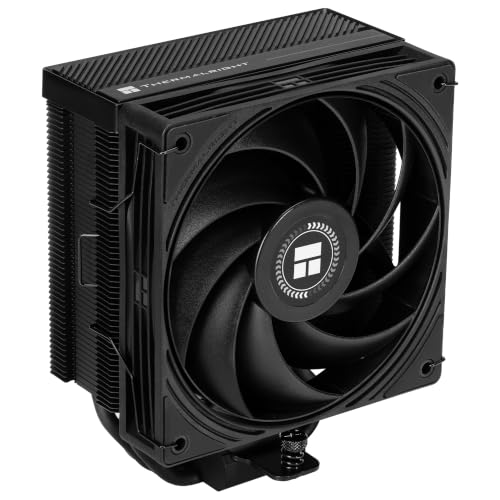
The Assassin X 120-A Dark distinguishes itself with an all-black finish and a higher-speed fan: its 120 mm TL-N12-R9 V2 is rated up to 2,400 RPM, 85.35 CFM and 2.95 mm H₂O. Its single tower uses four 6 mm direct-contact heat pipes, and Thermalright rates its cooling capacity up to 240 W TDP. Socket support covers AMD AM4 and AM5 and Intel LGA 1851 and 1700. At 151 mm tall, it needs 3 mm more vertical room than Thermalright Assassin X120 Refined SE, so confirm the case’s cooler-height limit if clearance is close.
Bottom line: Choose this for a dark build when the case allows a 151 mm cooler.
Thermalright Assassin X 120R Digital ARGB White

The Assassin X 120R Digital ARGB White adds a digital screen in its top cover, setting it apart from the simpler single-tower designs. Its 120 × 71 mm body uses four heat pipes and a 120 mm PWM fan rated at 2,000 RPM ±10%, with 70.84 CFM airflow and 2.63 mm H₂O pressure. Thermalright says the screen can show CPU temperature, CPU usage and graphics-card temperature. The white cooler stands 151 mm tall, so it is not the best choice where the extra 3 mm over Thermalright Assassin X120 Refined SE exceeds the case’s clearance.
Bottom line: Choose this if you want a white cooler with a digital screen and adequate height clearance.
How to choose a Thermalright Assassin X 120
Start with socket fit and case height: a cooler must match the motherboard socket and remain below the case’s maximum CPU-cooler height. The Assassin X options here measure 148 or 151 mm tall. Leave a small margin rather than buying exactly to the limit, since case panels and installation tolerances can make a borderline fit awkward. Next, weigh design priorities: Thermalright Assassin X 120-A Dark has a rated 2,400 RPM fan, while Thermalright Assassin X 120R Digital ARGB White adds a screen. A higher fan speed alone does not establish lower CPU temperatures; airflow, heatsink design, case ventilation and processor load all affect cooling.
Socket lists can vary by product revision, so match the exact socket printed for the chosen model against the motherboard and processor before ordering.
Cooler height and case clearance
Measure the usable distance from the CPU surface to the closed side panel, then compare that number with cooler height. A case with less than 148 mm of cooler clearance cannot accommodate any of the single-tower choices here. Measure after accounting for any side-panel bulge or interior obstruction rather than relying on outside case dimensions. Width matters too: the Assassin X towers are 71 mm wide, which can still crowd nearby memory or motherboard components depending on fan position. Check RAM height and fan placement when memory modules have tall heat spreaders.
Use this quick comparison to narrow the fit before checking the exact socket match.
| Need | Choice | Physical condition |
|---|---|---|
| Lowest single-tower height | Thermalright Assassin X120 Refined SE | 148 mm maximum height |
| Dark finish with faster-rated fan | Thermalright Assassin X 120-A Dark | 151 mm maximum height |
| Screen in the cooler top | Thermalright Assassin X 120R Digital ARGB White | 151 mm maximum height |
Fan ratings and cooling design
Fan speed, airflow and static pressure describe different properties, so compare like with like rather than treating one rating as a full cooling result. RPM is rotational speed; CFM is a volume-flow rating; mm H₂O indicates pressure capability. Thermalright Assassin X 120-A Dark and Thermalright Assassin X 120R Digital ARGB White include airflow figures, at 85.35 CFM and 70.84 CFM respectively, while Thermalright Assassin X 120-A Dark also has a 2.95 mm H₂O pressure rating. These figures do not establish comparative CPU temperatures, which also depend on processor heat output, case airflow and fan curve.
Thermalright rates Thermalright Assassin X 120-A Dark for cooling capacity up to 240 W TDP, but that is not a guarantee of processor temperature under every workload. Consider processor power behavior, case ventilation and noise preference when deciding whether a fan setup is suitable.
Socket and installation fit
Check the socket designation on both the cooler and motherboard before installation: an Intel LGA 1700 match, for example, does not establish compatibility with every other Intel socket. Thermalright Assassin X120 Refined SE lists AMD AM4 and AM5 plus Intel LGA 1150, 1151, 1155, 1200, 1700 and 1851; Thermalright Assassin X 120-A Dark lists AM4, AM5, LGA 1700 and LGA 1851. Thermalright Assassin X 120R Digital ARGB White lists AM4, AM5, LGA 1851, LGA 1700, LGA 115X and LGA 1200. A socket-compatible cooler can still interfere with tall memory or nearby components. Confirm the exact socket and clearance before ordering.
For a safe installation, switch off and unplug the computer, secure the cooler evenly using its intended mounting hardware, and keep the fan cable clear of blades. Remove any protective film from the cooler base before mounting; leaving film in place blocks heat transfer.
Frequently Asked Questions
How much cooler clearance should my PC case have?
The case’s CPU-cooler limit must be at least the cooler’s full height. These options range from 148 mm to 155 mm, so a case rated below 148 mm excludes all of them.
Can a 120 mm CPU cooler fit an AM5 motherboard?
A 120 mm fan size alone does not confirm AM5 fit; the cooler must include AM5 mounting support. All four products here list AMD AM5 compatibility.
Does a higher RPM fan always cool a CPU better?
No; RPM alone does not determine CPU temperature. Airflow, heatsink surface, processor load and case ventilation matter, and a faster fan can also be more audible.
What does 85 CFM mean on a CPU cooler?
CFM is a fan airflow volume rating, not a direct CPU-temperature measurement. The Dark model’s 85.35 CFM rating should be considered alongside its heatsink, fan pressure and case airflow.
How often should I clean a CPU air cooler?
Inspect the heatsink and fan every few months, with more frequent checks in dusty rooms or near pets. Dust buildup between the fins can restrict airflow; unplug the PC before cleaning and avoid bending the fins.