
TomTom GO Comfort 6: Models Compared by Fit

The TomTom GO Comfort 6 is not among these options; TomTom GO Comfort 5 is the closest match because it is a GO Comfort model with Wi-Fi updates and real-time traffic, but its screen is 5 inches. Choose a different model if you need large-vehicle routing, a 6-inch display, or renewed 5-inch hardware.
We earn a commission if you buy through links on this page. As an Amazon Associate I earn from qualifying purchases. Products are compared on manufacturer specifications, not hands-on testing.
- Best overall: TomTom GO Comfort 5 – The GO Comfort line, Wi-Fi updates, real-time traffic and North American maps make this the closest match.
- Best for truck routing: TomTom Truck GO Expert 6 – It offers custom routing and POIs for trucks, buses and coaches, with a 6-inch screen.
- Best for Europe routes: TomTom GO Navigator 6 – It includes Europe maps and a large 6-inch display.
| Product | Best for | Screen size | Routing focus | Map coverage | Shop |
|---|---|---|---|---|---|
| TomTom GO Comfort 5 | Everyday car navigation | 5 inches | Car routes | North America | Check Price on Amazon |
| TomTom GO Comfort 5 Renewed | Renewed Comfort model | 5 inches | Car routes | — | Check Price on Amazon |
| TomTom Truck GO Expert 6 | Large-vehicle routing | 6 inches | Truck, bus and coach | World maps | Check Price on Amazon |
| TomTom GO Navigator 6 | European car routes | 6 inches | Car routes | Europe | Check Price on Amazon |
TomTom GO Comfort GPS Navigators and Alternatives
These models differ in screen size, vehicle routing and geographic map coverage.
TomTom GO Comfort 5
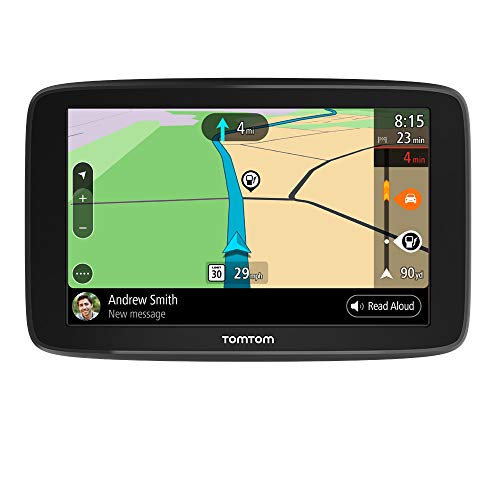
TomTom GO Comfort 5 is the closest fit for a GO Comfort 6 search: it is a GO Comfort model, though its screen measures 5 inches rather than 6. TomTom says it supports Wi-Fi updates, real-time traffic, smart routing and destination prediction, and includes North American maps. Smartphone text read-aloud and route planning through MyDrive suit drivers who want connected trip planning. Its main limitation is the smaller display, which matters if a 6-inch screen is essential; it also does not describe truck-specific routing.
Bottom line: Choose this if the GO Comfort features matter more than having a 6-inch screen.
TomTom GO Comfort 5 Renewed

TomTom GO Comfort 5 Renewed is a renewed 5-inch GO Comfort 5, making it a related option for shoppers who prioritize the model family over screen size. Its name specifies Wi-Fi, lifetime traffic and maps, smart routing, destination prediction and road trips. The 5-inch screen is the same size as the other GO Comfort option here, so it does not solve a need for a 6-inch display. Because it is renewed, buyers who specifically want new hardware should choose another model instead.
Bottom line: Pick this if a renewed GO Comfort 5 suits your needs.
TomTom Truck GO Expert 6

TomTom Truck GO Expert 6 stands apart with truck, bus and coach routing rather than the car-focused GO Comfort approach. The 6-inch HD screen accompanies custom routes and POIs, plus live warnings for bridge heights, ADR tunnels and UN Class restrictions. TomTom says TomTom Traffic and one year of speed camera alerts are included, and the model supports world maps and Wi-Fi updates. This is the strongest match when large-vehicle restrictions determine the purchase, but it is not a GO Comfort model and its routing focus may be unnecessary for ordinary car trips.
Bottom line: Choose this for commercial vehicles and restriction-aware route planning.
TomTom GO Navigator 6

TomTom GO Navigator 6 is a 6-inch car navigator with Europe maps, which makes it more relevant to drivers seeking that screen size and regional coverage than a GO Comfort alternative. It includes Wi-Fi map updates and a 12-month speed camera alert trial; TomTom says its traffic updates can help drivers avoid congestion. The magnetic mount is another distinguishing feature. Its map coverage is Europe rather than North America or world maps, so drivers planning primarily outside Europe should check coverage before choosing it.
Bottom line: Choose this for a 6-inch screen and Europe-focused car navigation.
How to choose a TomTom car navigator
Start with the route type and map region, then use screen size as a tie-breaker. Car units prioritize everyday turn guidance, while truck navigators can account for vehicle restrictions such as bridge heights and tunnel classifications. A 6-inch display is larger than the 5-inch GO Comfort screen here, but screen size alone does not determine whether a model has the maps or routing needed for a trip. Check that the intended country or region is covered before a long drive; the options here identify North America, Europe or world maps. If you drive a truck or bus, choose a model that explicitly includes large-vehicle routing rather than assuming a car route will accommodate vehicle dimensions.
Screen size and dashboard fit
A 5-inch screen favors a more compact footprint, while a 6-inch display gives route prompts more viewing area. Measure the available dashboard space and consider sightlines before deciding: a larger unit can obstruct the view if mounted too high or too close to the windshield. Keep navigation devices out of the driver’s direct forward view and away from airbag deployment zones. A magnetic mount can make placement and removal easier, but the mounting position still needs to remain stable and legal for the vehicle. Pick the smallest screen that remains easy for the driver to read without leaning or taking attention from the road.
Car routing versus truck routing
Truck routing is useful when vehicle size or cargo restrictions can change which roads are suitable. Commercial navigation may account for height restrictions, restricted tunnels and vehicle-specific destinations, while ordinary car routing does not promise that kind of adaptation. The truck model here identifies bridge-height and ADR tunnel warnings as well as UN Class restrictions; those alerts are relevant only when the vehicle and load require them. For a personal car, a car-oriented navigator is generally the simpler match. Before relying on any route for a commercial vehicle, verify critical road restrictions against current local signs and rules because conditions and restrictions can change.
Keeping maps and traffic services current
Wi-Fi updates can let a navigator refresh maps without connecting it to a computer, but the update process still needs a suitable Wi-Fi connection and enough time to finish before departure. Live traffic is separate from map data: traffic can help identify congestion, while a map update refreshes road information. Speed camera alerts may have a trial period or subscription condition, so confirm the active term before relying on that feature. Update maps before a major trip, particularly when driving in an unfamiliar region, and avoid handling the device while driving. For routes that cross borders, verify regional map coverage before leaving.
Frequently Asked Questions
Is there a TomTom GO Comfort with a 6-inch screen here?
The 6-inch options are different product lines, including a truck navigator and a Europe-focused car navigator.
What screen size is best for a car GPS?
A 5-inch screen suits drivers prioritizing a compact device, while 6 inches offers a larger viewing area. Measure your dashboard and avoid mounting any screen where it obstructs the road view or an airbag.
Can a truck GPS be used in a regular car?
A truck navigator can provide navigation, but its vehicle-specific routing is meant for large vehicles. For a regular car, a car-oriented model avoids paying attention to restrictions that do not apply to the vehicle.
How often should I update a GPS map?
Update before a major trip and whenever a relevant map update is available, especially for unfamiliar or recently changed roads. Wi-Fi updating still requires a suitable connection and time to complete while parked.
Are speed camera alerts included permanently?
Not necessarily; the GO Navigator identifies a 12-month trial, while the truck model describes one year of alerts. Check the applicable term before assuming alerts remain active afterward.