
Trail Cameras Without WiFi: 3 Models Compared

For a trail camera without WiFi, WOSPORTS 64MP 4K Non-WiFi Trail Camera is the clearest match if 4K video and a 0.2-second trigger matter most. Choose WOSODA Two-Pack 48MP Trail Cameras instead for two cameras in one pack, or GardePro A3S 64MP Non-Cellular Trail Camera for a 0.1-second trigger and stated 100-foot night vision.
Trail cameras record motion to local storage rather than relying on WiFi for remote viewing, so plan to retrieve the camera or its memory card to view footage.
We earn a commission if you buy through links on this page. As an Amazon Associate I earn from qualifying purchases. Products are compared on manufacturer specifications, not hands-on testing.
- Best overall: WOSPORTS 64MP 4K Non-WiFi Trail Camera – It combines 4K video, a 0.2-second trigger and a non-WiFi design.
- Best for two locations: WOSODA Two-Pack 48MP Trail Cameras – The pack includes two cameras, each with a 0.3-second trigger and 1080p video.
- Best for low-light scouting: GardePro A3S 64MP Non-Cellular Trail Camera – It pairs a Sony Starvis sensor with maker-claimed night vision up to 100 feet.
| Product | Best for | Video resolution | Trigger speed | Shop |
|---|---|---|---|---|
| WOSPORTS 64MP 4K Non-WiFi Trail Camera | 4K video | 4K | 0.2 s | Check Price on Amazon |
| WOSODA Two-Pack 48MP Trail Cameras | Two locations | 1080p | 0.3 s | Check Price on Amazon |
| GardePro A3S 64MP Non-Cellular Trail Camera | Low-light scouting | 1296p | 0.1 s | Check Price on Amazon |
Trail Cameras Without WiFi Compared
Compare how the non-WiFi options differ in video resolution, trigger speed and camera count.
WOSPORTS 64MP 4K Non-WiFi Trail Camera

For buyers who want 4K video in a non-WiFi camera, this WOSPORTS model pairs that resolution with a 0.2-second trigger. The maker says it records 64MP photos, with adjustable photo settings from 5MP to 64MP, and offers 1–3 burst shooting. Its 120-degree detection angle and 32 940nm IR LEDs are useful specifications to weigh when planning a broad field of view and discreet night capture. The limitation is that the specifications give no storage capacity or battery runtime; confirm those before choosing it for a remote site.
Bottom line: Pick this if 4K video and a wide detection angle are priorities.
WOSODA Two-Pack 48MP Trail Cameras

The two-camera pack is the practical distinction here: it lets a buyer cover two locations with one purchase. The maker says each camera captures 48MP photos and 1080p video, triggers in 0.3 seconds, and detects motion up to 60 feet. Its 850nm low-glow infrared is a different night-vision approach from no-glow LEDs, so consider whether a faint glow is acceptable at the site. The maker says an SD card is not included and the cameras support cards up to 256GB; budget for removable storage and routine card retrieval.
Bottom line: Choose this for covering two separate camera locations.
GardePro A3S 64MP Non-Cellular Trail Camera
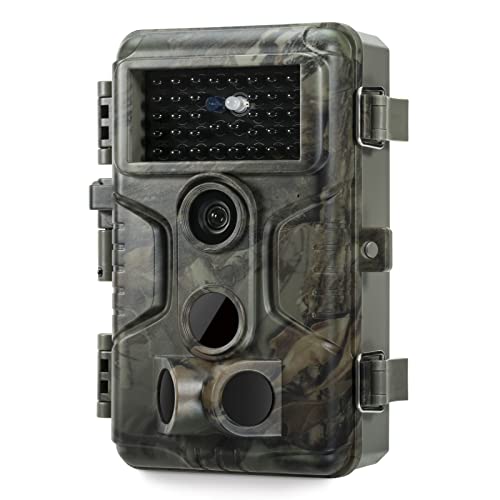
The A3S stands apart with a 0.1-second trigger and a Sony Starvis sensor, making it the quickest-trigger option among these non-WiFi cameras. The maker says it records 64MP photos and 1296p video with sound, and claims no-glow night vision reaches 100 feet. Non-cellular, non-WiFi operation means footage is not sent through a phone connection; the maker says to retrieve the SD card to view captures. Buyers who want remote alerts or live access should choose a cellular camera instead, not this model.
Bottom line: Pick it when a fast trigger and claimed 100-foot night vision matter.
How to Choose a Trail Camera Without WiFi
Choose by trigger speed, capture type and how often you can visit the camera, rather than by megapixel count alone. Trigger speed measures the delay between motion detection and capture; a quicker trigger can help when an animal crosses the frame briefly. Video resolution matters if moving footage and sound are more useful to you than still photos. For a site you can visit often, removable-card workflow may be manageable; for a remote site, card capacity and power runtime become important planning factors. These products do not supply runtime figures in the specs, so confirm expected battery life before placing a camera far from access.
Detection angle and detection distance are not the same: angle describes the width monitored, while distance describes how far motion can trigger capture. Aim the camera across a trail rather than directly down it to give a crossing animal more time in the detection zone.
How Non-WiFi Trail Cameras Store Footage
A non-WiFi trail camera generally records captures to a memory card, which you retrieve to review the files. Unlike a cellular camera, it does not send images to a phone over a mobile network; this avoids depending on a signal at the site but requires physical access for retrieval. Use a card capacity within the camera’s supported limit and format it in the camera before deployment when the manual allows. Keep a spare card in a protective case so a full or wet card does not leave the camera unavailable during a visit.
For continuous use, check the camera on a schedule that matches expected activity and storage use. High-resolution photos, longer clips and frequent motion events consume more card space and battery power than sparse captures, so settings and animal traffic change how often visits are needed.
Night Vision and Placement for Trail Cameras
Infrared illumination determines how a camera records after dark: no-glow 940nm LEDs are designed to avoid a visible red glow, while 850nm low-glow systems can emit a faint red glow. A longer advertised night-vision range does not guarantee clear identification at that distance; subject size, vegetation, angle and ambient conditions all affect usable detail. Keep branches and tall grass out of the immediate foreground, since close objects can reflect infrared light and wash out the subject.
Mount the camera firmly at the height and angle suited to the animal or entry point you want to monitor, and test the detection zone before leaving. Avoid aiming toward sunrise or sunset where possible, because direct light can create glare in daytime footage. A secure mount and tamper-conscious placement also reduce disturbance to wildlife and unauthorized handling.
Trail Camera Specification Differences
Use the need-to-choice guide below to match a specification to the job. A fast trigger is useful where animals pass quickly, while a two-camera pack addresses coverage across separate locations. Video resolution is a format comparison, not a guarantee of better identification at night; sensor, lens, distance and lighting also matter.
| Need | Specification to prioritize | Why it matters |
|---|---|---|
| Fast-moving trail crossing | Short trigger time | Less delay between detection and capture |
| Two separate monitoring points | Two-camera pack | Cover separate locations without moving one camera |
| Reviewing motion and sound | Video with sound | Captures movement and audio rather than still images alone |
| Discreet nighttime setup | No-glow infrared | Avoids the visible red glow associated with low-glow IR |
Frequently Asked Questions
Do trail cameras without WiFi need internet access?
No, a non-WiFi trail camera can record locally without an internet connection. You generally retrieve the memory card or camera itself to review captures, so choose a site you can visit.
How often should I retrieve a trail camera memory card?
A practical starting point is to check after one or two weeks, then adjust for activity, clip length and card capacity. Frequent motion events and longer video clips fill storage faster than occasional still photos.
Is 850nm or 940nm infrared better for wildlife?
A 940nm no-glow illuminator avoids a visible red glow, while 850nm low-glow infrared can show a faint glow. Consider whether visibility matters at your location, and remember that distance and vegetation affect night image detail.
How high should I mount a trail camera?
For many ground-level wildlife setups, about 3 feet is a useful starting height, adjusted for the animal’s size and the terrain. Aim across the expected path and test the detection zone before leaving the camera unattended.
What memory card capacity should a trail camera use?
Use a card no larger than the camera supports; supported limits vary by model. Higher-resolution photos and longer video clips use more space, so check the camera’s manual and bring a spare card for remote placements.