
TV Mounts for No-Stud Walls: 5 Drywall Picks

For most people, ECHOGEAR No-Stud Drywall Mount is the clearest fit because it accommodates TVs up to 77 inches and 100 pounds. No-stud mounts attach to drywall without locating framing, but buyers with a larger or heavier TV should compare the other mounts’ limits and confirm the wall surface is suitable.
We earn a commission if you buy through links on this page. As an Amazon Associate I earn from qualifying purchases. Products are compared on manufacturer specifications, not hands-on testing.
- Best overall: ECHOGEAR No-Stud Drywall Mount – Fits TVs up to 77 inches and 100 pounds, with tilt or flush positioning.
- Best for large TVs: HangSmart TV Original – Its compatibility reaches 100-inch TVs and its weight limit is 150 pounds.
- Best for smaller TVs: Auoace No-Stud Drywall Hanger – Its screen range begins at 13 inches and runs through 55 inches.
| Product | Best for | TV size range | Weight limit | VESA range | Shop |
|---|---|---|---|---|---|
| ECHOGEAR No-Stud Drywall Mount | Tilt or flush | 32–77 in. | 100 lb | 75 mm to — | Check Price on Amazon |
| HangSmart TV Original | Large screens | 19–100 in. | 150 lb | — | Check Price on Amazon |
| Auoace No-Stud Drywall Hanger | Small TVs | 13–55 in. | 99 lb | 100 × 100 to 400 × 400 mm | Check Price on Amazon |
| Perlegear No-Drill TV Mount | Mid-size TVs | 24–65 in. | 100 lb | 100 × 100 to 400 × 400 mm | Check Price on Amazon |
| EZISE Studless TV Mount | Wide VESA fit | 32–75 in. | 150 lb | 200 × 100 to 600 × 400 mm | Check Price on Amazon |
TV Mounts for No-Stud Walls
Match the mount’s screen range, weight capacity and VESA pattern to your TV before choosing.
ECHOGEAR No-Stud Drywall Mount

ECHOGEAR No-Stud Drywall Mount is the only option here that explicitly offers both tilt and a flush setup. The mount uses 32 nails and sits 1.18 inches from the wall; the maker says it fits TVs up to 77 inches and 100 pounds and includes a built-in bubble level. Its VESA range begins at 75 mm, but the range is incomplete, so match the TV’s hole pattern before choosing it. Buyers who need a swivel arm or have a TV above the weight limit should choose a different mounting approach.
Bottom line: Choose this if tilt or a flush position matters and your TV is within its size and weight limits.
HangSmart TV Original

HangSmart TV Original has the broadest screen-size range among these choices, extending from 19 to 100 inches. The maker says the mount supports TVs up to 150 pounds and is designed as a DIY no-stud option; its compatibility includes flat-screen LED and curved TVs. The VESA range is not complete, so check your TV’s mounting-hole spacing against the mount before purchase. Its 150-pound limit is not permission to exceed the limit of the wall surface or installation system, and anyone unable to verify fit should avoid relying on screen size alone.
Bottom line: Choose this for a larger screen only after confirming its VESA fit and staying within the weight limit.
Auoace No-Stud Drywall Hanger
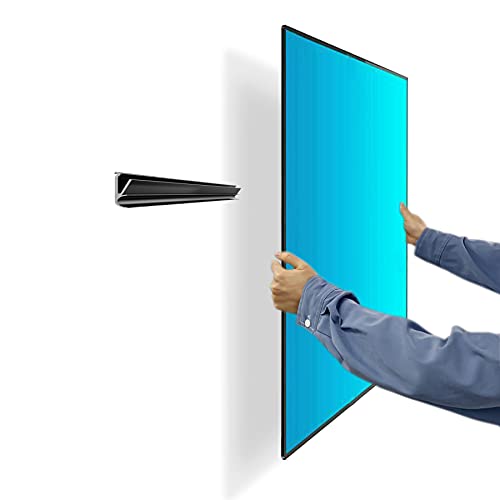
Auoace No-Stud Drywall Hanger covers the smallest TVs in this group, with compatibility starting at 13 inches and running to 55 inches. The maker says the drywall hanger supports up to 99 pounds and TV VESA patterns from 100 × 100 to 400 × 400 mm. The VESA measurements describe the distance between the four mounting holes on the TV, not its screen dimensions. This option is a poor fit for a TV larger than 55 inches or one whose hole pattern falls outside that range, even if the weight is below the limit.
Bottom line: Choose this for a smaller TV whose weight and VESA pattern both fall within its limits.
Perlegear No-Drill TV Mount

Perlegear No-Drill TV Mount covers a mid-size range from 24 to 65 inches and pairs that with a 100-pound limit. The maker says the wall plate is secured to drywall with nails rather than a drill, and gives a VESA range of 100 × 100 to 400 × 400 mm. All three fit checks matter together: screen size, TV weight and mounting-hole pattern. A TV within the size range can still be incompatible if it exceeds the weight limit or has a VESA pattern outside the range. Buyers with a heavier or wider-pattern TV should compare another option.
Bottom line: Choose this when your TV meets all three stated size, weight and VESA conditions.
EZISE Studless TV Mount

EZISE Studless TV Mount stands out for its VESA span, reaching 600 × 400 mm, and a weight limit of 150 pounds. The maker says it fits 32- to 75-inch TVs and uses aluminum alloy; a level and mounting hardware are included. A broad hole-pattern range does not override the screen-size or weight limits, so verify all three against your TV. Buyers whose TV is below 32 inches, above 75 inches or heavier than 150 pounds should not treat the VESA range alone as proof of fit.
Bottom line: Choose this for a 32- to 75-inch TV that needs a VESA pattern up to 600 × 400 mm.
How to choose a no-stud TV mount
Choose by checking the TV’s weight, screen-size range and VESA pattern against the mount before installation. VESA is the horizontal-by-vertical spacing, in millimeters, between the four threaded holes on the back of a TV; for example, 400 × 400 mm is not the screen’s diagonal measurement. A TV must meet every compatibility limit, not just fit one of them. Measure the hole spacing center to center, then compare the pattern and weight to the mount’s limits. The screen-size range is a separate check because mounts may be designed for a certain display range even when the holes line up. If any measurement is outside the mount’s range, do not assume the fit is safe.
Drywall and installation fit
No-stud mounts use multiple fasteners in drywall rather than attaching a bracket to a wood stud, but the wall still needs to be sound and suitable for that mounting method. Avoid damaged, soft or crumbling drywall, and do not assume a drywall-only mount is suitable for plaster, masonry or tile. A mount’s weight limit is a maximum, not a target; include the TV’s actual weight and any attached accessories in the comparison. Follow the mount’s installation sequence and use the specified fasteners and spacing. If you cannot confirm the wall construction or the TV’s weight, pause and verify both rather than relying on screen size as a substitute.
Compare no-stud mount fit by need
Use this comparison to narrow choices by the constraint that most often rules out a mount: TV size, weight or VESA pattern. All three must fit; a match in one column cannot compensate for a mismatch in another. VESA values are horizontal × vertical hole spacing in millimeters.
| Need | Choose a range | Fit check |
|---|---|---|
| Screen up to 55 inches | 13–55 inches | Also check weight and VESA |
| Screen up to 65 inches | 24–65 inches | Also check weight and VESA |
| VESA above 400 × 400 mm | Up to 600 × 400 mm | Screen and weight limits still apply |
| Screen larger than 77 inches | Up to 100 inches | Confirm VESA and weight fit |
Safety checks before hanging a TV
Keep the TV within the mount’s weight limit and install the wall plate only on a wall surface permitted for that mount. A wall fastener’s capacity depends on the wall material and condition, so a mount’s own weight rating does not establish that every wall can carry that load. Before hanging, confirm the fasteners are fully installed as directed and the bracket is secure; do not use the mount if drywall is cracked, damp or loose. Lift and attach a large TV with another person rather than trying to support it one-handed. For uncertain wall construction, use a mounting method suited to the actual wall or get qualified help.
Frequently Asked Questions
How do I measure a TV’s VESA pattern?
Measure horizontally and vertically between the centers of the four threaded mounting holes on the TV, in millimeters. Compare both numbers with the mount’s VESA range; a 400 × 400 mm pattern must fit both dimensions.
Can a no-stud mount go on plaster walls?
Do not assume a drywall-only mount is suitable for plaster. Plaster and lath differ from drywall, so use a mount specifically approved for the wall type or choose a mounting method suited to that construction.
Does TV screen size determine mount compatibility?
No; screen size is only one compatibility check. The TV’s weight and VESA hole spacing must also fall within the mount’s ranges.
How much weight can a no-stud TV mount hold?
The limits vary by mount; options here give maximums from 99 to 150 pounds. Stay below the chosen mount’s limit and make sure the wall is sound and suitable for the fastening method.
Can I install a no-stud mount on damaged drywall?
No; do not mount a TV to drywall that is cracked, damp, soft or crumbling. The surface must be sound, and the fasteners must be installed as directed for the specific mount.