
USB-C to Android Cables: 5 Legacy Options Compared

Superer USB-C to Micro-USB Cable is the most versatile USB-C to Android pick for a legacy Micro-USB phone, with a 3.3-foot braided cable and support for up to 3A charging. These products connect a USB-C port to an older Micro-USB device; choose another cable type if your Android phone itself has a USB-C port.
For a short run, USB-C to Micro-USB Cable, 1 ft is just 1 foot long, while JXMOX USB-C to Micro-USB Adapter 4-Pack is an adapter for using a separate USB-C cable.
We earn a commission if you buy through links on this page. As an Amazon Associate I earn from qualifying purchases. Products are compared on manufacturer specifications, not hands-on testing.
- Best overall: Superer USB-C to Micro-USB Cable – Combines a 3.3-foot braided cable with up to 3A charging and 480Mbps data transfer.
- Best for short reach: USB-C to Micro-USB Cable, 1 ft – Its 1-foot length suits a close connection where extra cable slack is unwanted.
- Best for spare adapters: JXMOX USB-C to Micro-USB Adapter 4-Pack – The four-pack converts a USB-C cable to a Micro-USB plug for charging or data sync.
| Product | Best for | Length or pack | Max charging current | Data transfer | Shop |
|---|---|---|---|---|---|
| Superer USB-C to Micro-USB Cable | Braided cable | 3.3 ft; 1 cable | 3A | 480Mbps | Check Price on Amazon |
| USB-C to Micro-USB Cable, 1 ft | Short connections | 1 ft; 1 cable | 3.1A | 480Mbps | Check Price on Amazon |
| JXMOX USB-C to Micro-USB 2-Pack | Two-cable sets | 3.3 ft; 2 cables | 2.4A | 480Mbps | Check Price on Amazon |
| 3 ft USB-C to Micro-USB Cable | Three-foot reach | 3 ft; 1 cable | — | — | Check Price on Amazon |
| JXMOX USB-C to Micro-USB Adapter 4-Pack | Adapter spares | 4 adapters | 2.4A | 480Mbps | Check Price on Amazon |
USB-C to Android Cable Options
These options connect a USB-C source to Micro-USB devices, including compatible older Android phones.
Superer USB-C to Micro-USB Cable

Superer USB-C to Micro-USB Cable stands out for its 3A charging support and nylon-braided exterior, while keeping the connection aimed at Micro-USB devices rather than newer USB-C phones. The 3.3-foot cable supports charging and USB 2.0 data transfer up to 480Mbps for compatible phones, cameras, controllers, and power banks. The maker says its strain relief withstands 10,000+ bends. This is a useful single-cable choice for a legacy Android device. Its Micro-USB plug will not fit an Android phone with a USB-C port, so check the device connector before choosing it.
Bottom line: Choose this for a 3.3-foot braided cable with 3A charging support.
USB-C to Micro-USB Cable, 1 ft

USB-C to Micro-USB Cable, 1 ft is the shortest option here at 1 foot, making it the fit for a nearby USB-C charger or computer and an older Micro-USB Android device. Its braided jacket and aluminum-alloy case are built into the cable ends, and the maker gives maximum charging figures of 3.1A at 5.2V plus data transfer up to 480Mbps. It also supports charging and syncing. That short reach leaves little slack, so it is less suitable when the device needs to sit farther from the USB-C port; measure the route before selecting it.
Bottom line: Pick this when a 1-foot cable is enough for the connection.
JXMOX USB-C to Micro-USB 2-Pack

JXMOX USB-C to Micro-USB 2-Pack differs by including two 3.3-foot cables, a practical match when two Micro-USB devices need compatible cords. The maker says the cables support up to 2.4A charging and 480Mbps syncing from a USB-C or Thunderbolt 3 port to a Micro-USB device. Examples include older Android phones, Kindle readers, controllers, speakers, and power banks. The Micro-USB end is not for USB-C phones, and the maker excludes OTG functions and video output. Choose it for charging or ordinary data sync, not for connecting peripherals or sending display video.
Bottom line: Choose this when you want two cables for Micro-USB devices.
3 ft USB-C to Micro-USB Cable

3 ft USB-C to Micro-USB Cable is a 3-foot cable for older devices with a Micro-USB charging port, including compatible Android phones and other legacy electronics. Its USB-C end connects to a USB-C port on a computer, charger, or newer phone. That connector direction matters: the Micro-USB end cannot charge a newer Android phone that has a USB-C charging port. The features do not give a charging-current or data-speed figure, so this option is best judged by connector fit and its three-foot reach rather than by a speed comparison. Check that the older device has Micro-USB before choosing it.
Bottom line: Pick this for an older Micro-USB device needing a 3-foot cable.
JXMOX USB-C to Micro-USB Adapter 4-Pack
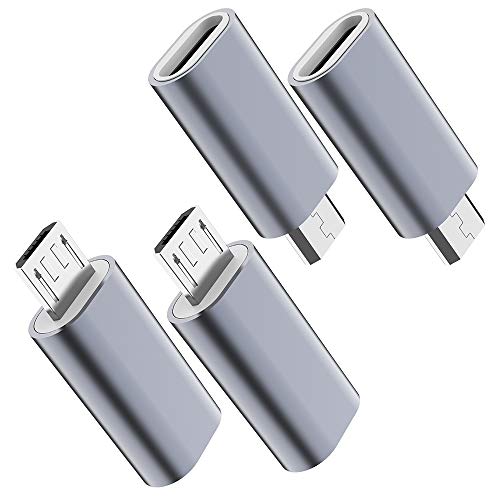
JXMOX USB-C to Micro-USB Adapter 4-Pack is an adapter rather than a cable: its USB-C female side accepts a separate USB-C cable, and its Micro-USB male plug goes into a legacy Micro-USB device. The four-pack suits someone who already carries USB-C cables and wants conversion for compatible older Android devices. The maker gives support up to 2.4A and 480Mbps for charging and data sync, but excludes OTG connections and video output.
Bottom line: Choose these when you already have USB-C cables to adapt.
How to Choose a USB-C to Android Cable
Choose by the Android device’s charging-port shape first: these options end in Micro-USB, not USB-C. Micro-USB devices are common among older phones and accessories, while many newer Android phones use USB-C at both ends of a charging cable. A connector that looks close is not interchangeable, so confirm the port on the device itself. Then match reach to the setup: 1 foot is suited to close connections, while 3 to 3.3 feet provides more room between a device and a power source. For charging and file sync on the same cable, check that both the phone and computer support data, not just charging.
Micro-USB Cable or Adapter
A cable is the simpler choice when you need a fixed USB-C-to-Micro-USB connection; an adapter is useful when you already own USB-C cables. The adapter here has a female USB-C side and a male Micro-USB side, so the cable plugs into the adapter and the Micro-USB end goes into the older device. Connector orientation and gender matter: a cable with two male ends cannot plug directly into a female adapter port unless their ends match. Neither format changes a Micro-USB device into a USB-C device. Use the table to match the setup and reach you need.
| Need | Choose | Why |
|---|---|---|
| One direct connection | USB-C to Micro-USB cable | No separate cable-to-adapter junction |
| Reuse USB-C cables | Female USB-C adapter | Accepts a separate USB-C cable |
| Very short route | 1-foot cable | Minimal excess length |
Charging and Data Limits to Check
Charging current and data speed are separate capabilities: a cable can carry power while data transfer depends on the connected devices and their ports. USB 2.0 transfer tops out at 480Mbps as a specification ceiling, but actual transfers can be slower because of the device, files, or port. The maker-rated charging limits in these choices range from 2.4A to 3.1A; a cable’s maximum does not force a device to draw that current. For devices that only support charging, a higher data rating will not add syncing capability. Match the cable or adapter’s supported functions to the task, and do not treat a data-speed figure as a guaranteed file-transfer rate.
Common Connector and Use Mistakes
The most common mismatch is buying a Micro-USB cable for a modern Android phone with a USB-C charging port. Check the phone’s port before ordering: USB-C is a small oval connector that can be inserted either way, while Micro-USB has a narrower, asymmetrical plug that fits one way. Another mistake is expecting an adapter or cable to provide video output or USB OTG; the JXMOX options explicitly exclude those functions. USB-C connector shape alone does not guarantee every USB function, so use a different, function-compatible setup for external drives, keyboards, mice, or a display. Keep charging equipment undamaged and stop using a cord with exposed conductors or a loose plug.
Frequently Asked Questions
How can I tell whether my Android phone uses Micro-USB?
Look at the phone’s charging port: Micro-USB has an asymmetrical, tapered plug opening, while USB-C is oval and reversible. These cables fit only a Micro-USB device, so choose a USB-C-to-USB-C cable for a phone with a USB-C port.
Can a USB-C to Micro-USB cable transfer files?
Yes, compatible cable-and-device combinations can sync data as well as charge. USB 2.0 has a maximum signaling rate of 480Mbps, but device ports and file transfers can run slower.
Does a higher amp rating make my phone charge faster?
Not necessarily; the phone and power source also limit charging current. A cable rated for up to 3A does not make a device draw 3A if the device supports less.
Can these cables connect a phone to a USB-C charger?
Yes, the USB-C plug can connect to a compatible USB-C charger and the Micro-USB plug to a legacy device. Confirm the device has a Micro-USB charging port; newer USB-C phones need a different cable.
Can a Micro-USB adapter connect a USB drive to my phone?
The JXMOX adapter here does not support OTG, which is the function commonly used to attach USB peripherals such as drives, keyboards, or mice. For that job, use an OTG-compatible adapter and confirm the phone supports OTG.