
USB Light for Laptop: 5 Flexible Lamps Compared

For most laptop users, EBYPHAN 14-LED USB Lamp is the best match because it offers three brightness levels, a flexible neck and USB power. Choose i2 Gear 14-LED USB-A Lamp if you specifically want a frosted lens and USB-A fit; pick a compact model if portability matters more than an extended gooseneck.
USB laptop lights draw power from a port rather than needing a separate battery, and their flexible arms let you aim light at a keyboard or book.
We earn a commission if you buy through links on this page. As an Amazon Associate I earn from qualifying purchases. Products are compared on manufacturer specifications, not hands-on testing.
- Best overall: EBYPHAN 14-LED USB Lamp – Three brightness levels and a flexible gooseneck make it easy to adjust the light.
- Best for dual-pack use: Kyfreshpower 12.8-Inch USB Lamp Set – The package includes one full-size lamp and one mini USB light.
- Best for compact carry: Soseelnee 6.5-Inch USB Light, 2-Pack – Its 6.5-inch length and 6-LED design keep the lamp small.
- Best for USB-A laptops: i2 Gear 14-LED USB-A Lamp – It fits Type A USB ports and has three illumination levels.
| Product | Best for | LEDs | Brightness settings | USB fit | Shop |
|---|---|---|---|---|---|
| EBYPHAN 14-LED USB Lamp | Adjustable brightness | 14 | 3 levels | USB devices, 5V | Check Price on Amazon |
| Kyfreshpower 12.8-Inch USB Lamp Set | Two-light flexibility | 2 | 2 levels | USB devices, 5V | Check Price on Amazon |
| i2 Gear 14-LED USB-A Lamp | USB-A laptops | 14 | 3 levels | USB Type A | Check Price on Amazon |
| Soseelnee 6.5-Inch USB Light, 2-Pack | Compact two-pack | 6 | — | USB-powered | Check Price on Amazon |
| Kyfreshpower 6.69-Inch Mini USB Lamp | Single mini lamp | 6 | — | USB-powered | Check Price on Amazon |
USB Lights for Laptop Keyboards
Compare brightness controls, form factor and port compatibility to find a lamp that fits your laptop setup.
EBYPHAN 14-LED USB Lamp

Three brightness levels distinguish this lamp from the simpler two-level and fixed-output options. Its 14 LED beads sit on a flexible gooseneck, and a touch switch controls the light; it runs from USB devices rated 5V, 0.5–2A without a battery. The maker describes it as suitable for laptop keyboards, reading and travel. Choose it if you want more control over brightness without a separate light source. Its small size may be less suitable if you need a broad beam to cover a large desk area.
Bottom line: Pick this if brightness adjustment matters more than a larger lamp head.
Kyfreshpower 12.8-Inch USB Lamp Set

This set stands out by including a full-size lamp and a mini USB light, rather than a single unit. The 12.8-inch lamp has a 360-degree bendable neck and two brightness settings controlled by a switch on the lamp head. It works with 5V USB devices, including laptops and power banks, so it can move between a desk and portable setup. Choose it when two lighting positions are useful. The two-level control offers fewer brightness choices than three-level models, which may matter if you want finer adjustment.
Bottom line: Choose this when having a second mini light is useful.
i2 Gear 14-LED USB-A Lamp
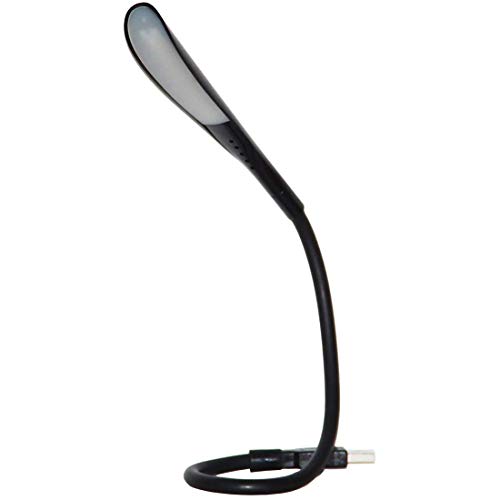
The clear distinction here is its Type A USB requirement: the maker says it will not work with USB-C ports. A frosted lens spreads a soft warm light, while the touch dimmer cycles through low, medium and high settings. The flexible gooseneck can be positioned over a keyboard, and the lamp has 14 LEDs. It suits users with an available USB-A port who prefer a softened beam over a very bright task light. The port restriction makes it a poor fit for a laptop that only has USB-C.
Bottom line: Pick this if your laptop has USB-A and you prefer a frosted lens.
Soseelnee 6.5-Inch USB Light, 2-Pack

Compact size and a two-lamp pack set this option apart from the longer gooseneck lights. Each 6.5-inch light has six LEDs and a flexible body that can be twisted or tilted to aim it. USB power lets it connect to a laptop, power bank or phone charger; the maker describes its output as soft. This is a sensible choice for travel or a small keyboard area where a short, light lamp is easier to carry. It has no brightness adjustment specified among its features, so it is less suited to buyers who need multiple output levels.
Bottom line: Choose this if a small two-pack matters more than brightness controls.
Kyfreshpower 6.69-Inch Mini USB Lamp
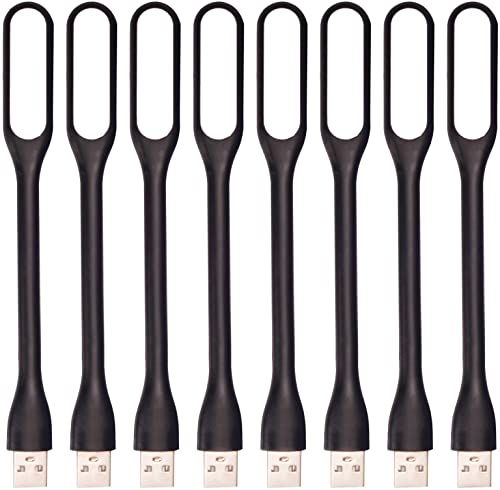
This single mini lamp has a 6.69-inch length and six LEDs, making it a compact alternative to the 12.8-inch flexible lamp set. Its body bends and twists 360 degrees to direct light, and USB power supports use with a laptop, power bank or phone charger. The maker characterizes the light as soft for night use. Choose it when you want one small lamp and do not need a second unit. Its short form may be limiting when the USB port is far from the area you want to illuminate.
Bottom line: Pick this for a single compact light that you can aim by bending its body.
How to Choose a USB Light for a Laptop
Choose by brightness control, arm reach and port type before considering LED count alone. A two-level lamp gives a quick low-or-high choice, while a three-level model adds an intermediate setting; neither LED count nor brightness-level count alone tells you the beam’s measured brightness. A flexible neck helps aim the light at keys without moving the laptop, while a shorter lamp is easier to pack but may not reach as far. USB-A ports supply 5 volts; USB 2.0 ports are specified for up to 500 mA and USB 3.x ports for up to 900 mA, though a lamp’s actual draw matters. If a laptop has only USB-C, choose a lamp whose connector fits or verify adapter compatibility before ordering.
USB Port Fit and Laptop Compatibility
Match the lamp’s plug to an available port, because USB power alone does not guarantee a direct physical fit. USB-A and USB-C use different connectors; a Type A-only lamp needs a Type A port or an appropriate adapter, and the i2 Gear model specifically excludes USB-C compatibility. USB ports provide 5V power, but allowable current varies by port and device, so do not assume every port can supply the same amount. Measure how far the port sits from the keyboard area: a longer flexible neck can reach over keys, while a mini lamp may suit a nearby port better. Check the connector and reach together before choosing, especially on thin laptops with ports only on one edge.
Flexible Gooseneck Lamps Versus Mini USB Lights
Longer gooseneck lamps offer more reach, while mini lights prioritize compact carry and close-range aiming. A flexible arm can direct light onto a keyboard or book, but it should not be bent so it blocks the display or interferes with typing. A short lamp is practical when the USB port is beside the area to illuminate; if the port is several inches away, choose a model with enough arm length to bridge that distance. Use this quick fit guide to compare the main tradeoff.
| Need | Choose | Reason |
|---|---|---|
| More reach | Long flexible gooseneck | Position the light farther from the port |
| Easy packing | Mini flexible lamp | Shorter form is easier to carry |
| USB-C-only laptop | USB-C-compatible lamp | A Type A-only plug will not fit directly |
Positioning and Using a Laptop USB Lamp
Position the lamp so its beam falls on the keyboard without shining directly into your eyes or obscuring the screen. A flexible neck lets you change the angle; adjust it from the side rather than placing the lamp across the display. USB-powered lamps use the host device’s port, so leaving one connected can draw power while the computer is awake or asleep depending on the laptop’s port behavior. Unplug the lamp if you are packing the computer or do not want a connected accessory drawing power. For reading, aim the light at the page rather than toward the reader, and keep the arm clear of keys you need to press.
Frequently Asked Questions
Will a USB laptop light work with a USB-C port?
Only if its connector fits or a compatible adapter is used. The i2 Gear lamp is explicitly limited to Type A ports, so it will not plug directly into USB-C.
Does a USB lamp need a separate battery?
These lamps use USB power rather than requiring a separate battery. The two Kyfreshpower and EBYPHAN models specify 5V USB sources, including laptops and power banks.
How many brightness levels should a laptop light have?
Two levels provide a simple low-or-high choice, while three add a middle setting. Choose three levels if you want another adjustment step; LED count alone does not indicate measured brightness.
Where should I aim a laptop keyboard light?
Aim the beam down at the keys from the side, keeping it out of your eyes and clear of the display. A flexible neck can change the angle without moving the laptop.
Can a laptop USB port power a lamp?
USB ports supply 5V, and typical USB 2.0 and USB 3.x port specifications allow up to 500 mA and 900 mA respectively. Check the lamp’s power requirements against your port, since the port’s available current can vary.