
VESA 400×300 Wall Mounts: 5 Options Compared

For a VESA 400×300 wall mount, start with Pipishell Full Motion Mount, 26–65 Inch if you want articulated positioning and an expressly stated 75x75mm-to-400x400mm VESA range. VESA 400×300 is the distance between the TV’s mounting holes, not a screen-size measurement.
Choose a different mount if you need a fixed or tilting bracket, a higher load capacity, or a larger supported screen; verify that your TV’s weight and hole spacing fall within the mount’s limits.
We earn a commission if you buy through links on this page. As an Amazon Associate I earn from qualifying purchases. Products are compared on manufacturer specifications, not hands-on testing.
- Best overall: Pipishell Full Motion Mount, 26–65 Inch – Its VESA range runs from 75x75mm through 400x400mm, and it supports up to 80 lbs.
- Best for 16-inch studs: Mounting Dream Full Motion MD2380 – It is designed for 16-inch studs and supports a TV up to 110 lbs.
- Best for large TVs: Perlegear PGLF8 Full Motion, 42–90 Inch – It supports 42–90-inch TVs up to 132 lbs and states a VESA range up to 600x400mm.
| Product | Best for | VESA range or maximum | TV weight limit | TV size range | Shop |
|---|---|---|---|---|---|
| Pipishell Full Motion Mount, 26–65 Inch | Broad VESA range | 75x75mm–400x400mm | 80 lbs | 26–65 in. | Check Price on Amazon |
| USX MOUNT Full Motion, 32–70 Inch | Narrow stud spacing | 75x75mm–400x400mm | 99 lbs | 32–70 in. | Check Price on Amazon |
| Mounting Dream Full Motion MD2380 | 16-inch studs | Max 400x400mm | 110 lbs | 32–70 in. | Check Price on Amazon |
| Mounting Dream Tilting Mount, 37–90 Inch | Low-profile tilt | Max 600x400mm | 132 lbs | 37–90 in. | Check Price on Amazon |
| Perlegear PGLF8 Full Motion, 42–90 Inch | Large-screen movement | 200x100mm–600x400mm | 132 lbs | 42–90 in. | Check Price on Amazon |
VESA 400×300 TV wall mounts
Compare the VESA compatibility, load limit and screen-size range, then confirm your TV and wall meet the fit requirements.
Pipishell Full Motion Mount, 26–65 Inch

Pipishell Full Motion Mount, 26–65 Inch gives an expressly stated VESA range that includes 400x300mm, making it a strong fit when you need full motion positioning. It supports TVs from 26 to 65 inches weighing up to 80 lbs, with tilt and swivel adjustment. The mount is compatible with wood studs, concrete and brick, but not drywall alone. Its 80-lb limit is lower than the limits of some alternatives, so check your TV’s weight before choosing it.
Bottom line: Choose it for a TV within the size and weight limits when articulated movement matters.
USX MOUNT Full Motion, 32–70 Inch

USX MOUNT Full Motion, 32–70 Inch combines a 75x75mm-to-400x400mm VESA range with compatibility for 12- or 16-inch wood studs, concrete or brick. Its dual articulating arms extend 13.89 inches and retract to 2.59 inches, with tilt and swivel for adjusting the viewing angle. The 99-lb limit and 32-to-70-inch TV range narrow its fit compared with larger-screen options. Do not mount it to drywall alone; check the wall material and stud placement first.
Bottom line: Pick it when your wall has 12- or 16-inch stud spacing and your TV fits its limits.
Mounting Dream Full Motion MD2380

Mounting Dream Full Motion MD2380 is a full motion option for 32-to-70-inch TVs up to 110 lbs, with a maximum VESA size of 400x400mm. Its arms extend 17.5 inches and retract to 3.4 inches, and the bracket tilts up or down and swivels. It is designed for standard 16-inch studs, so it is a poor fit if your wall’s stud spacing differs. Confirm that the TV’s mounting pattern is supported by the bracket before ordering, rather than relying on the maximum dimensions alone.
Bottom line: Choose it for a supported TV and standard 16-inch stud layout.
Mounting Dream Tilting Mount, 37–90 Inch
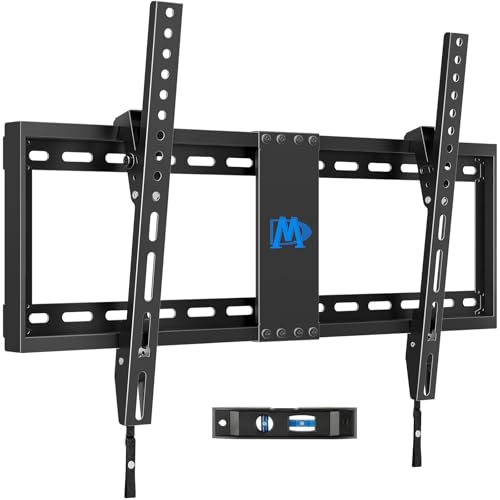
Mounting Dream Tilting Mount, 37–90 Inch is a tilting, low-profile bracket for 37-to-90-inch TVs weighing up to 132 lbs, with a maximum VESA size of 600x400mm. It sits 1.5 inches from the wall and tilts forward up to 8 degrees. The mount supports wood-stud spacing up to 24 inches, which can suit layouts beyond standard 16-inch spacing. It does not provide the swivel and extension range of a full motion arm, so choose another type if you need to turn the screen toward different seats.
Bottom line: Pick it for a large TV when a close-to-wall position and tilt are more useful than swivel.
Perlegear PGLF8 Full Motion, 42–90 Inch

Perlegear PGLF8 Full Motion, 42–90 Inch pairs a 42-to-90-inch screen range and 132-lb capacity with a VESA range from 200x100mm to 600x400mm. Its dual articulating arms provide swivel and tool-free tilt. The mount is for 8-, 12- or 16-inch wood studs, concrete or brick; it is not for drywall alone. The VESA range starts at 200x100mm, so TVs with smaller patterns may not fit. Confirm the precise hole pattern as well as wall type and load before choosing it.
Bottom line: Choose it for a larger, heavier TV with a supported pattern and wall type.
How to confirm a VESA 400×300 fit
A 400×300 VESA pattern means the centers of the mounting holes are 400 mm apart horizontally and 300 mm apart vertically. That converts to about 15.75 by 11.81 inches. Measure center to center, not from the outside edges of the holes, and make sure you identify the correct horizontal and vertical dimensions. A mount’s maximum VESA dimensions are not always enough to prove every intermediate pattern fits, because brackets use different hole layouts or slots. Check for an explicitly supported pattern or confirm fit with the manufacturer before ordering. Also compare the TV’s weight without its stand with the mount’s load limit; fitting the hole pattern alone does not establish safe support.
Choose between tilting and full motion mounts
A tilting mount keeps the screen close to the wall and changes its vertical angle; an articulating full motion mount can also swivel and extend. The right choice depends on seating position and clearance: choose tilt if the screen faces one primary seating area, and full motion if you need to angle it toward more than one position. The tilting option sits 1.5 inches from the wall and allows up to 8 degrees of forward tilt. Full motion options in this comparison extend between 13.89 and 17.5 inches, but extension needs space behind and beside the TV. Allow for cables and nearby doors before selecting an arm.
Match the mount to the wall and load
A TV mount’s load limit, stud layout and wall material are separate fit checks. The options here have maximum TV weights from 80 to 132 lbs, and their stud compatibility varies from 12-inch spacing to as much as 24 inches. Use a stud finder to locate framing and measure its centers; do not assume the studs are at a standard spacing. Several options also permit concrete or brick installation, but drywall alone is explicitly unsuitable for the full motion mounts that say so. Use the correct anchors and fasteners for the wall construction, and never exceed the mount’s weight limit. If the TV weight or wall construction is uncertain, resolve that before mounting.
VESA mount fit checks at a glance
Use the TV’s measured hole pattern first, then narrow choices by load, screen size and wall layout. A VESA label describes mounting-hole spacing in millimeters, while screen size is measured diagonally in inches; these are different measurements. A TV can match a mount’s screen-size range and still fail its hole-pattern or load check. Use the table as an initial filter, not a substitute for confirming the exact pattern and mounting hardware for your TV.
| Check | What to measure or compare | Decision rule |
|---|---|---|
| VESA pattern | Hole centers, horizontal × vertical | Require support for 400x300mm specifically |
| TV load | TV weight without stand | Stay at or below the mount’s maximum |
| Wall structure | Stud centers or masonry type | Use only a compatible wall and fastener setup |
| Movement | Tilt, swivel and arm extension needed | Choose tilt for a fixed seat; full motion for repositioning |
Frequently Asked Questions
How do I measure a 400×300 VESA pattern?
Measure horizontally and vertically from the center of one mounting hole to the center of the opposite hole. A 400x300mm pattern is about 15.75 by 11.81 inches; do not measure the TV screen or the outside edges of the holes.
Can a 400×300 TV use a 400×400 mount?
Possibly, but a 400×400 maximum does not by itself confirm that the bracket supports 400x300mm. Confirm that the exact hole pattern is supported or that the bracket’s slots can reach all four mounting points.
How much weight can a TV wall mount hold?
The maximum varies by mount in this comparison, from 80 to 132 lbs. Compare the TV’s weight without its stand with the chosen mount’s limit and do not exceed that limit.
Can I attach a TV mount to drywall alone?
Do not mount a TV bracket to drywall alone; the full motion options that specify wall types call for studs, concrete or brick. Locate the wall structure and use fasteners appropriate to it before hanging the TV.
How far should a full motion TV mount extend?
The full motion mounts here extend from 13.89 to 17.5 inches, depending on the model. Measure the space around the TV and account for cables and nearby obstacles before choosing an arm.